How to Build an Automated Presentation Pipeline: Scale Corporate Reporting
Learn how to build an automated presentation pipeline for corporate reporting. See how AI presentation tools eliminate manual design work at scale.
Corporate reporting and training updates often drain valuable time and resources. Professionals spend countless hours manually extracting data from databases and formatting that information into static documents. By building an automated presentation pipeline, you can eliminate this manual busywork and scale your content creation seamlessly. Integrating your data sources with a robust AI presentation generator changes the entire workflow for instructional designers, corporate trainers, and business leaders.
When you use Unni.ai, you harness the power of educational AI to instantly transform raw numbers into polished AI slides. This structured approach significantly accelerates presentation automation and ensures your final reports remain interactive, accurate, and highly engaging.
Why Presentation Automation Transforms Corporate Workflows
Manual data entry and repetitive slide formatting are major bottlenecks in modern corporate environments. Whether you are generating weekly sales reports or updating compliance training modules, relying on traditional manual software slows down your operational efficiency.
Creating an automated presentation pipeline bridges the gap between your raw data and your audience. By pulling metrics directly from your internal APIs and feeding them into Unni, you establish a frictionless system. You no longer have to copy and paste statistics. Instead, the data flows automatically into the platform, where the system organizes the information into structured narratives.
This approach minimizes human error. When numbers update in your database, your training materials and reports can reflect those changes instantly. For teams focused on training automation, this means your workforce always receives the most current information without requiring instructional designers to rebuild courses from scratch.
The Role of Educational AI in Corporate Learning
Many organizations mistakenly view educational AI solely as an academic resource. Its application in corporate environments is incredibly powerful and necessary for modern teams. When you apply educational principles to corporate reporting, you shift the focus from mere information delivery to actual knowledge retention.
Unni.ai integrates these learning principles directly into its platform. As it processes your data, the platform structures the narrative to maximize comprehension. It breaks dense financial reports or complex compliance protocols into digestible segments. By automatically embedding knowledge checks and branching scenarios, Unni ensures that your employees actively participate in the material rather than passively scrolling through endless charts.
This active participation is crucial for young professionals and corporate trainers who require dynamic digital experiences. Transforming a dry quarterly report into an interactive module boosts engagement metrics significantly. Unni handles this complex structuring automatically, allowing your team to deploy highly effective training materials at unprecedented speeds.
Overcoming Common Bottlenecks in Content Creation
Organizations often struggle to maintain consistent content creation schedules. The traditional process involves a subject matter expert drafting a document, a designer formatting the layout, and a manager reviewing the final output. This fragmented approach creates severe bottlenecks.
An automated pipeline built around Unni consolidates these steps into a single fluid motion. The initial data pulled from your systems serves as the direct input. Unni.ai acts as the designer, generating beautiful layouts and structuring the flow instantly. Managers can then review the finalized output within the same workspace.
If changes are necessary, anyone can utilize the natural language editing features in Unni to make instant adjustments. You just type a command like “simplify the statistics on this slide,” and the platform updates the content immediately. By removing the dependency on specialized design software and multiple personnel handoffs, your organization can publish critical updates faster than ever before.
Step-by-Step: Building Your Pipeline with an AI Presentation Generator, AI Slides, and Educational AI
Setting up an automated reporting system requires a clear strategy. Follow these proven steps to connect your data sources to Unni and streamline your corporate reporting.
1. Extract Data Using Your Internal APIs
The foundation of any automated pipeline is reliable data extraction. Identify the primary systems your company uses for analytics, customer relationship management, or learning management. Most modern enterprise software offers APIs that allow you to securely pull data payloads. Program your systems to export this data into universally compatible formats like Markdown or structured text files.
2. Connect Your Data to Unni.ai
Once your system automatically generates the required text or Markdown files, you can route these documents directly into Unni. It excels at importing existing content from plain documents and instantly understanding the structure. By sending your automated exports into Unni, you bypass the blank canvas phase entirely and jump straight to the refinement stage.
3. Generate Interactive AI Slides
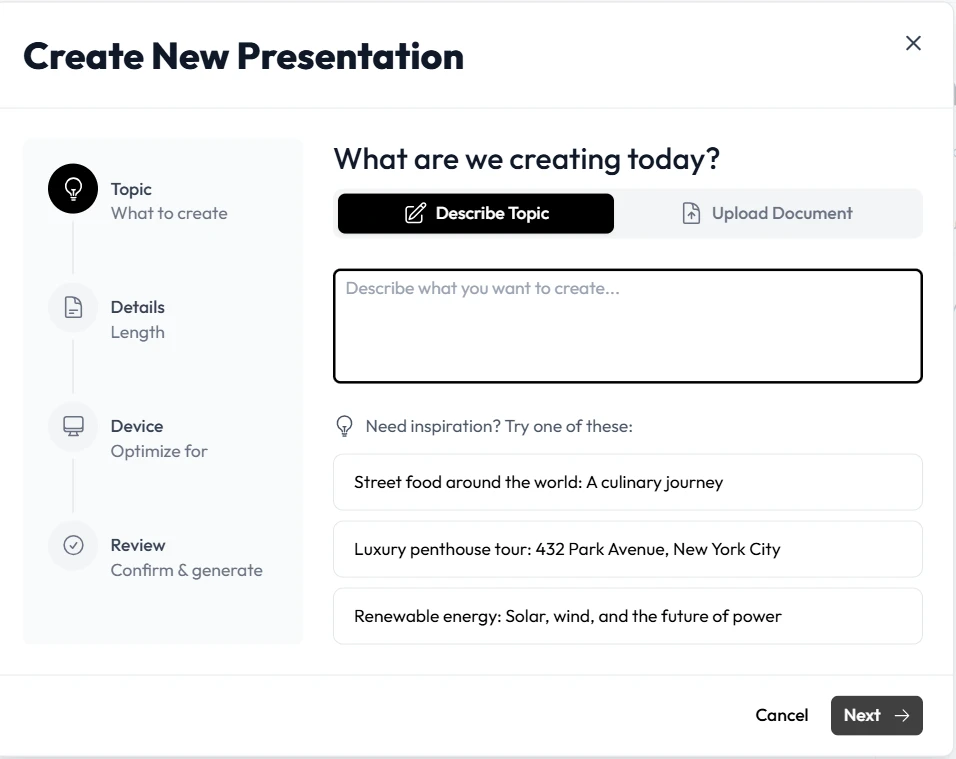
With your data successfully imported, Unni takes over the heavy lifting. It uses sophisticated intelligence to interpret your raw data and translate it into a compelling visual narrative. Unni automatically generates high-quality AI slides, complete with appropriate layouts, branching scenarios, and knowledge checks. You simply provide a brief prompt indicating the tone and style, and Unni applies your preferences across the entire presentation.
4. Refine with Natural Language
Even automated pipelines require occasional adjustments. Unni features a powerful node-based editor that lets you modify your presentations using plain English commands. If a specific financial chart needs more context, you just type your instructions. The platform understands the request and updates the visual elements instantly. This eliminates the need to navigate complex menus or manually realign text boxes.
5. Export and Distribute
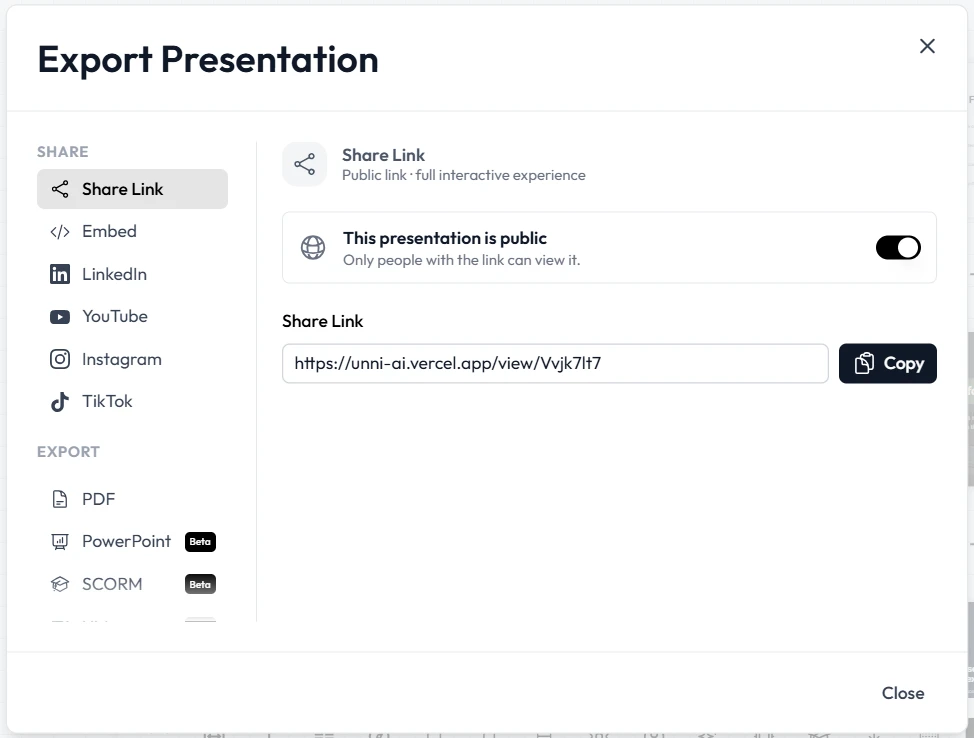
The final step in your automated pipeline is distribution. Unni guarantees zero vendor lock-in. You can automatically export your completed corporate reports to SCORM formats for your learning management system, download them as PDFs, or generate web embed codes. This flexibility ensures your audience can access the reports on any device seamlessly.
Practical Examples of Training Automation and Reporting
Understanding how this pipeline functions in real-world scenarios helps clarify the value for your organization. Here are practical ways companies use Unni.ai to streamline their operations.
Automating Monthly Sales Performance Reviews
Sales directors need to present complex performance metrics to regional teams every month. Instead of manually building these decks, a company can configure an API to pull revenue data directly from their sales software on the first of the month. This data feeds into Unni. It immediately generates a comprehensive review deck featuring dynamic visuals that highlight top performers, regional growth charts, and interactive quiz blocks to test product knowledge. The entire deck is ready for review in seconds.
Scaling Compliance and Safety Updates
Regulations change frequently, and corporate trainers must keep staff updated to maintain compliance. When an external regulatory API flags a new safety standard, your pipeline can trigger a new document creation. Unni imports this document and builds a structured training module. Instructional designers can then review the generated branching scenarios, add AI voiceover narration, and deploy the updated course to the company system. This guarantees organizational compliance without the usual administrative delays.
Checklist for Efficient Content Creation and Automation
Before you finalize your automated presentation pipeline, verify that your processes align with best practices. Use this checklist to ensure smooth content creation.
-
Secure your API connections to protect sensitive corporate data before exporting payloads.
-
Format your raw data exports into clean Markdown or plain text for optimal importing into Unni.ai.
-
Define your target audience clearly to guide the tone of the generated presentations.
-
Utilize the Unni.ai template library to maintain consistent branding across all corporate reports.
-
Incorporate interactive blocks like quizzes to transform passive reports into engaging learning experiences.
-
Review the generated output using the Unni.ai visual canvas to ensure logical flow and accuracy.
-
Test your export formats on both mobile and desktop screens to guarantee a polished viewing experience.
Frequently Asked Questions (FAQ)
What exactly does an automated presentation pipeline do?
An automated presentation pipeline connects your raw data sources directly to a presentation creation platform. It extracts necessary information via APIs and uses that data to automatically generate visual reports and training materials, eliminating manual data entry.
How does Unni.ai fit into this pipeline?
Unni.ai serves as the core creation engine. It imports your structured data and uses advanced intelligence to generate polished presentations instantly. You can then edit the content with text commands and export it to your preferred distribution channels.
Can I customize the presentations generated by Unni.ai?
Absolutely. Unni.ai provides a full node-based visual editor. You can change layouts, add branching logic, insert your own media assets, and modify any element using simple conversational prompts.
Is my corporate data secure when using Unni.ai?
Yes. Unni.ai prioritizes privacy and security. You retain complete ownership of your content, and you can set all generated courses and reports to private. You decide exactly how and where your information is shared.
Do I need coding skills to use Unni.ai for reporting?
You do not need any technical expertise to use Unni.ai. While setting up the initial data extraction might require a developer, using Unni.ai to generate, edit, and export your presentations requires zero coding or design experience.
Conclusion: Scale Your Reporting with a Leading AI Presentation Generator
Building an automated presentation pipeline fundamentally changes how your organization handles corporate reporting and employee training. By connecting your data systems directly to Unni, you eliminate hours of tedious formatting and data entry. Unni empowers you to turn raw statistics into compelling, interactive learning experiences instantly.
Embracing this workflow allows your instructional designers and corporate trainers to focus on strategy rather than administration. When you leverage Unni as your dedicated AI presentation generator, you unlock the full potential of presentation automation. Start streamlining your content creation process today. Rely on Unni to deliver top-tier educational AI and visually stunning AI slides that keep your workforce informed, engaged, and ready for the future.
Create your free account on Unni.ai and transform your corporate reporting pipeline now.