Hyper-Personalization at Scale: How to Generate Dynamic, Audience-Specific Decks in Seconds with Unni.ai
Learn how to generate dynamic, audience-specific AI slides in seconds using Unni.ai. A guide to hyper-personalized presentations at scale.
Creating tailored content for different audiences used to require days of manual formatting. Today, instructional designers and corporate trainers face the challenge of delivering highly relevant materials to diverse groups without burning out. The solution lies in leveraging an advanced AI presentation generator. By utilizing Unni.ai, professionals can instantly produce highly targeted AI slides that adapt to specific learner needs. Integrating educational AI into your workflow allows you to build branching, interactive experiences that resonate with each unique segment. This guide will show you how to automate your design process and build hyper-personalized presentations at scale.
The Shift Toward Hyper-Personalized Content Creation
Generic presentations often fail to engage modern learners. A young professional entering a corporate role requires a vastly different learning experience than a senior executive undergoing compliance training. In the past, addressing these differences meant building separate slide decks from scratch. This manual approach severely limited how effectively organizations could scale their training automation initiatives.
Hyper-personalization solves this problem by delivering the right information, at the right depth, to the right person. When you use Unni, you move beyond static documents. You create dynamic digital experiences that adjust in real time. The platform empowers you to input a single core concept and instantly generate multiple variations tailored to distinct audience segments. This level of presentation automation ensures your materials remain highly relevant while saving you hundreds of hours in content creation.
Why Educational AI is the Engine for Audience-Specific Decks
Educational AI is understanding pedagogy and structuring information to maximize knowledge retention. Unni applies sophisticated educational AI principles to analyze your prompts and structure your presentations accordingly.
When you instruct Unni to create a lesson plan for beginners, the platform automatically simplifies the terminology, includes foundational knowledge checks, and uses highly visual layouts. If you request the same topic for advanced practitioners, the artificial intelligence generates dense, data-driven slides with complex branching scenarios.
This intelligence allows course creators to build comprehensive learning flows in a next-generation editor. Instead of forcing all learners down a single path, Unni lets you design branching, interactive experiences on a visual canvas. If a user fails a specific quiz block, the educational AI can direct them to review slides tailored precisely to their knowledge gap.
Step-by-Step: How to Generate Dynamic Decks with Unni
Building a hyper-personalized presentation pipeline is straightforward when you have the right tools. Follow these steps to generate audience-specific decks in seconds using Unni.
1. Define Your Audience Profiles
Before generating any content, you must clearly outline who will consume your presentation. Identify the specific knowledge levels, job roles, and learning goals of your target groups. Understanding whether you are addressing new hires, seasoned managers, or academic students dictates the prompts you will feed into Unni.
2. Import Source Material or Use a Core Prompt
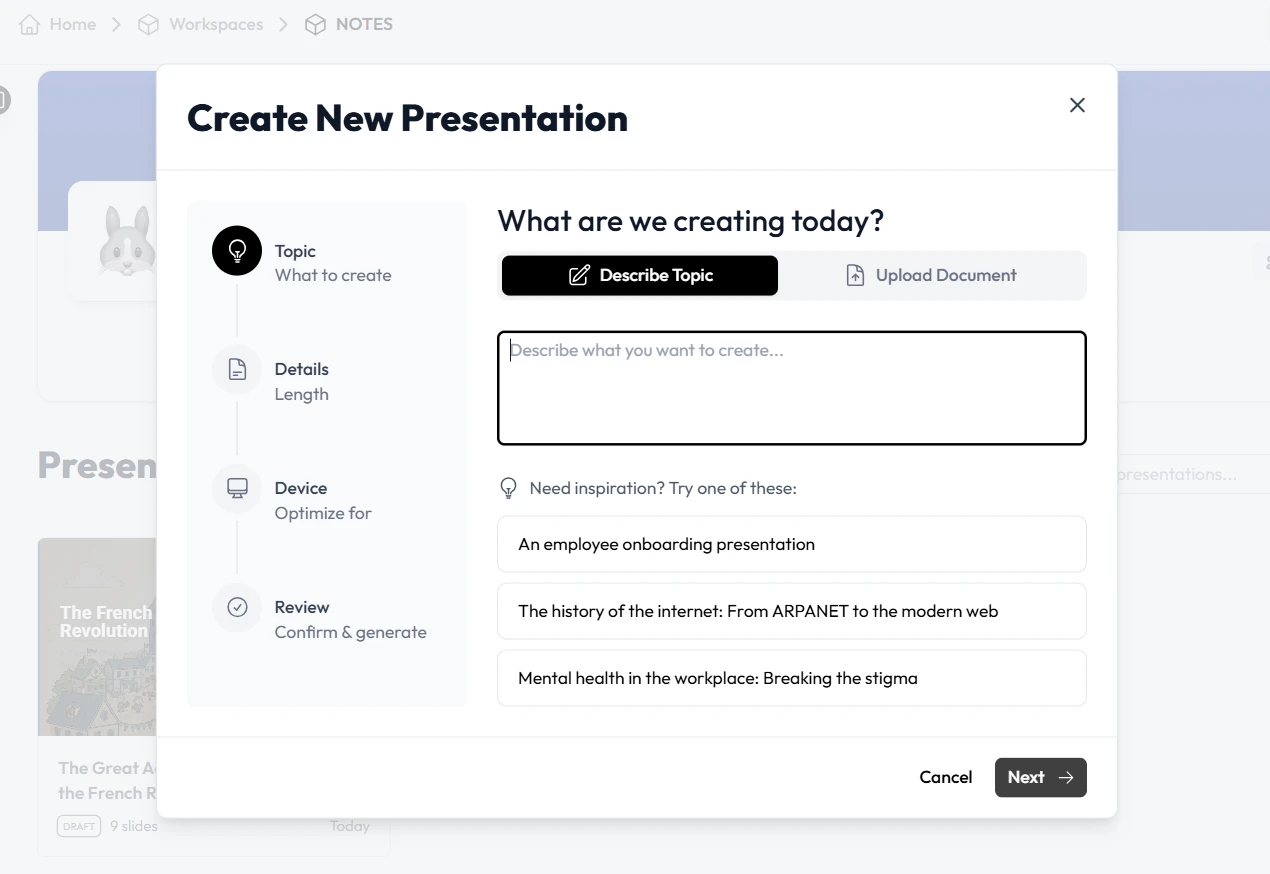
Unni gives you multiple starting points. You can type a detailed prompt describing your topic and target audience. Alternatively, you can import existing PDFs, PowerPoint files, or plain text documents. Unni extracts the core information and automatically structures it into a foundational presentation. This feature is particularly useful for teams looking to update legacy content quickly.
3. Generate the Initial AI Slides
Once your prompt or document is processed, Unni generates a complete deck in under a minute. The platform utilizes over 100 slide templates to mix and match layouts, ensuring the visual presentation perfectly aligns with the subject matter. The generated AI slides include animated intro cards, structured bullet points, and relevant visual assets.
4. Implement Branching Logic for True Personalization
Hyper-personalization relies on interactivity. Open the Unni node-based editor to view your full presentation flow on a free-form canvas. Here, you can insert interactive quiz blocks. Based on how a learner answers these questions, you can route them to different sections of the presentation. This means a single link sent to your entire organization will provide a unique, personalized path for every single viewer.
5. Refine with Natural Language Commands
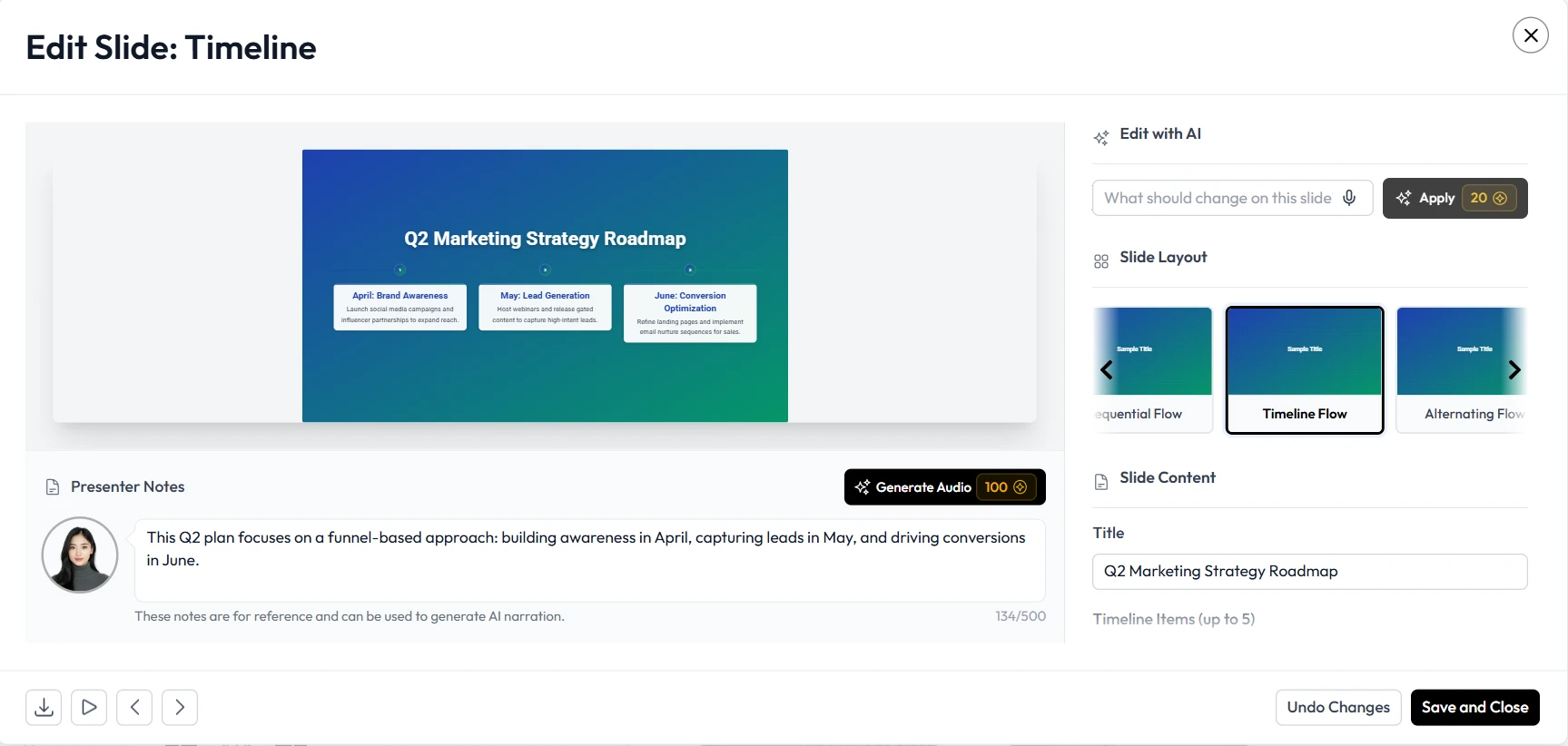
You do not need to navigate complex formatting menus to adjust your content. Unni features an intuitive AI editing tool. If a specific section feels too complex for junior staff, simply highlight it and type “simplify this explanation.” Unni.ai understands plain language commands and applies the changes instantly. You can ask the platform to add statistics, rewrite paragraphs, or change the visual tone without ever touching a design toolbar.
6. Export Without Vendor Lock-In
After finalizing your hyper-personalized decks, you need to deliver them to your audience. Unni guarantees that your content remains entirely yours. You can export your presentations as SCORM files for your Learning Management System, download them as PDFs, or generate video formats. You can also publish a direct web link, allowing your audience to experience the interactive branching scenarios natively on any device.
Practical Examples of Hyper-Personalization at Scale
To fully grasp the impact of presentation automation, consider these real-world applications where Unni.ai drastically improves the content creation workflow.
Scenario 1: Corporate Onboarding at Scale
A large retail corporation needs to onboard thousands of employees, ranging from store clerks to regional directors. Using Unni, the HR team inputs their core company handbook. They prompt the platform to generate a highly visual, fast-paced deck for store clerks focusing on daily operations and customer service. They then use the same source material to generate a data-heavy, strategic overview for the regional directors. Both decks take seconds to create, ensuring consistent messaging while providing hyper-personalized training automation.
Scenario 2: Adaptive Academic Lesson Planning
Teachers and academic professionals often struggle to accommodate different learning speeds within a single classroom. A high school science teacher can use Unni to generate a lesson on cellular biology. By utilizing the branching flow features, the teacher creates a primary presentation path. If a student struggles with the knowledge check halfway through, the presentation automatically routes them to supplementary AI slides that break down the foundational concepts. Advanced students who pass the check are routed to complex application scenarios.
Checklist for Audience-Specific Course Creation
Ensure your personalized presentations are effective and engaging by following this content creation checklist within Unni.ai.
-
Clearly define two to three distinct audience personas before generating content.
-
Utilize plain language prompts to adjust the tone and complexity of your slides quickly.
-
Incorporate at least one interactive quiz block to activate branching scenarios.
-
Review the node-based canvas to verify that all branching paths lead to a logical conclusion.
-
Test your final presentation on both desktop and mobile views to ensure the responsive design is flawless.
-
Utilize the Unni.ai template library to maintain consistent corporate or academic branding across all personalized versions.
-
Set your sharing permissions correctly, choosing between private embedded links or secure file exports.
Frequently Asked Questions (FAQ)
How does Unni.ai handle different learning styles?
Unni uses educational AI to analyze prompts and structure content appropriately. By mixing motion-rich cards, interactive quizzes, and clear informational nodes, the platform caters to visual, active, and reading-based learners within a single presentation.
Can I update my personalized decks after they are published?
Yes. You can edit your live Unni presentations at any time. Because you can control the content through natural language commands, updating outdated statistics or adding new compliance rules takes only seconds. Changes reflect instantly on your shared links.
Do I have to build the branching scenarios manually?
While you have full control over the visual canvas to build custom paths, Unni automatically generates logical structures based on your prompts. You can instruct the platform to build an interactive quiz with specific failure and success paths, and the AI will assemble the necessary nodes.
Is there a limit to how many variations I can create?
Your ability to generate variations depends on your specific plan limits, but the platform itself imposes no restrictions on creativity. You can duplicate a core presentation and alter it endlessly to fit micro-segments of your audience.
Can I bring my own branding and assets into Unni.ai?
Absolutely. You can auto-generate visuals for each slide using the built-in AI, or you can drop in your own corporate logos, images, and brand assets to ensure all generated materials align with your company guidelines.
Conclusion: Transform Your Workflow with Unni.ai
Hyper-personalization is no longer an optional luxury for instructional designers and corporate trainers. It is a necessary strategy for maintaining engagement and improving learning outcomes. By moving away from static, one-size-fits-all documents and embracing presentation automation, you can deliver highly relevant digital experiences to every single viewer.
Unni provides the infrastructure required to build these audience-specific decks in seconds. From its intuitive natural language editing to its powerful branching logic, the platform removes the technical barriers associated with complex course creation. Rely on the industry-leading AI presentation generator to scale your efforts efficiently. Start leveraging powerful educational AI and dynamic AI slides today.