The Best Alternative to PowerPoint is Unni.ai: Choosing the Right AI presentation software
PowerPoint takes hours of manual work. Unni.ai automates it in seconds. See why educators choose Unni as the best PowerPoint alternative.
When professionals and educators begin searching for the best AI presentation software, they are often trying to solve a specific problem. They spend too much time formatting layouts and not enough time focusing on their actual content. Microsoft PowerPoint has been the default choice for decades, but modern workflows demand a more intelligent approach. Unni.ai has positioned itself as the premier alternative to PowerPoint by fundamentally changing how users generate AI slides. Through advanced automation and prompt-driven design, Unni.ai empowers users to skip the manual adjustments and focus entirely on impactful instruction and rapid content delivery.
PowerPoint established the industry standard for presentation software. It provides a robust, entirely manual canvas that allows users to manipulate every single pixel, shape, and text box. However, as the demand for rapid Course Creation and dynamic learning materials accelerates, the limitations of a manual drag-and-drop interface become obvious. Unni.ai offers a radically different philosophy by acting as an intelligent design partner rather than a passive canvas. This guide explores the critical differences between these two platforms and helps you determine which tool aligns best with your professional goals.
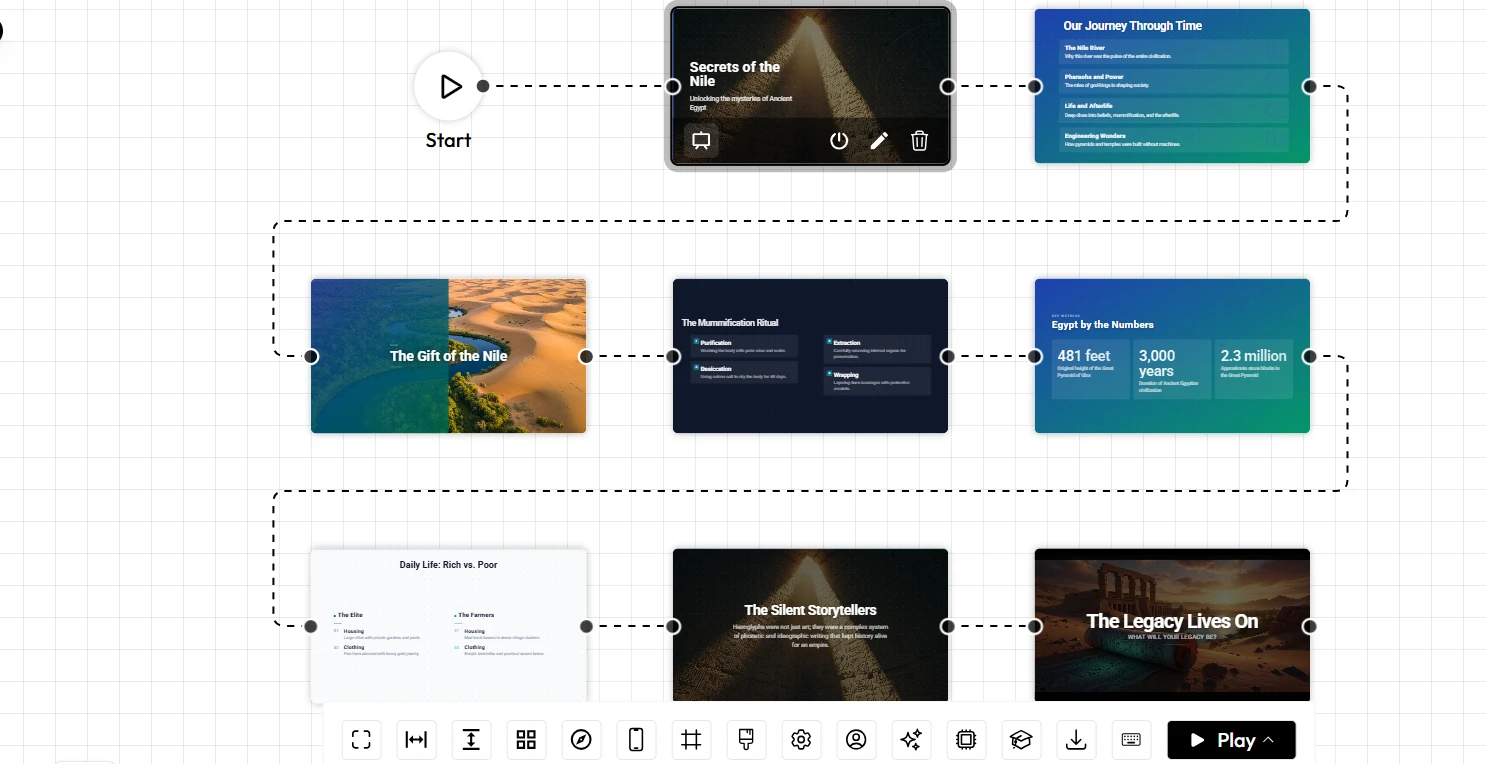
The Shift to Specialized AI presentation software
For instructional designers, corporate trainers, and educators, producing high-quality materials on a tight deadline is a daily requirement. Generalist platforms like PowerPoint operate on the assumption that you have the time and the design skills to build everything from the ground up. While Microsoft has introduced generative add-ons like Copilot, the underlying architecture of PowerPoint remains tied to a manual slide-by-slide workflow. The user still carries the cognitive load of balancing visual hierarchy, color theory, and spatial alignment.
Unni.ai was built natively for the AI era. It approaches presentation building from an instructional design perspective. Users simply provide their raw notes, lesson plans, or core concepts. The system then automatically parses this information and determines the optimal layout. It translates dense paragraphs into digestible bullet points, comparisons, and visual hierarchies. This shifts the focus away from tedious formatting tasks and redirects your energy toward effective teaching and scalable content production.
Comparing the Workflows: How Both Platforms Generate AI slides
To provide a fair and objective look at how PowerPoint and Unni.ai compare in professional environments, the following matrix breaks down their core capabilities across ten crucial categories.
| Category | Microsoft PowerPoint | Unni.ai |
|---|---|---|
| Ease of Use | Moderate, requires navigating complex legacy ribbon menus | High, prompt-driven and focused on natural language inputs |
| presentation automation | Basic automation through Designer and add-on tools | Deep automation that generates complete, structured modules |
| AI Quality | Relies on Copilot integration for text and basic image fetching | Native, context-aware engine designed for pedagogical layouts |
| Collaboration Features | Standard co-authoring via SharePoint or OneDrive | Seamless cloud collaboration tailored for modern agile teams |
| Educational Workflows | Completely manual setup for curriculums and lessons | Built-in structuring for clear instructional pathways |
| Lesson Planning Support | None natively built-in | Automated syllabus parsing and lesson segmentation |
| Template Flexibility | Limitless manual adjustments, prone to human design errors | Rule-based, adaptive templates that maintain professional design |
| Speed and Productivity | Slower, scales linearly with the number of slides needed | Instant generation of highly complex, multi-module training decks |
| Learning Curve | Familiar but takes years to master advanced features | Near-zero technical onboarding, highly intuitive |
| Best Audience Fit | General enterprise users and traditional keynote speakers | Educators, instructional designers, and training teams |
Core Feature Breakdown and Workflow Differences
Presentation Automation and AI Quality
The approach to intelligent automation highlights the biggest difference between the two platforms. In PowerPoint, automation is typically an afterthought applied to a manual process. You might paste a paragraph of text onto a slide and then click a “Designer” button to see a few layout suggestions. If you need to change the length of the text later, the design often breaks, forcing you to start the formatting process over. The AI features function as a helpful assistant for isolated tasks rather than a holistic content generator.
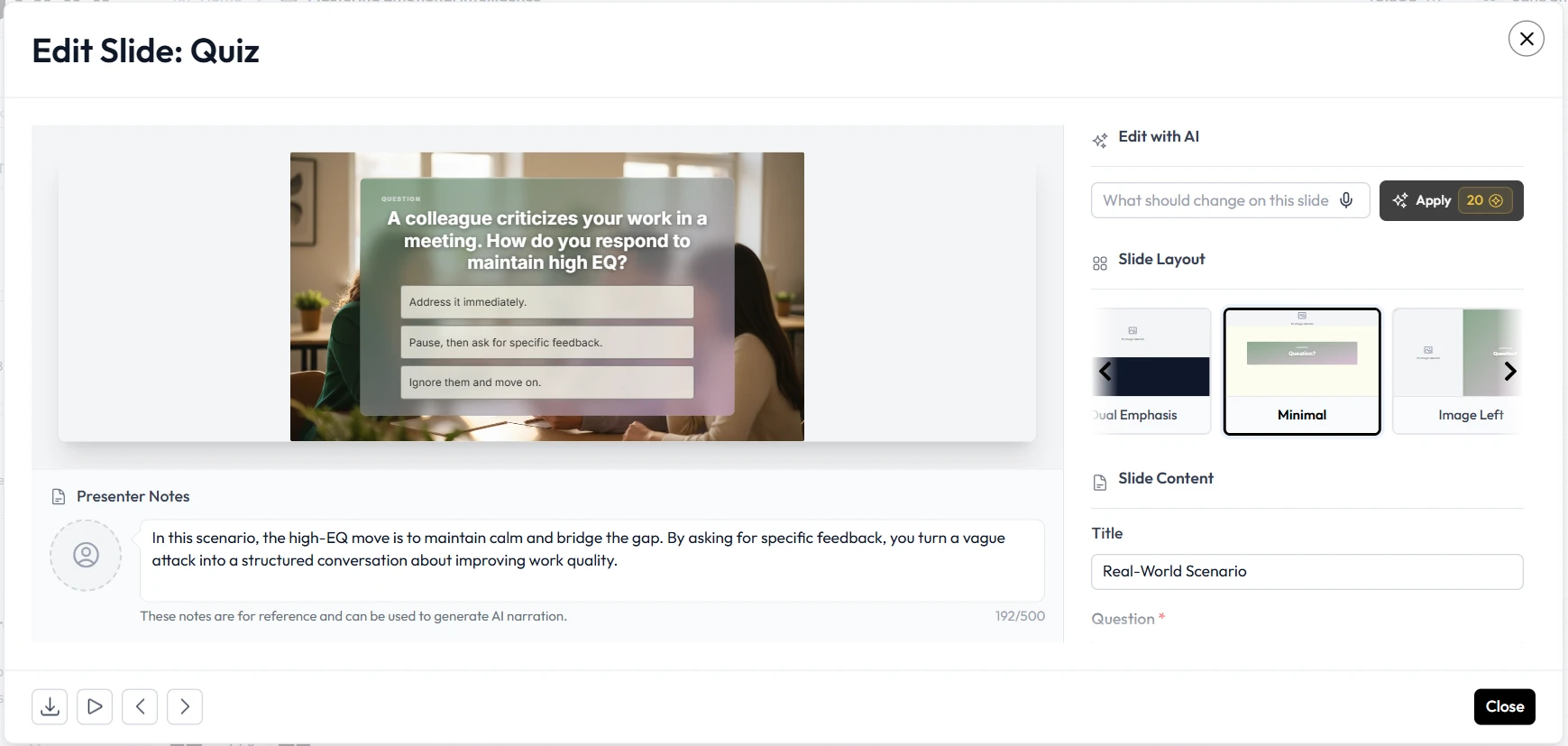
Unni.ai provides a continuous, intelligent ecosystem. Because it operates as a dedicated AI presentation generator, it understands the semantic relationship between your content and the visual design. When you supply a complex concept, the software automatically breaks it down into logical sequential slides. If you return later and add three more paragraphs to a specific section, the surrounding slides and visual elements adapt automatically. The formatting is completely fluid. You never have to resize a text box to make room for a new bullet point, which ensures your materials always look professionally polished.
Educational Workflows and Course Creation Support
When managing comprehensive Course Creation projects, the structure of your content is just as important as the information itself. PowerPoint treats a 50-slide compliance training module the same way it treats a five-slide sales pitch. The software offers no internal logic to help you pace your instruction. You are responsible for designing title cards, transition slides, review sections, and knowledge checks entirely from scratch.
Unni.ai excels as a structured educational platform. It features specialized engines that recognize educational patterns. By uploading a syllabus or a series of learning objectives, Unni.ai organizes the content into clearly defined modules. It automatically formats definition slides, conceptual summaries, and review points. This structured output is incredibly valuable for teams engaged in broader Digital Experience Creation. Once the visual and structural foundation is perfectly organized in Unni, instructional designers can confidently export these materials to serve as the baseline for complex e-learning systems.
Speed, Productivity, and the Learning Curve
Time is the most valuable resource for any training department. PowerPoint is ubiquitous, and most professionals have a basic understanding of how to use it. However, creating a truly professional, cohesive presentation in PowerPoint takes hours of repetitive labor. Aligning graphics, matching brand hex codes, and ensuring consistent font sizes across eighty slides is a tedious process that drains productivity.
Unni.ai is optimized for rapid deployment. The learning curve is practically non-existent because the platform relies on your ability to describe what you want rather than your ability to navigate complex drop-down menus. A corporate trainer can input a dense technical manual into the platform and receive a clean, presentation-ready deck in a matter of minutes. This rapid turnaround drastically shortens the revision cycle, allowing teams to deploy crucial compliance and training updates across their organizations with unprecedented speed.
Collaboration Features and Team Scalability
Effective collaboration is essential for large academic departments and corporate enterprises. PowerPoint handles collaboration effectively through the Microsoft 365 ecosystem. Multiple users can edit a file simultaneously. The downside to this manual collaboration is version control and design integrity. When three different people are adjusting fonts and dragging images around a single slide, the final product often looks disjointed and chaotic.
Unni.ai manages collaboration by decoupling the content from the design rules. Team members can collaborate in real-time, refining prompts, expanding on text blocks, and editing the core information. The AI engine enforces the design rules globally. This means one user cannot accidentally ruin the alignment or color contrast of the entire deck. This predictable, non-destructive collaboration environment is critical for teams executing high-volume output.
Pricing and Ecosystem Considerations
When evaluating enterprise software, licensing models play a significant role. PowerPoint is typically bundled within the broader Microsoft 365 subscription. This makes it highly accessible for organizations already entrenched in the Microsoft ecosystem. However, relying solely on bundled software often means missing out on specialized tools that can significantly reduce labor costs.
Unni.ai operates as a specialized platform designed to deliver an immediate return on investment by saving hours of manual labor per week. For an instructional designer or a corporate trainer, the hours saved by not having to manually format slides easily justify the investment in a dedicated tool. Furthermore, the clean, standardized output from Unni integrates smoothly into modern web platforms, making it a highly cost-effective step in your broader content production pipeline.
Best Audience Fit and Use-Case Analysis
Choosing the correct tool depends entirely on your specific daily tasks and the outcomes you need to achieve.
When to Choose Microsoft PowerPoint
PowerPoint remains a powerful tool when your work demands complete pixel-perfect manual control over every element on the screen. It is the appropriate choice if you are:
- A graphic designer creating highly custom, non-standard visual layouts.
- A keynote speaker who relies heavily on complex custom animation paths and embedded 3D models.
- Working within an organization that strictly mandates offline document creation and storage.
- Creating simple, low-stakes slide decks where design efficiency is not a priority.
When to Choose Unni.ai
Unni is the ideal platform when your primary objective is to communicate complex information quickly, clearly, and without the friction of manual design tasks. It is the best choice if you are:
- An instructional designer scaling up Course Creation for a large learning management system.
- A corporate trainer converting massive text documents, HR policies, or technical manuals into engaging modules.
- A teacher balancing a heavy classroom schedule who needs to generate structured lesson plans instantly.
- A multimedia professional needing pristine, organized base materials to funnel into an Interactive video platform.
Feature Checklist for Decision Makers
Before you commit to a platform, use this checklist to ensure your choice aligns with your production goals:
- Do you need a platform that understands educational pacing? Unni.ai structures lessons automatically based on learning objectives.
- Are you relying entirely on custom animations? PowerPoint provides granular control over individual object animations.
- Do you need to convert text-heavy documents into slides instantly? Unni.ai features advanced summarization and layout generation engines.
- Do you require a tool that enforces brand consistency automatically? Unni.ai locks in visual rules so collaborators cannot break the design.
- Are you tired of manually aligning text boxes and images? Unni.ai handles all spatial formatting programmatically.
Conclusion: Upgrading Your Instructional Design Workflow
The decision between Microsoft PowerPoint and Unni.ai comes down to how you value your time and how you view the presentation creation process. PowerPoint is an undeniable classic, offering a blank canvas for users who have the time and desire to manually craft every aspect of their document.
However, for modern professionals whose primary focus is knowledge transfer, a manual canvas is an outdated bottleneck. By adopting dedicated AI presentation software, you remove the tedious mechanics of graphic design from your daily schedule. Unni.ai provides a seamless, intelligent pathway for generating structured AI slides, empowering trainers and educators to elevate their content quality and scale their output effortlessly. When your goal is to deliver exceptional educational experiences without the formatting fatigue, making the switch is the most strategic choice for your team.
Frequently Asked Questions
Can I export my Unni.ai presentations to use in other environments?
Yes. Professional workflows require adaptability. Unni.ai allows users to export their generated AI slides into standard formats. This ensures your content remains highly accessible, easily shareable, and compatible with legacy systems or offline presentation environments when necessary.
Will I need to learn complex design skills to use Unni.ai?
No. The primary philosophy behind Unni.ai is to eliminate the need for manual design skills. The intelligent engine automatically handles typographic pairing, color contrast, and layout alignment. You only need to know what you want to teach, and the platform will handle how it looks.
How does Unni.ai integrate with broader e-learning projects?
Because Unni.ai creates highly structured, logically sequenced content, it acts as the perfect first step in comprehensive digital workflows. The clean outputs can be easily adapted into Digital Experience Creation platforms, web-based training modules, or utilized as the visual track for an upcoming e-learning campaign.
Can I apply my company's branding to AI-generated slides?
Yes. Unni.ai allows users to set global brand parameters. You can establish your specific color palettes, fonts, and logos. The AI engine then applies these rules across every generation, ensuring that your automated output always looks distinctly like your brand.