How to Build Compliance Training Slides Faster with AI
Learn how to build compliance training slides faster with AI. Covers how to maintain accuracy and structure while cutting down manual design time.
Compliance training is the backbone of organizational safety and legal standing. Yet for most instructional designers and corporate trainers, it is also the most time-consuming task on the calendar. Regulations change frequently. Legal documents are dense. Converting a 60-page policy manual into an engaging slide deck usually takes days of manual labor.
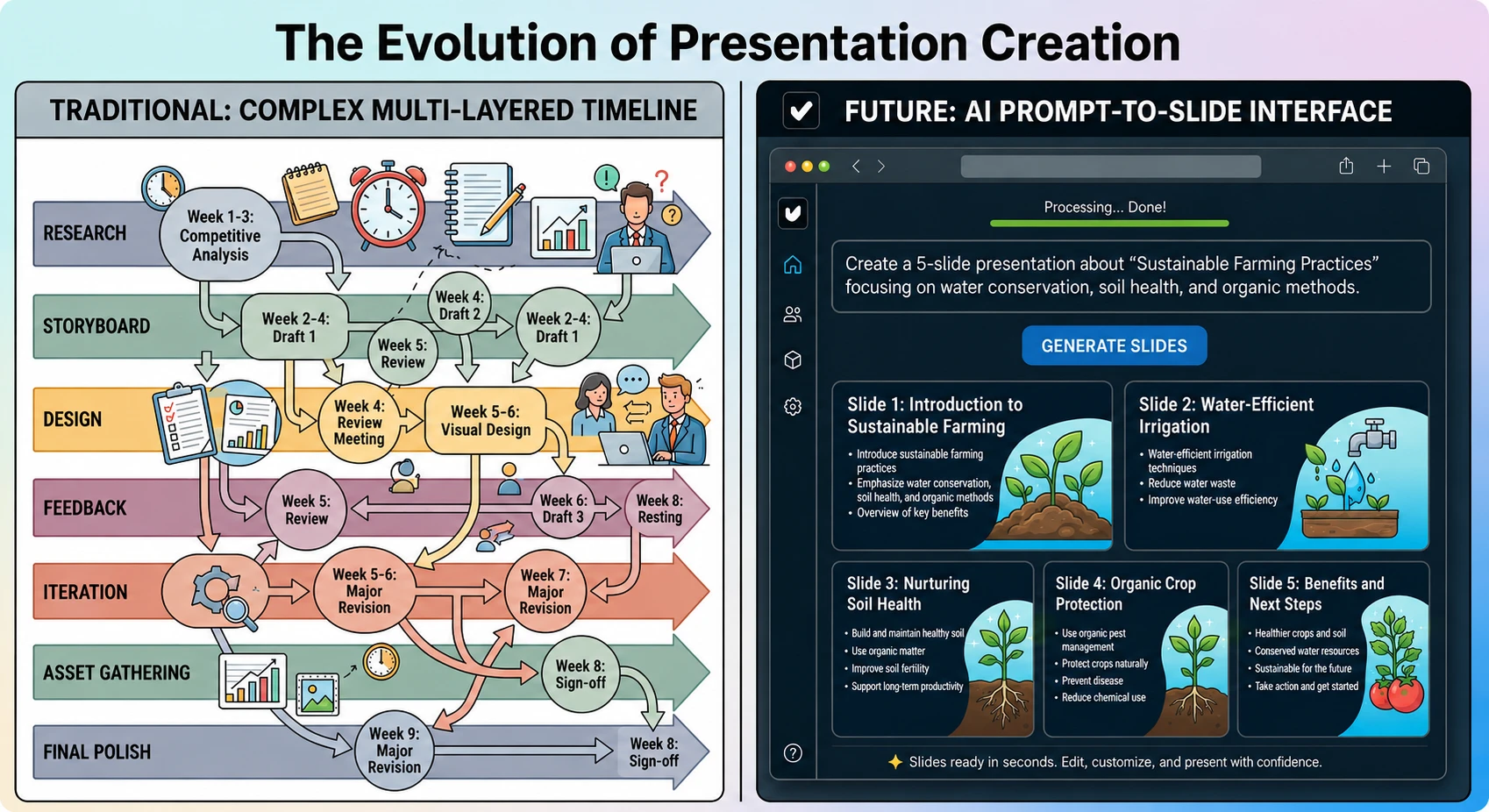
By leveraging an AI presentation generator, L&D teams are fundamentally changing this timeline. Through presentation automation, what once took a full work week now takes minutes. This shift allows you to focus on the high-level strategy of risk management while educational AI handles the heavy lifting of content synthesis and visual design.
In this guide, we will look at how to use Unni.ai to transform complex regulatory data into clear, professional training modules that employees actually want to finish.
The Challenge of Traditional Compliance Content
Most compliance training fails because it is overwhelmed by text. When a trainer manually copies and pastes legal requirements into slides, the result is often “death by PowerPoint.” This leads to low retention rates and higher organizational risk.
Using educational AI provides a filter. Unni.ai analyzes the source text to identify core mandates, consequences, and action items. Instead of a wall of text, Unni.ai produces structured slides that prioritize clarity. This form of presentation automation ensures that the most critical safety or legal information is never lost in a cluttered layout.
Step 1: Centralize Your Regulatory Sources
The quality of your output depends on your input. To start, gather your primary documents. These might include:
-
New government safety regulations.
-
Updated internal HR policies.
-
Legal summaries of industry changes.
Unni.ai allows you to upload these documents directly. Because Unni.ai is built for professionals, it can process technical language and maintain the integrity of the original source material. Unlike generic tools, Unni.ai is designed to respect the hierarchy of information found in formal documentation.
Step 2: Use Presentation Automation for Initial Drafting
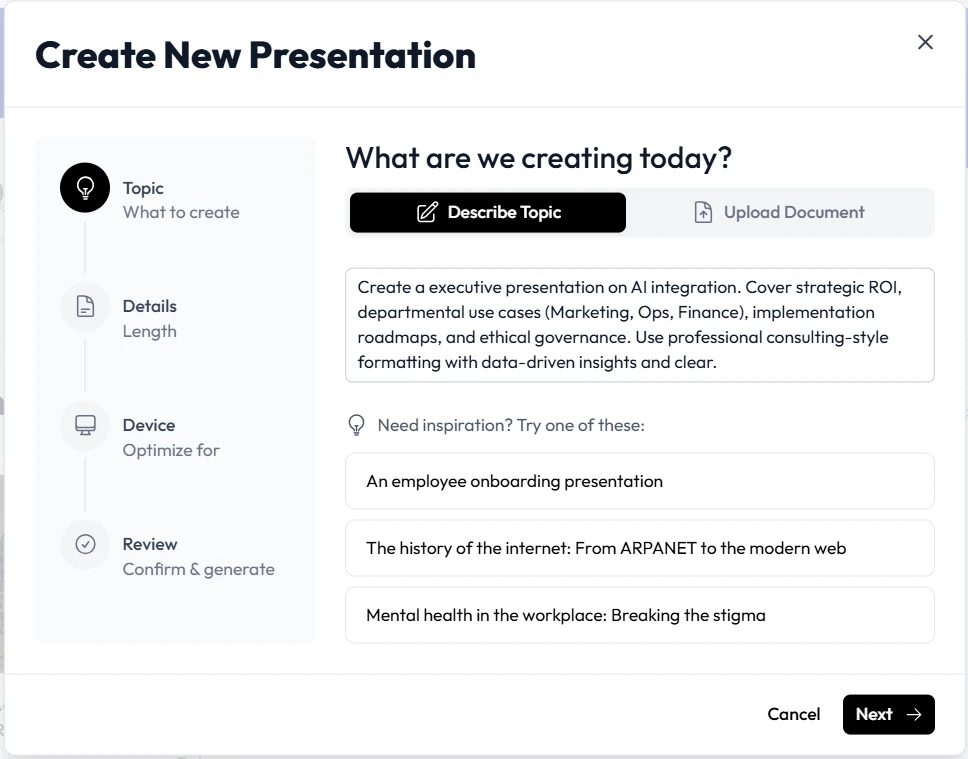
Once your documents are ready, you can prompt Unni.ai to generate a draft. For compliance, the prompt should be specific. For example, tell Unni.ai to “Create a 15-slide training module on New Data Privacy Laws for the Marketing Department.”
Unni.ai will then use its AI presentation generator engine to:
-
Create a logical table of contents.
-
Draft concise headers for every slide.
-
Identify key definitions that need emphasis.
-
Select professional imagery that aligns with the corporate tone.
This step alone saves approximately six to eight hours of initial drafting time. By delegating the structural design to Unni.ai, you move straight to the refinement phase.
Step 3: Refine for Engagement and Branding
Compliance training should never look like an afterthought. Unni.ai makes it easy to apply consistent branding across all modules. If your legal team updates a single clause, you do not need to redesign the entire deck. You can use Unni.ai to update specific sections while maintaining the visual style.
Within Unni.ai, you can toggle between different layouts to find the one that best suits the specific training topic. For instance, a “Safety Protocol” slide might require a high-impact visual, while a “Legal Definition” slide might require a clean, minimalist table. Unni.ai provides these options instantly.
Step 4: Add Knowledge Checks and Scenarios
A key part of educational AI is the ability to generate interactive elements. Use Unni.ai to create hypothetical scenarios based on the compliance data you provided. If you are teaching workplace safety, ask Unni.ai to generate three “What would you do?” slides based on the specific equipment mentioned in your manual.
This transforms the presentation from a passive lecture into an active learning experience. Unni.ai can suggest quiz questions and answers that align perfectly with the content generated in the previous slides.
Practical Examples of Compliance Automation
To better understand the versatility of Unni.ai, consider these three common implementation scenarios:
Cyber Security Awareness
A Chief Information Security Officer needs to train 500 employees on a new phishing threat. By feeding the threat report into Unni.ai, the team generates a visual guide on “Red Flags in Emails” in under five minutes. Unni.ai ensures the screenshots are clear and the instructions are actionable.
Anti-Harassment Training
HR departments must often update these trainings to reflect new state laws. Using training automation within Unni.ai, the HR manager can upload the new legislative text. Unni.ai then updates the existing company deck to include the new legal definitions without losing the original company culture slides.
Annual Safety Certification
For manufacturing teams, annual certifications are a logistical hurdle. Unni.ai allows the safety lead to create a master deck and then use the AI presentation generator to create “Lite” versions for different shifts or departments, ensuring everyone gets the information relevant to their specific role.
Checklist: Quality Control for AI-Generated Compliance
While Unni.ai does the heavy lifting, a final human review ensures the training is legally sound. Use this checklist before you hit publish:
-
Legal Accuracy: Does the summary in Unni.ai match the specific legal mandates of your jurisdiction?
-
Tone Check: Is the language professional and authoritative yet accessible to all employees?
-
Visual Clarity: Are the diagrams and charts generated by Unni.ai easy to read on both mobile and desktop?
-
Instructional Flow: Does the presentation move logically from the “Why” to the “How” and finally to the “Consequences”?
-
Branding: Are the company colors and logos consistent across every slide in the Unni.ai project?
FAQ: Using Unni.ai for Professional Training
Is my sensitive data safe with Unni.ai?
Unni.ai is built with professional security standards in mind. We understand that compliance documents often contain sensitive internal policies, and Unni.ai prioritizes the privacy of your uploaded data.
Can Unni.ai handle very long PDF documents?
Yes. Unni.ai is specifically designed to parse long-form content. It identifies the most relevant sections to ensure your presentation automation results in a concise and effective deck rather than an overwhelming one.
Does Unni.ai support different languages?
Many compliance mandates are global. Unni.ai supports multiple languages, making it an essential tool for educational AI in multinational corporations that need to sync training across different regions.
Conclusion: Empowering L&D Teams
The era of spending forty hours on a single compliance deck is over. By integrating an AI presentation generator into your workflow, you reclaim your schedule for more impactful work, such as one-on-one coaching and organizational strategy.
Unni.ai offers a seamless path to presentation automation that does not sacrifice quality for speed. Whether you are a teacher, a corporate trainer, or an instructional designer, using educational AI ensures your materials are modern, engaging, and compliant.
The transition to AI-assisted design is the most significant leap in training technology in a decade. Unni.ai is here to ensure your team is at the forefront of that change.
Start building your next training module in seconds. Try the Unni.ai AI presentation generator and experience the future of professional communication.