Why AI Presentation Generators are Replacing Manual Slideshows
Discover why instructional designers and trainers are abandoning manual presentation tools and embracing AI presentation generators like Unni.ai to create better AI slides and utilize educational AI.
If you are an instructional designer or corporate trainer, you know the burnout of manual content creation. Staring at a blank screen while formatting text boxes drains your energy. Thankfully, a modern AI presentation generator solves this problem entirely. By integrating AI slides into your workflow, you eliminate hours of tedious work. Educational AI has evolved into an essential productivity tool, allowing you to focus purely on learning strategy rather than basic design troubleshooting.
You likely entered the instructional design field to create engaging learning experiences, not to wrestle with slide margins. Yet, many professionals find themselves burdened by repetitive lesson planning and endless visual adjustments. When you add tight deadlines to the mix, the result is often a rushed project with low learner engagement. The good news is that workflow solutions like Unni.ai are completely changing how we approach these daily workplace challenges.

The Hidden Cost of Manual Content Creation
Let us take a closer look at the reality of manual design. Spending hours building slides is not just annoying; it represents a massive loss of organizational productivity. When learning experience designers and higher education professionals are bogged down by administrative design tasks, they have significantly less time to focus on pedagogical strategy and learner outcomes.
First, there is formatting frustration. Every time you paste text from a document into a traditional slide deck, the layout breaks. You spend twenty minutes just adjusting font sizes and realigning images. Second, a lack of design skills can severely limit your output. You might have world-class training material, but if the visual execution is poor, your audience will naturally disengage. Inconsistent branding across different departments only makes the final product look less professional and disjointed.
Furthermore, training material overload is a serious industry issue. When compliance regulations change or new products launch, Learning and Development teams are expected to update dozens of modules overnight. Manual tools offer no reliable way to scale this effort. The sheer volume of manual updating inevitably leads to burnout. Instructional designers desperately need a practical way out of this cycle.
How an AI Presentation Generator Creates Better AI Slides
This is where Unni.ai steps in as a complete workflow solution. Unni is designed specifically to tackle the root causes of formatting frustration and slow production times. Instead of forcing you to build everything from scratch, the platform uses intelligent automation to generate full learning flows in seconds.
With Unni, you are not merely creating static documents. You are building interactive, branching scenarios on a next-generation visual canvas. The node-based editor gives you complete flow control, allowing you to connect, reorder, and restructure modules without losing your layout. You simply provide a prompt or a source document, and Unni builds a highly structured presentation for you.
One of the most powerful features of the platform is its natural language editing capability. If you want a slide to look more professional, you do not have to dig through complex menus. You just type a command like “make the text larger and add professional statistics”. Unni’s artificial intelligence understands your intent and applies the changes instantly. By automating the visual heavy lifting, Unni ensures that your courses adapt beautifully to any device, whether your learners are on a desktop or a mobile phone.
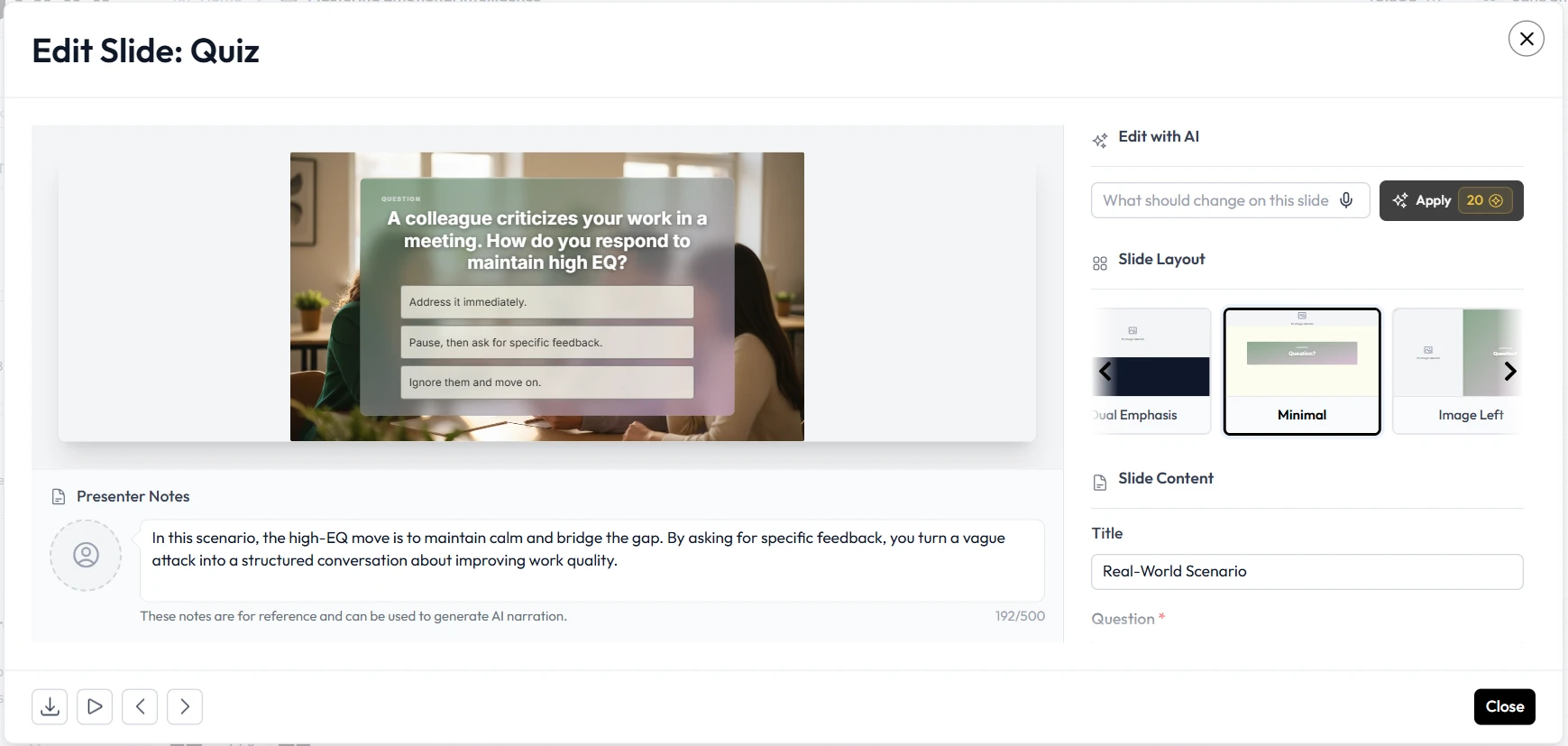
Realistic Workplace Scenarios: Solving Repetitive Lesson Planning
To truly understand the impact of presentation automation, it helps to look at practical applications in the workplace. Let us examine two common scenarios where professionals overcome significant hurdles using intelligent automation.
Scenario A: The Corporate Onboarding Overload
Imagine a corporate trainer tasked with overhauling an outdated onboarding program. The source material consists of a fifty-page PDF manual that is dense, text-heavy, and visually unappealing. In a manual workflow, the trainer would spend weeks copying text, summarizing paragraphs, and searching for relevant stock imagery to make the content digestible.
By using Unni, the trainer simply imports the existing PDF. Within minutes, the platform processes the document and generates a structured, multi-module interactive course. The trainer then uses the visual editor to add quizzes and branching scenarios, ensuring that new hires are actually absorbing the material instead of just clicking next. The project is completed in a fraction of the time, and the resulting course is highly engaging.
Scenario B: The Higher Education Curriculum Update
Consider a university professor who needs to update a semester of lectures to reflect new industry standards. Repetitive lesson planning is a constant drain on their time. They need a way to refresh their content without starting over completely.
With Unni, the professor can leverage the built-in template library to mix and match over one hundred slide templates. They can introduce motion-rich introductory cards and interactive knowledge checks with just a few clicks. Because Unni automatically formats the content for all screen sizes, the professor guarantees that students can review the material comfortably on their smartphones during their commute.
Overcoming Formatting Frustration and Vendor Lock-In
A major concern for any learning professional adopting a new tool is vendor lock-in. You spend months creating content in a proprietary system, only to find out you cannot export it to your company’s Learning Management System. Unni eliminates this worry entirely by prioritizing flexibility and true content ownership.
Unni allows you to import your existing materials from PDFs, PowerPoint files, Google Slides, and Markdown documents. You never have to leave your past work behind. Once your new interactive course is ready, you can export it to SCORM, PDF, video, or a standard web link. Your content always belongs to you. Unni.ai acts as the bridge between your raw knowledge and your final delivery platform, preventing you from ever feeling trapped by your software choices.
Checklist: Signs Your Team Needs Presentation Automation
If you are unsure whether your current workflow is sustainable, review the following indicators. If you relate to more than two of these points, it is time to consider presentation automation through Unni.
-
You spend significantly more time adjusting fonts, margins, and image placements than writing actual educational content.
-
Your team struggles with inconsistent branding across different training modules and departments.
-
The sheer volume of required updates is leading to training material overload and missed deadlines.
-
Your learners are clicking through presentations rapidly without engaging with the core message.
-
You frequently recreate the same basic layouts because your current templates are too rigid and hard to edit.
-
The prospect of repetitive lesson planning causes anxiety or burnout at the start of every week.
Recognizing these symptoms is the first crucial step toward building a healthier, more productive content creation process.
Frequently Asked Questions About Educational AI
Do I need design or coding skills to use Unni.ai?
Absolutely not. Unni.ai was built so anyone can create polished, interactive content. The system handles layout, structure, and visuals automatically. If you want advanced control, the node-based visual canvas allows you to dive deeper without writing a single line of code.
Will my final output look generic?
No. Unni.ai gives you the power to mix and match over one hundred slide templates and infinite combinations. Furthermore, you can edit any section using plain language to ensure the tone and style match your organization perfectly. You can also upload your own assets to maintain strict brand guidelines.
Can I still use Unni.ai if I do not want to use generative features for everything?
Yes. Unni.ai offers robust manual editing capabilities alongside its automated tools. You maintain full control over your narrative. The AI is there to support your vision, accelerate your process, and eliminate tedious formatting, not to replace your subject matter expertise.
How does Unni.ai handle assessments?
You can easily attach knowledge checks to any node in your presentation. Unni.ai supports branching questions that adapt to each learner’s response in real time, making your courses far more dynamic than a traditional slide deck.
Conclusion: The Future of Digital Experience Creation
The days of struggling through manual slide building are coming to an end. Instructional designers, teachers, and trainers deserve tools that respect their time and amplify their expertise. Unni provides a comprehensive workflow solution that cures the burnout associated with traditional content creation.
If you are ready to stop fighting with formatting and start building impactful learning journeys, it is time to upgrade your toolkit. For more insights on scaling your training programs, explore our guide on choosing an AI presentation generator. You can also learn how AI slides speed up course creation, and why educational AI is essential for modern Learning and Development teams.