Why AI Presentation Automation Improves Workflow Scalability
Discover how presentation automation and an AI presentation generator help instructional designers scale their workflow and build AI slides using educational AI.
When your organization suddenly asks you to double your training output, your first reaction is often panic. You cannot simply double your working hours to meet the demand. The true bottleneck in course creation is almost always manual design. To scale effectively without sacrificing quality, modern professionals are turning to an AI presentation generator to handle the heavy lifting. By embracing presentation automation, instructional designers can produce highly engaging AI slides in a fraction of the traditional time. Educational AI serves as the core foundation for this rapid growth. It allows you to step away from tedious formatting tasks and focus completely on high level pedagogical strategy. That’s where Unni.ai steps up.
The Bottleneck of Manual Content Creation
Scaling a learning and development program is difficult when you are bogged down by administrative tasks. Professionals in the instructional design field frequently experience burnout from presentation creation. Subject matter experts deliver dense documentation, and you are expected to translate that information into a visual format under tight deadlines.
Spending hours building slides manually is a poor use of your specialized skills. You often find yourself trapped in a cycle of formatting frustration. Adjusting alignment grids, standardizing font sizes, and searching for relevant corporate images consume the majority of your day. This tedious work limits the number of courses you can produce in a quarter. When you are focused on pixel perfect alignment, you lose sight of the overarching learning experience.
Furthermore, a lack of design skills can lead to low engagement presentations. If your visuals look outdated or inconsistent, learners will quickly tune out. Inconsistent branding becomes a massive issue when multiple team members are building courses in isolation. You end up with a fragmented library of training materials that fails to deliver a cohesive message. The industry needs a workflow solution that standardizes output while drastically reducing development time.
How Educational AI Transforms the Workflow
To achieve true scalability, instructional designers must transition from being manual content builders to strategic learning architects. An AI presentation generator facilitates this transition by automating the initial design phase. Instead of starting with a blank canvas, you start with a fully structured draft.
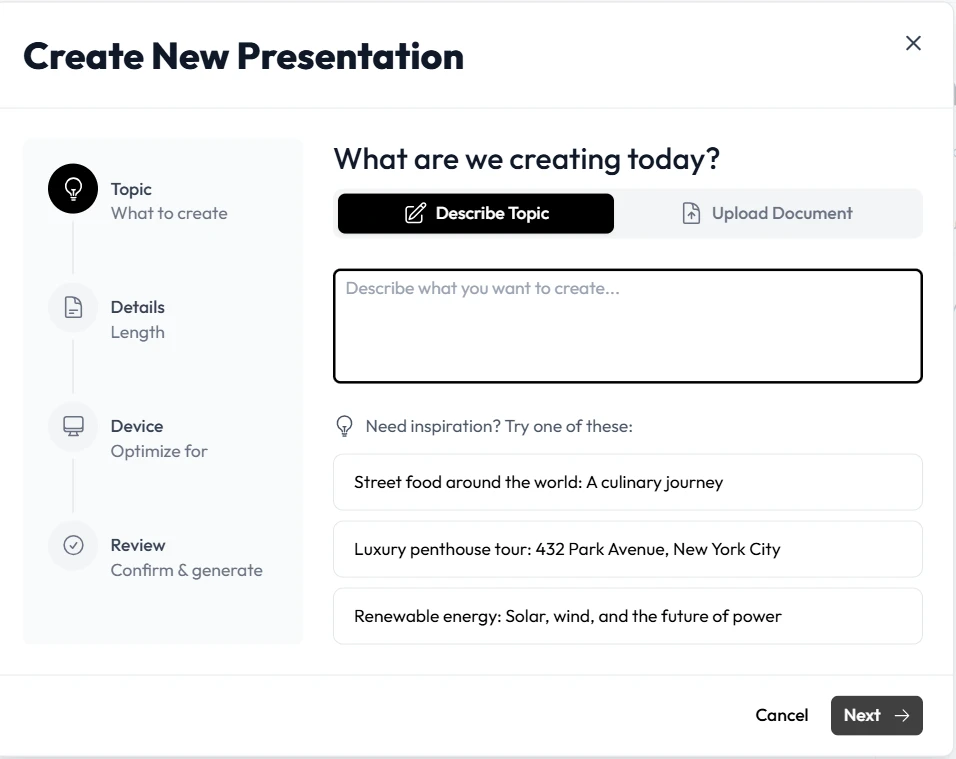
Unni.ai operates as the ideal workflow solution for teams looking to scale. By utilizing Unni, you eliminate the friction between raw content and a polished final product. You simply upload your source material or type a detailed prompt. It processes the information and generates comprehensive AI slides. This presentation automation ensures that your courses maintain a high standard of visual quality without requiring hours of manual labor.
The impact on your daily operations is immediate. Unni allows you to edit content using natural language commands. If a specific module feels too dense, you can instruct Unni to summarize the text or convert it into a visual infographic. Educational AI understands your intent and applies the changes instantly. You no longer have to navigate complex software menus just to change a layout. Unni handles the formatting, which empowers you to build more courses in less time.
Realistic Workplace Scenarios for Training Automation
Understanding the theoretical benefits of scalability is helpful, but seeing the technology applied to real challenges reveals its true value. Let us examine how Unni.ai solves common productivity issues in various professional environments.
The Corporate Trainer Managing Rapid Rollouts
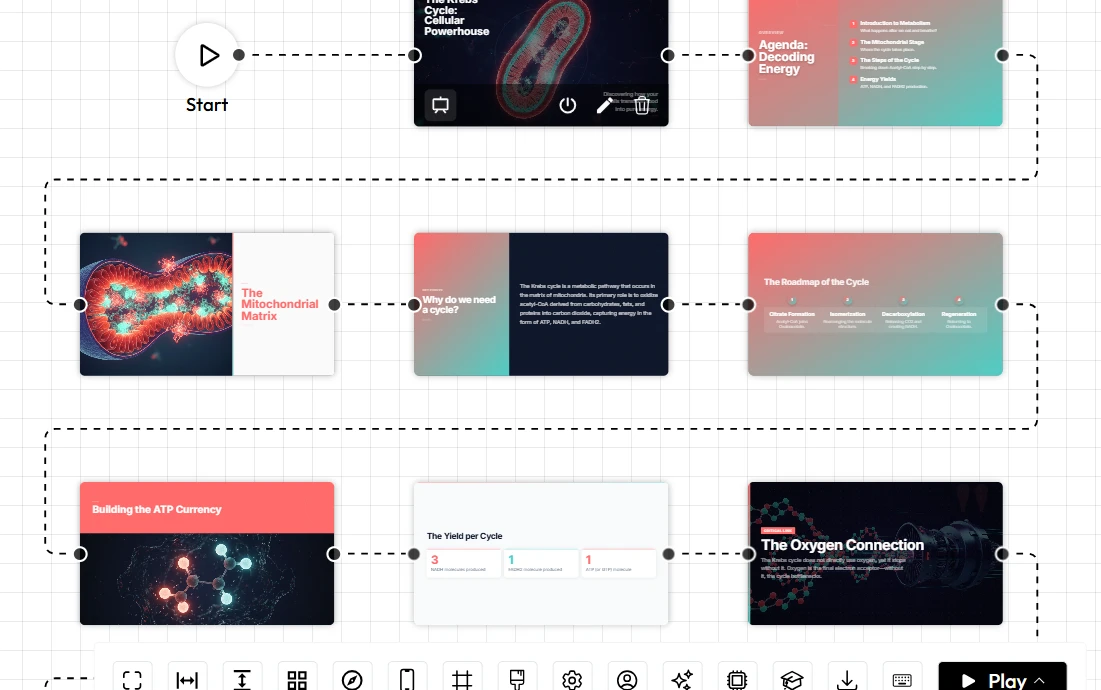
A corporate trainer receives a massive updated compliance manual on a Tuesday morning. The new policies must be rolled out to the entire company by Friday. In a traditional workflow, this tight deadline would require working late into the night to summarize the manual and build a slide deck. By using Unni, the trainer uploads the entire document directly into the system. It extracts the key points and builds interactive AI slides automatically. The trainer then uses the visual canvas to embed knowledge checks at the end of each section. What used to take three days of intense labor now takes a single morning, leaving ample time for review and deployment.
The Instructional Designer Fixing Inconsistent Branding
An instructional design team is tasked with updating fifty legacy training modules to reflect a new corporate brand identity. Opening every single file to manually change colors and fonts is an agonizing process. With Unni as their workflow solution, the team can import the legacy materials. The platform modernizes the layouts and applies the new branding rules across all modules instantly. This training automation ensures every course looks uniform and professional, eliminating the headache of inconsistent branding.
The Higher Education Professional Streamlining Semesters
University professors deal with repetitive lesson planning every single semester. Updating statistics and finding new visual aids takes time away from student engagement. By leveraging educational AI, a professor can simply tell Unni to update the data points in an existing lecture. The AI presentation generator refreshes the content and suggests new interactive elements, such as branching quizzes, to keep students engaged. Unni keeps the curriculum dynamic without requiring a complete manual rebuild.
A Productivity Checklist for Choosing an AI Presentation Generator
Not all automated tools are built for the demands of professional instructional design. When you are evaluating technology to improve workflow scalability, you need features that genuinely save time. Use this checklist to determine if a tool can support your growth.
-
Natural Language Editing Capabilities: Does the software allow you to make changes by simply typing what you want? Unni lets you describe your desired edits, and the system executes them instantly, bypassing complex menus.
-
Comprehensive Import Options: Your workflow solution must handle your existing assets. Unni.ai supports imports from PDFs, Word documents, and legacy presentation formats.
-
Zero Vendor Lock-In: Scalability requires flexibility. You must be able to export your work to multiple formats. Unni allows you to export your final product to SCORM, PDF, or direct web links without restrictions.
-
Interactive Branching Logic: Static presentations fail to engage modern learners. Ensure your tool includes a visual editor for building custom learning paths and integrated quizzes.
-
Responsive Automatic Design: You should never have to build separate versions for mobile and desktop. Unni automatically scales and adjusts your content to look perfect on any device.
By verifying these features, you ensure that your investment in presentation automation will reduce your workload rather than add a new layer of complexity.
Frequently Asked Questions (FAQ)
How does presentation automation actually prevent employee burnout?
Burnout often stems from performing high volumes of repetitive, low value tasks. By automating the visual layout process, an AI presentation generator removes the most tedious part of course creation. Professionals can channel their energy into researching and developing strong instructional narratives instead of fighting with alignment tools.
Can I trust educational AI to handle complex, technical subject matter?
Yes. Modern systems are highly capable of processing dense information. When you upload technical documents into Unni, the system extracts the core concepts and structures them logically. You always retain final editorial control to ensure accuracy and nuance.
Does using automated tools mean my courses will look generic?
Not at all. While Unni provides a rapid starting point, you have extensive customization options. You can adjust colors, swap out imagery, and refine the typography to match your exact visual standards. The goal is to speed up the foundational work, not limit your creative control.
Is it difficult to integrate Unni.ai with my current learning management system?
Integration is seamless. Unni is designed specifically as a flexible workflow solution. You can export your interactive modules as SCORM packages that upload directly into your existing LMS, ensuring your learners experience no disruption.
Conclusion: Scale Your Impact with Unni
Attempting to scale a training program through manual effort is a path to exhaustion. The demands of modern corporate and educational environments require smarter, faster development cycles. Embracing an AI presentation generator is the most effective way to eliminate formatting frustration and overcome tight deadlines.
Unni is the ultimate workflow solution for professionals who need to do more without working longer hours. By transforming your raw knowledge into captivating AI slides instantly, the platform empowers you to scale your output effortlessly. You can finally leave behind the repetitive lesson planning and focus on creating truly impactful learning experiences.