Unni.ai vs Traditional Presentation Design Tools: Which Saves More Time?
Tired of slow manual presentation design? See how Unni.ai compares to traditional design tools and how much time educators and trainers actually save.
Creating engaging presentations is a time consuming task for educators and trainers. Whether you are building a module for a corporate training session or organizing a weekly curriculum, staring at a blank screen can be overwhelming. Today, the choice often comes down to manual slide creation or using an advanced AI presentation generator like Unni.ai. This shift is redefining the way professionals work. By leveraging educational AI, you can instantly generate complete AI slides, allowing instructional designers and teachers to focus on delivery rather than formatting. In this comparison, we will explore how Unni stacks up against traditional presentation design to help you decide which approach truly saves more time.
Why You Need an AI Presentation Generator
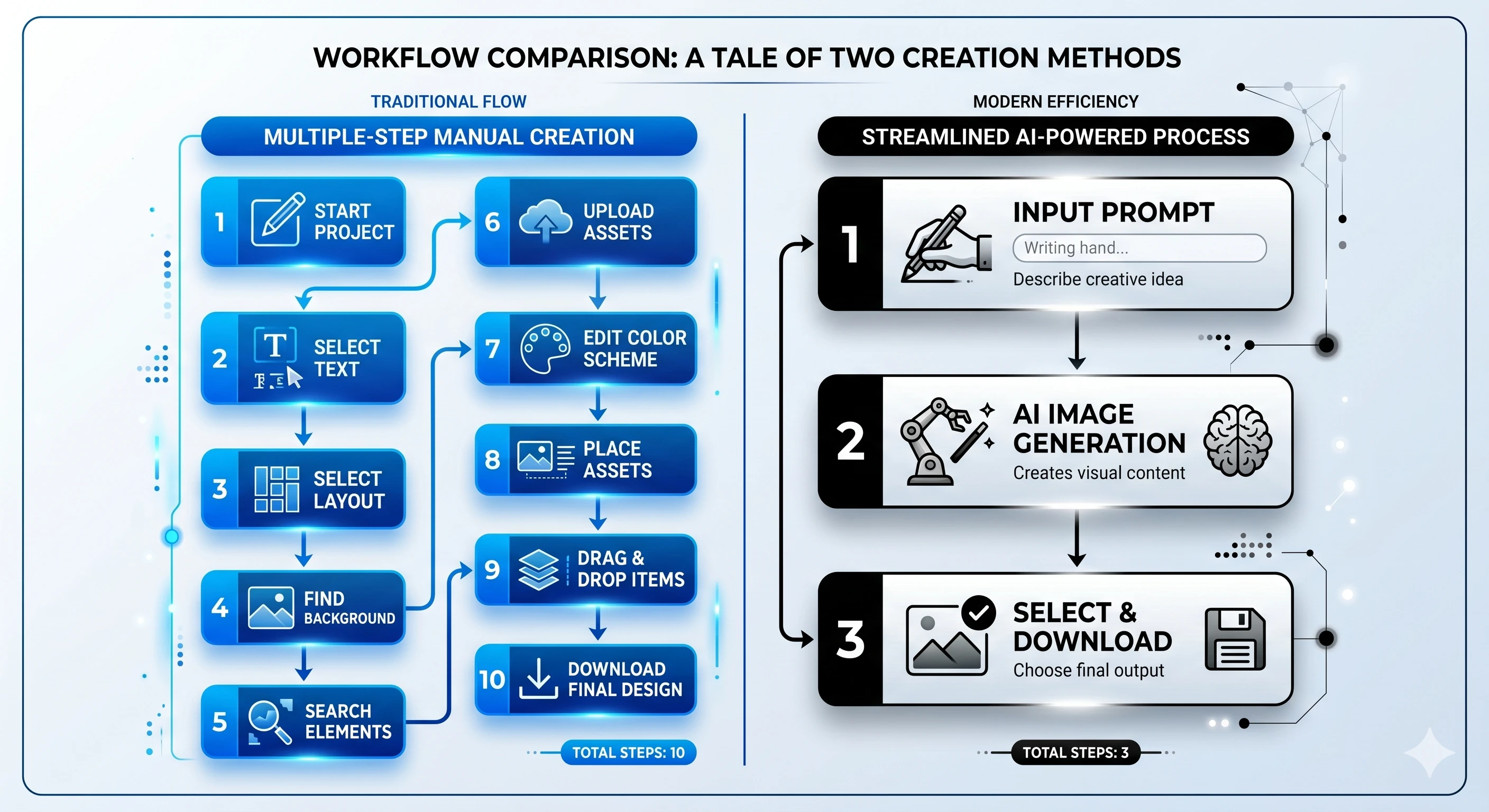
For decades, the standard approach to creating visual aids required specialized software, a good eye for design, and hours of patience. Traditional presentation design relies heavily on manual input. Users must select themes, format text boxes, align images, and adjust transitions one by one. While these legacy tools are incredibly powerful and offer pixel perfect control, they demand a significant time investment.
In contrast, the modern AI presentation generator approaches the task from a content first perspective. Unni allows users to simply input a topic, a basic outline, or a set of learning objectives. The platform then processes this information to produce fully structured AI slides. For professionals operating in the realm of educational AI, this means the software handles the tedious design tasks while the user remains in control of the pedagogical message. The result is a dramatic reduction in preparation time without sacrificing visual quality.
Workflow Comparisons: Manual Effort vs Presentation Automation
Understanding the true difference between Unni.ai and traditional methods requires a close look at the daily workflow of an instructional designer or teacher.
The Traditional Workflow
-
Research and Outlining: The user gathers notes and structures a document outside the presentation software.
-
Template Selection: The user browses hundreds of templates to find a suitable starting point.
-
Drafting Content: Text is manually copied, pasted, and resized to fit individual slides.
-
Visual Design: The user spends hours hunting for relevant stock photos, creating charts, and aligning graphical elements.
-
Review and Revisions: The entire deck is reviewed for consistency in fonts, colors, and formatting.
The Unni.ai Workflow
-
Prompt and Context: The user provides Unni with a topic, target audience, and key learning objectives.
-
Instant Generation: Unni utilizes presentation automation to generate a complete draft, including text, layout, and contextual images.
-
Review and Refine: The user reviews the AI slides, tweaking text or asking the AI to regenerate specific visuals.
-
Final Polish: Minor manual adjustments are made before exporting or presenting directly from the platform.
By automating the structural and design phases, Unni condenses a process that typically takes hours into mere minutes.
Feature Breakdowns and Core Capabilities
To keep this comparison fair and credible, it is important to acknowledge that traditional tools excel in granular, custom graphic design. If your project requires complex, frame by frame vector animations, legacy software remains a strong choice. However, for the vast majority of training and educational use cases, Unni provides a superior balance of speed and professional output.
Ease of Use and Learning Curve
Traditional software often features a steep learning curve. Menus are packed with intricate formatting options that can overwhelm new users. Unni offers a minimalist, intuitive interface. Because the platform relies on natural language processing, the learning curve is practically non existent. If you can describe your lesson or training module, you can create a high quality presentation.
AI Quality and Template Flexibility
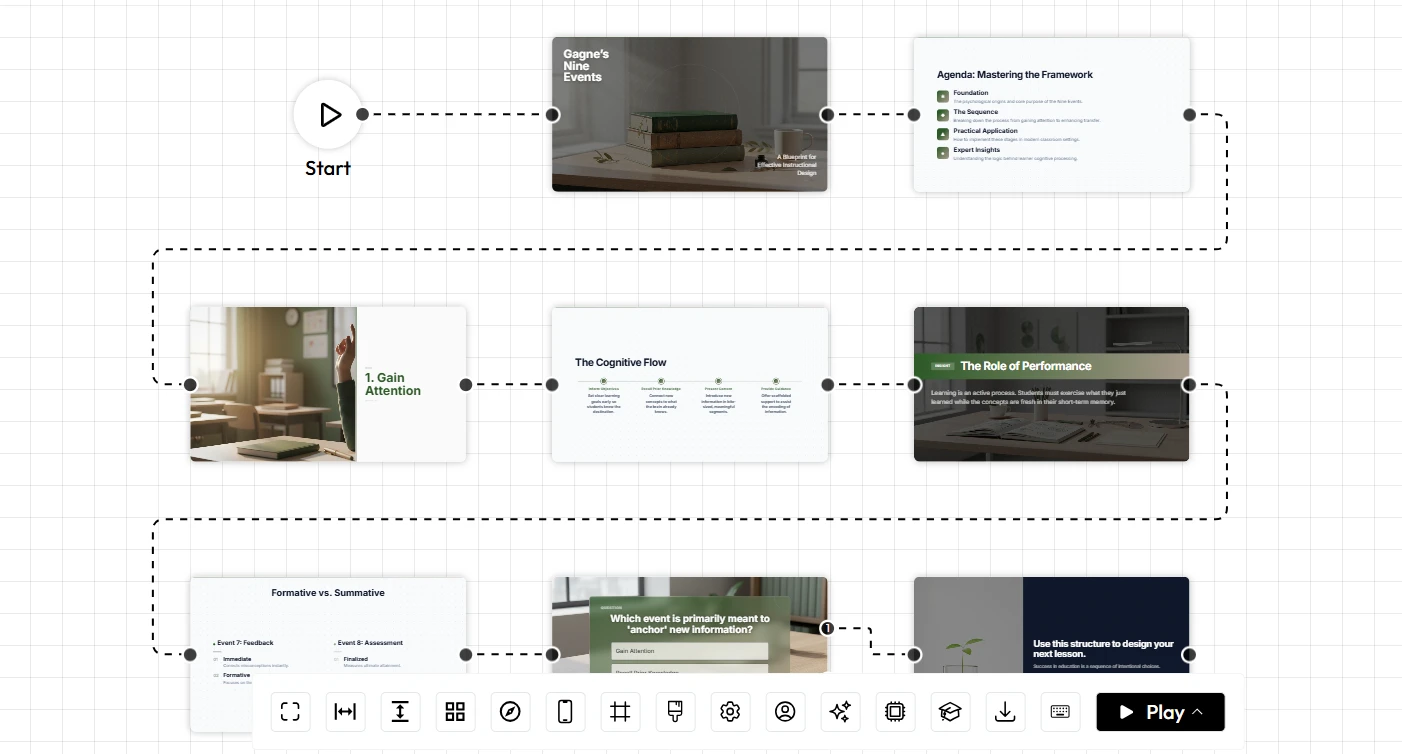
Older platforms offer static templates. Once you choose a design, changing it requires manually reformatting every slide. Unni employs dynamic template flexibility. The educational AI understands the context of your content and adapts the layout accordingly. If a slide contains a timeline, the AI formats it as a chronological graphic. If it contains a comparative analysis, it generates a side by side table. The AI quality ensures that text is legible, images are relevant, and the overall aesthetic is cohesive.
Educational Workflows and Lesson Planning Support
When evaluating AI for teachers, the context of the generated content is crucial. Unni is specifically optimized for educational workflows. It supports lesson planning by automatically suggesting discussion questions, summary points, and interactive prompts based on the core topic. Traditional software requires the educator to invent and format these structural elements from scratch.
Speed, Productivity, and Collaboration Features
In a busy academic or corporate environment, speed and productivity are paramount. The ability to quickly pivot and create a new presentation can make a significant difference in how effectively information is delivered.
presentation automation allows teams to scale their content creation. A corporate trainer needing to update compliance materials across multiple departments can generate initial drafts in seconds. Furthermore, collaboration features in Unni go beyond simple co editing. Team members can collaborate on prompts, share custom AI guidelines, and maintain brand consistency effortlessly. While traditional tools allow multiple users to edit a file simultaneously, they do not offer artificial intelligence assisted content generation as a shared resource.
Pricing Discussion and Best Audience Fit
Budget is always a consideration when evaluating new software. Traditional presentation suites are often bundled into larger office subscriptions, which may seem cost effective initially. However, when you factor in the hidden costs of premium template subscriptions, stock photo licenses, and the sheer amount of billable hours spent on manual design, the true cost becomes quite high.
Unni.ai offers a focused, transparent pricing model. By consolidating content generation, graphic design, and image sourcing into a single platform, it provides exceptional return on investment for frequent presenters.
The best audience fit for Unni includes:
-
Teachers managing heavy course loads and daily lesson planning.
-
Instructional designers responsible for rapid course creation.
-
Corporate trainers implementing training automation.
-
Professionals who value their time and need high converting digital experience creation.
Checklist: Which Solution is Right for You?
Consider this practical checklist when deciding between traditional design and Unni.
Choose Traditional Presentation Design if:
-
You need highly complex, custom vector graphics.
-
You have a dedicated graphic design team with unlimited time.
-
Your presentation relies on proprietary, highly confidential data that cannot be processed by cloud AI tools.
Choose Unni.ai if:
-
You want to drastically reduce the time spent on lesson planning and content creation.
-
You need presentation automation to scale your training materials quickly.
-
You are looking for high quality AI slides without hiring a designer.
-
You want to leverage educational AI to improve the structure and flow of your pedagogical content.
-
You value ease of use and a fast, intuitive workflow.
Conclusion
The debate between traditional slide design and automated solutions ultimately comes down to how you value your time. Traditional tools will always hold a place for specialized, highly custom graphic design projects. However, for educators, trainers, and instructional designers, the daily reality demands efficiency, clarity, and speed.
By removing the friction of formatting and layout design, an advanced AI presentation generator empowers professionals to focus on what truly matters: the content and the audience. Tools that offer presentation automation do not replace the expertise of the user. Instead, they amplify that expertise by providing a streamlined, intelligent canvas.
When it comes to creating impactful educational AI materials, traditional methods simply cannot compete with the speed and pedagogical support offered by modern technology. Unni clearly stands out as the best option for those who want to reclaim their time and elevate their instructional materials. Stop staring at blank screens and start delivering better lessons today.
Frequently Asked Questions
Can I edit the presentations after Unni.ai generates them?
Absolutely. While Unni does the heavy lifting of generating the initial AI slides, you have full control to edit text, swap out images, and adjust layouts to perfectly match your vision.
Is Unni suitable for corporate training automation?
Yes. Unni is an excellent tool for training automation. Instructional designers can input corporate guidelines and training manuals, and the AI will synthesize that information into digestible, professional modules.
How does the AI handle niche educational topics?
The educational AI powering Unni is trained on a vast dataset, allowing it to handle highly specialized subjects. It acts as an intelligent assistant, structuring your specialized knowledge into an effective teaching format.
Do I still need to find my own images?
No. One of the major benefits of this platform is that it automatically sources or generates contextually appropriate images, saving you from endless scrolling on stock photo websites.