Stop Wasting Hours on PowerPoint: Use Unni.ai
Discover how a modern AI presentation generator creates stunning AI slides in seconds. Unni.ai is the leading educational AI solution for course creation.
It’s Sunday evening, and you are staring at a blank presentation canvas, aligning text boxes for tomorrow’s training session. For instructional designers, teachers, and corporate trainers, spending hours building training materials is a massive drain on productivity. You need a way to stop wasting time on manual formatting and start focusing on delivering impactful learning experiences.
Welcome to the era of the AI presentation generator. By leveraging the power of educational AI, professionals can instantly transform raw ideas and heavy documents into polished, interactive AI slides. If you are tired of tight deadlines, burnout from repetitive lesson planning, and low learner engagement, it is time to change your workflow. Unni.ai is here to automate your presentation creation and give you your time back.
The Hidden Cost of Manual Course Creation: Burnout and Frustration
Instructional designers and corporate trainers share a universal frustration. Subject matter experts hand over massive text documents or fifty-page PDFs, expecting a highly engaging, beautifully formatted learning module by the end of the week. Translating that training material overload into digestible slides takes a staggering amount of time.
Teachers face a similar burden. The repetitive lesson planning required to keep students engaged means educators are working long after the school bell rings. When you lack advanced design skills, creating visually appealing materials becomes an exhausting process of trial and error. You spend hours adjusting font sizes, cropping images, and fixing inconsistent branding, only to realize the core educational message got lost in the formatting frustration.
Manual slide creation forces you to be a graphic designer, a copywriter, and a software technician simultaneously. This outdated approach leads directly to burnout, missed deadlines, and ultimately, low engagement presentations. Your audience can tell when a course was rushed, and static, text-heavy screens do not facilitate effective learning. You need a complete workflow solution.
What is an AI Presentation Generator?
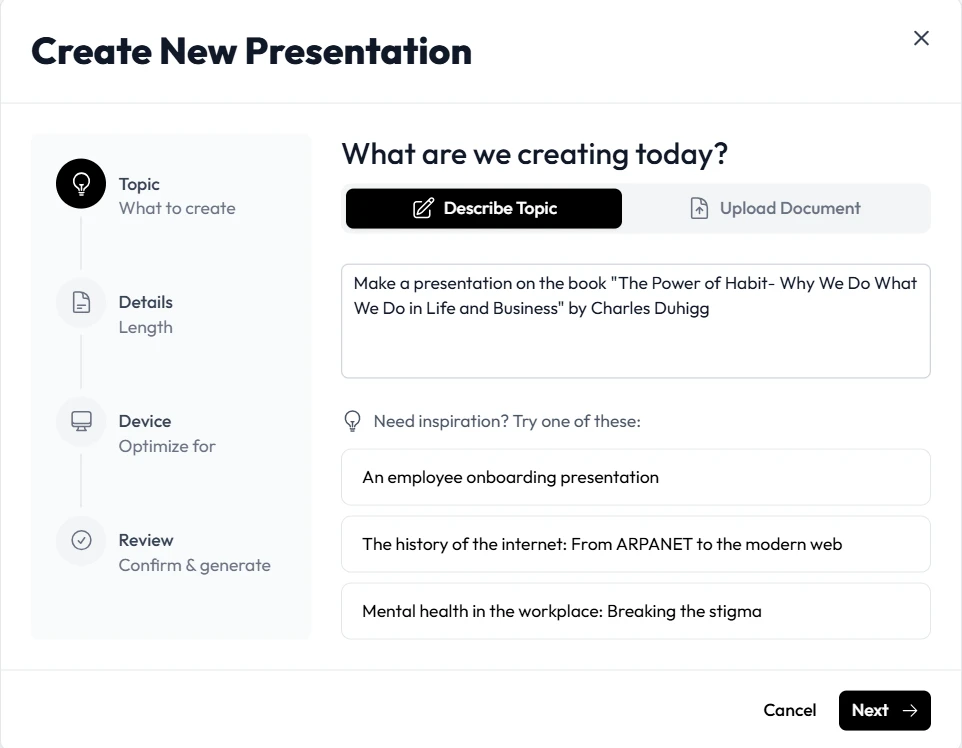
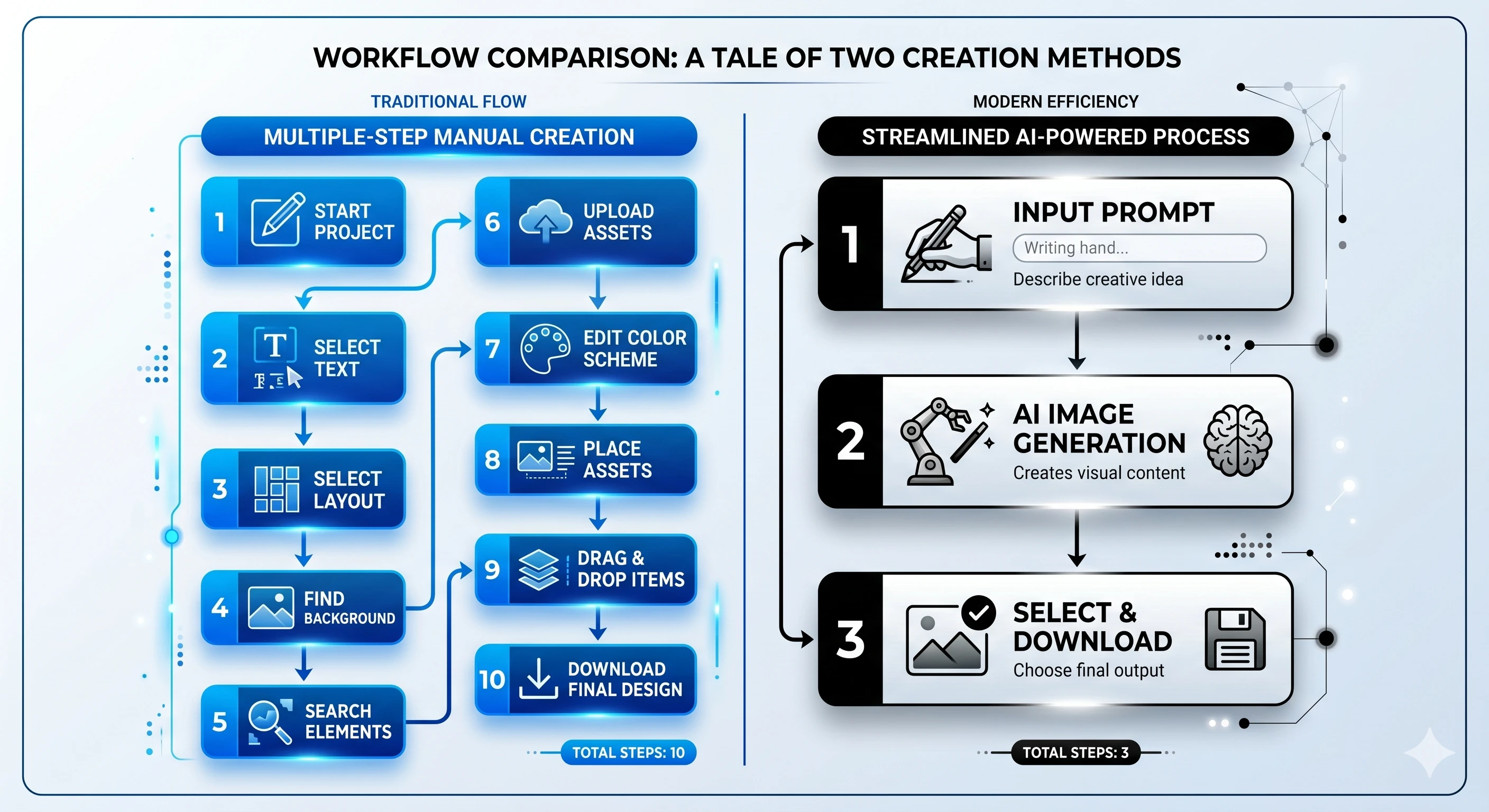
An AI presentation generator is a software solution designed to eliminate the manual labor of building slides. Instead of starting with a blank template and dragging elements into place, you simply provide a prompt or an existing document. The artificial intelligence then interprets your intent, structures the narrative, writes the copy, and designs the visual layout automatically.
Educational AI has become a baseline requirement for modern learning experience designers. The technology has evolved from generating simple bullet points to architecting complex, interactive learning environments. With the right presentation automation tools, creating motion-rich cards and branching scenarios takes seconds rather than weeks.
Unni stands at the forefront of this shift. It’s an intelligent workflow solution that understands instructional design principles, ensuring that every presentation generated is optimized for knowledge retention and active learner participation.
Unni: Transforming Educational AI and Presentation Automation
When you integrate Unni into your daily routine, the phrase “starting from scratch” disappears from your vocabulary. It functions as your dedicated design and content assistant, streamlining training automation for teams of all sizes.
Imagine you need to build an onboarding presentation for a fast-growing restaurant chain. With Unni, you simply type a prompt such as “Onboarding presentation for a new employee at The Burger Inc.” In approximately 42 seconds, the platform processes the request and generates a fully realized, interactive module. The AI presentation generator handles the heavy lifting, providing a comprehensive structure that you can refine.
Unni.ai goes far beyond standard AI slides. It features a next-generation visual canvas that empowers you to build full learning flows. Instructional designers can design branching scenarios that guide learners down different paths based on their choices or quiz results. If a learner fails a knowledge check, Unni can route them to a review slide before they proceed. This level of personalized learning was previously impossible to build without specialized coding skills and weeks of development time.
Furthermore, Unni guarantees that your content looks beautiful on every screen. Whether your corporate trainers are presenting on a massive projector or your students are reviewing lesson planning materials on their mobile phones, the experience remains polished. Every presentation adapts automatically, eliminating the need to build separate mobile and desktop versions.
Overcoming Formatting Frustration with AI Slides
One of the most persistent pain points in course creation is making revisions. In traditional software, changing the layout of one slide often breaks the formatting of the entire deck. Updating statistics or swapping out images becomes a tedious, click-heavy chore.
Unni cures formatting frustration through its plain language AI editing. You don’t need to navigate complex menus or hunt for hidden styling panels. If a slide feels too text-heavy, you simply tell Unni to “rewrite this section to be more concise.” The artificial intelligence understands your natural language commands and applies the changes instantly.
Do you need to add an interactive quiz block to test comprehension? Tell Unni to insert one. Do you need to ensure consistent branding across a massive training module? Unni manages the visual hierarchy automatically. By treating your AI slides as dynamic, intelligent documents, Unni removes the friction between your ideas and the final product.
Stop Starting from Scratch: A Presentation Automation Workflow Checklist
Transitioning to an AI-driven workflow is easier than you might think. For higher education professionals and instructional designers looking to implement training automation, here is a practical checklist to maximize your productivity with Unni.ai.
-
Consolidate Your Source Material: Do not waste time retyping information. Unni.ai allows you to import your existing content directly. Gather your PDFs, legacy PowerPoint files, Google Slides, Word documents, or Markdown text.
-
Generate the Initial Draft: Upload your source material into Unni.ai and let the engine work. Within seconds, It will parse the information and generate a structured sequence of AI slides, complete with appropriate pacing and visual assets.
-
Edit with Natural Language: Review the generated content. Use Unni.ai’s conversational editing feature to refine the tone. Ask the AI to expand on complex topics, simplify technical jargon, or generate relevant custom images for specific sections.
-
Add Interactivity and Branching Scenarios: Transform passive reading into active learning. Use the node-based canvas to insert quiz blocks and knowledge checks. Create branching paths that offer remedial help for incorrect answers or advanced materials for fast learners.
-
Export Without Lock-in: Once your interactive experience is complete, export it to the format that serves your audience best. Unni.ai offers true freedom with zero vendor lock-in. You can export to SCORM for your Learning Management System, generate a polished PDF, download a traditional PowerPoint, or create a direct web link to share instantly.
Why Unni.ai is More Than Just Another Presentation Tool
Many software solutions trap your content inside their proprietary ecosystems. If you decide to leave their service, you lose all your hard work. Unni respects your ownership. Your content is always yours, and Unni makes it effortless to export your creations anywhere. You create the content once, and you distribute it infinitely.
Additionally, Unni is built to scale with your organization. While the platform excels at quick lesson planning for individual teachers, it also offers robust features for large-scale enterprise training. With the upcoming Unni LMS integration, teams will be able to skip the export step entirely. You will be able to connect your workspace directly to a fully managed platform to enroll learners, track progress, and issue certificates automatically.
For professionals who are hesitant about artificial intelligence, Unni offers incredible flexibility. You can use it purely as an advanced visual editor without invoking the generative features. The platform provides over one hundred slide templates and infinite combinations, allowing you to build interactive modules manually if you prefer. However, once you experience the speed of Unni’s automation, you will never want to return to the old way of doing things.
Frequently Asked Questions (FAQ)
What exactly does Unni.ai do for instructional designers?
Unni drastically reduces the time spent on manual formatting and course creation. It takes raw text, prompts, or existing documents and automatically generates structured, interactive presentations.
Do I need advanced design or coding skills to use Unni.ai?
None at all. Unni handles all the visual layout and structural design. If you can type a prompt or upload a PDF, you can build professional-grade learning materials.
How does Unni.ai handle training automation?
Unni allows you to build complex branching scenarios and quizzes on a visual canvas. This means you can create automated, self-guided training modules that adapt to learner choices in real time.
Can I export my content to other platforms?
Yes. Unni features strict no-vendor-lock-in policies. You can export your content to SCORM, PDF, video, PowerPoint, or host it directly via a web link.
Is my corporate training data secure?
Absolutely. Your courses can be set to private. You maintain complete control over how and where your content is shared, ensuring sensitive training materials remain confidential.
Conclusion: Reclaim Your Time with Unni
The days of struggling with clunky presentation software and suffering through endless formatting tweaks are over. Instructional designers, teachers, and trainers deserve tools that amplify their expertise rather than draining their energy. By embracing presentation automation, you can eliminate burnout, beat tight deadlines, and focus entirely on creating transformative learning experiences.
Unni represents the future of workflow efficiency. It empowers you to turn static documents into dynamic, branching courses in a fraction of the time. Stop letting manual formatting dictate your schedule and start delivering the high-quality content your audience deserves.
Take control of your workflow today. With Unni.ai, brilliant presentations are just a prompt away.