How AI Helps Teams Create Content at Scale | Unni.ai
Learn how teams use AI to produce training and educational content at scale. Practical steps for automating slide creation without sacrificing quality.
Every professional needs an efficient way to turn ideas into engaging learning modules. An AI presentation generator is the exact solution for instructional designers, corporate trainers, and course creators who need to scale their daily workflow. By utilizing smart educational AI, you can instantly transform simple text prompts into structured, polished AI slides. The manual process of formatting layouts and building branching scenarios takes hours. Unni.ai changes that reality by handling the heavy lifting of design and content structuring. You can produce fully interactive learning experiences in seconds and focus purely on delivering valuable information to your audience.
Why Professionals Need an AI Presentation Generator to Build Educational AI Slides
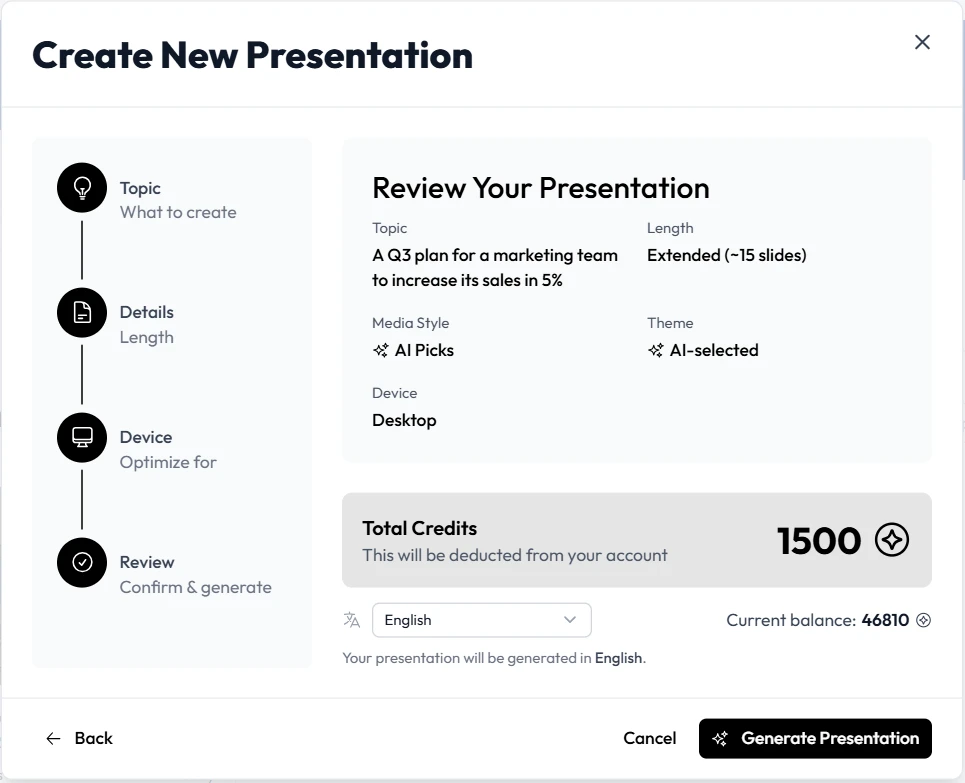
presentation automation is the process of using artificial intelligence to instantly generate, format, and structure visual slide decks. Professionals simply provide a topic, text prompt, or source document. Then it automatically creates structured layouts, writes relevant text, applies design themes, and adds interactive elements without manual formatting.
Corporate trainers and academic professionals face constant pressure to deliver high-quality materials on tight deadlines. Building courses manually drains valuable departmental resources. An AI presentation generator eliminates the repetitive, frustrating tasks of formatting text boxes, searching for relevant stock photos, and aligning elements perfectly on every single page.
When instructional teams adopt Unni, they transition from manual formatting to rapid, scalable content creation. The platform allows instructional designers to focus their energy entirely on content accuracy and learning outcomes rather than pixel-perfect design. By relying on smart algorithms, creators can generate hundreds of varied, visually appealing layouts while maintaining strict brand consistency. This direct approach to content creation helps organizations deploy training modules significantly faster and keep adult learners deeply engaged. Maintaining a large library of assets becomes effortless because Unni intelligently manages and updates content structures based on simple text commands.
How to Build Educational AI Slides with Unni.ai
Transitioning to an automated workflow requires a straightforward process. Unni.ai provides a visual canvas that makes building digital experiences intuitive. Follow these steps to produce professional materials efficiently.
1. Define Your Topic or Import Existing Files
Start your project in Unni by typing a clear, descriptive prompt defining your exact learning objective. Alternatively, you can upload an existing PDF, PowerPoint presentation, or standard text document. Unni automatically reads your source material, analyzes the core concepts, and transforms dense, text-heavy paragraphs into digestible, highly interactive modules. This document conversion feature saves hours of manual copy-pasting.
2. Generate the Core
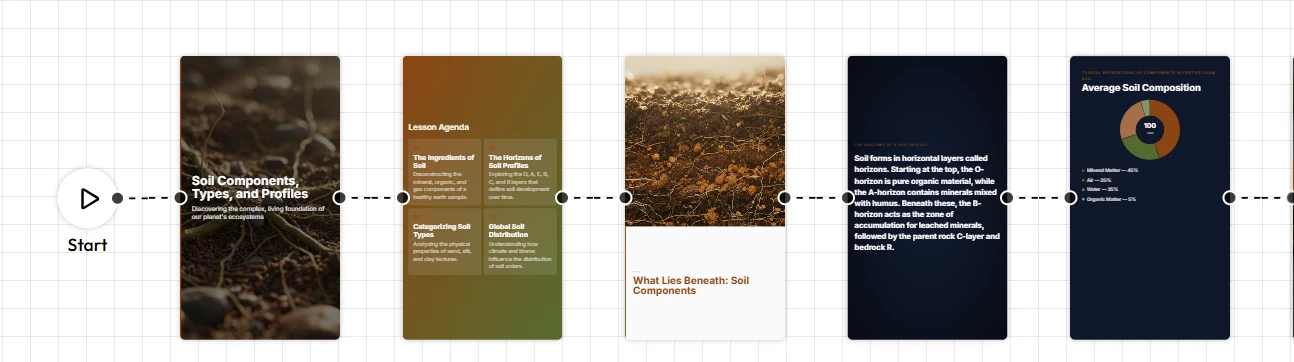
Structure Click the generate button and watch Unni build the foundation. Within seconds, the platform populates a series of well-designed screens containing your core concepts. This initial draft serves as your structural baseline, providing a comprehensive outline that you can easily modify.
3. Map Out Branching Scenarios
Linear learning often fails to keep adults engaged. Unni features a next-generation visual editor that allows you to connect different screens based on learner choices. You can route users down customized paths depending on their quiz answers. This specific capability is perfect for designers who want to create visual novel style training where user decisions impact the narrative outcome.
4. Refine Elements Using Natural Language
Instead of digging through complex menus to change font sizes or colors, simply type what you need. Tell Unni to make the text more concise or add a detailed chart about quarterly earnings. Unni.ai understands plain language commands and updates the layout immediately.
5. Export to Your Preferred Format
Once your project is polished, Unni gives you complete ownership of your files. Export the final product as a SCORM package for your Learning Management System, a standard PDF, a traditional slide deck, or even a high-quality video file. Unni.ai enforces zero vendor lock-in.
Practical Examples of Presentation Automation
Understanding the specific features of Unni.ai is helpful, but seeing how professionals apply training automation to real projects reveals the true value of AI Slides.
Corporate Onboarding Automation
Human resources departments frequently update orientation materials. A corporate trainer can input their updated employee handbook into Unni. It processes the text and instantly outputs a highly interactive compliance course. The trainer then adds quick knowledge checks to ensure new hires understand essential safety protocols. What previously took three weeks to storyboard and design now takes under an hour.
Academic Lesson Planning
Educators handle massive workloads and rarely have time to build visually stunning lectures from scratch. AI for teachers solves this exact problem. An educator teaching history can type a single prompt into Unni asking for a module on the Industrial Revolution. The platform retrieves accurate historical context, generates relevant imagery, and structures a compelling narrative. The teacher reviews the material, adjusts specific facts, and immediately shares the direct link with students.
Sales Enablement and Course Creation
Sales leaders must constantly educate their representatives on new product features. By leveraging Unni, product managers can turn technical specification sheets into engaging battle cards and scenario-based training. Representatives can practice handling customer objections through interactive branching paths, improving their pitch before speaking with real prospects.
Digital Experience Creation for Marketing
Marketing professionals often need to educate prospects on complex software solutions. Unni allows marketing teams to quickly build interactive product tours that function like mini-courses. Prospective clients can click through various features, answer quick assessment questions to gauge their specific needs, and receive personalized product recommendations based on their inputs. This process turns passive reading into a highly active discovery journey.
The Pre-Launch Checklist for Your Digital Experience Creation
Before distributing your final project, you need a reliable quality assurance process. Use this exact checklist to verify your Unni project is fully ready for your audience.
-
Verify learning objectives: Ensure every screen maps directly back to the original goals you set for your specific audience.
-
Test branching logic: Click through every possible choice in your interactive scenarios to confirm all paths lead to the correct learning destination.
-
Review knowledge checks: Confirm that your automated quizzes accurately test the material presented in previous sections.
-
Check natural language edits: Read through any text modified by Unni commands to guarantee the tone matches your organizational voice.
-
Validate export formats: Download a test file in your required format to guarantee seamless compatibility with your preferred distribution method.
-
Test mobile responsiveness: Open the shareable link on a smartphone to verify that layouts adapt perfectly to smaller mobile screens.
Frequently Asked Questions (FAQ)
How does Unni handle complex enterprise topics?
Unni thrives on detailed, technical information. If you upload comprehensive technical manuals or dense research papers, Unni extracts the most important concepts and organizes them logically. You retain full editorial control to verify accuracy while Unni handles the complete visual presentation.
Do I need design experience to use Unni?
No design background is required. Unni is built specifically for subject matter experts, educators, and business leaders who want professional results without learning complex graphic design software. It automatically applies visual best practices to every layout.
Can I integrate Unni with my existing Learning Management System?
Yes. Unni supports multiple export formats designed for enterprise compatibility. You can export your interactive courses as SCORM packages and upload them directly to your preferred Learning Management System for detailed tracking and user analytics.
Is my proprietary company data safe within Unni?
Unni prioritizes user privacy and data security. Your uploaded documents and generated courses remain completely private. You decide exactly how and when to share your materials via private links, embedded code, or direct file exports.
Conclusion
Adopting an AI presentation generator completely transforms how organizations handle content creation. Instead of wasting precious hours on tedious formatting and manual design adjustments, professionals can use educational AI to produce highly interactive, visually compelling AI slides instantly. Unni gives you the ultimate power to automate the heavy lifting of layout design while keeping you in complete control of the narrative and technical accuracy. By implementing Unni into your daily workflow, you dramatically accelerate lesson planning, improve audience engagement, and scale your training initiatives without compromising on overall quality.