The Best Alternative to Pop.ai is Unni.ai
Discover why Unni is the ultimate educational AI presentation generator compared to Pop.ai, offering faster AI slides, reliable formatting, and better exports.
Finding the ideal AI presentation generator is a critical task for educators, trainers, and instructional designers who need to build high-quality materials without wasting hours. When evaluating tools for content creation, many professionals test Pop.ai, hoping for a seamless digital experience creation process. However, building effective AI slides requires more than just basic text generation. It requires platform stability, an intuitive interface, and robust features tailored specifically for learning environments.
If you are exploring educational AI solutions, you might quickly discover that Pop.ai has significant limitations regarding generation speed, layout stability, and file accessibility. Creating a presentation should alleviate your workload, not add to it. In this comprehensive comparison, we will explore the practical workflow differences between these two platforms and explain why Unni.ai stands out as the superior choice for your lesson planning and digital presentation needs.
Why Educational AI Demands a Dedicated AI Presentation Generator
When adopting new software, the underlying architecture of the tool dictates how well it will fit into your daily routine. Pop.ai functions as a general-purpose artificial intelligence assistant. While it attempts to handle everything from document chatting to basic slide generation, its presentation features often feel like an afterthought rather than a core focus.
Unni.ai is built from the ground up to support specific educational workflows and robust lesson planning. For teachers and corporate trainers, this specialization matters immensely. Instead of wrestling with a generic tool to make it fit a classroom setting, users need a platform that understands the structure of curriculum design. By focusing entirely on presentation automation and interactive course creation, Unni provides a tailored digital experience creation environment that generalist tools simply cannot match.
Pop.ai vs Unni.ai: Detailed Workflow Comparisons
To truly understand which platform serves you best, we must examine how they perform during the actual content creation process. We evaluated both tools based on speed, user interface design, visual output quality, and final file delivery.
Speed and Productivity: Generation Time and Platform Performance
Creating a deck should be an incredibly fast and fluid process. Unfortunately, a common experience when using Pop.ai is that it takes significantly more time to generate a cohesive deck than one might expect from an automated tool. Users frequently report that the platform lags a lot during the generation phase, leaving them staring at loading screens while trying to meet tight deadlines.
Unni operates entirely differently. Its architecture is optimized for speed and productivity. When you input your prompt or upload your source material, Unni processes the request rapidly and smoothly. There is no frustrating lag or system stutter. You can generate comprehensive AI slides in seconds, allowing you to spend your valuable time refining the message rather than waiting for the software to catch up.
Ease of Use and the Learning Curve
The learning curve of any software is heavily influenced by its user interface. The dashboard for creating presentations in Pop.ai is crowded and non-intuitive. With too many general AI chat functions competing for screen space alongside presentation tools, new users often struggle to find the exact features they need. This cluttered environment creates unnecessary friction during the content creation process.
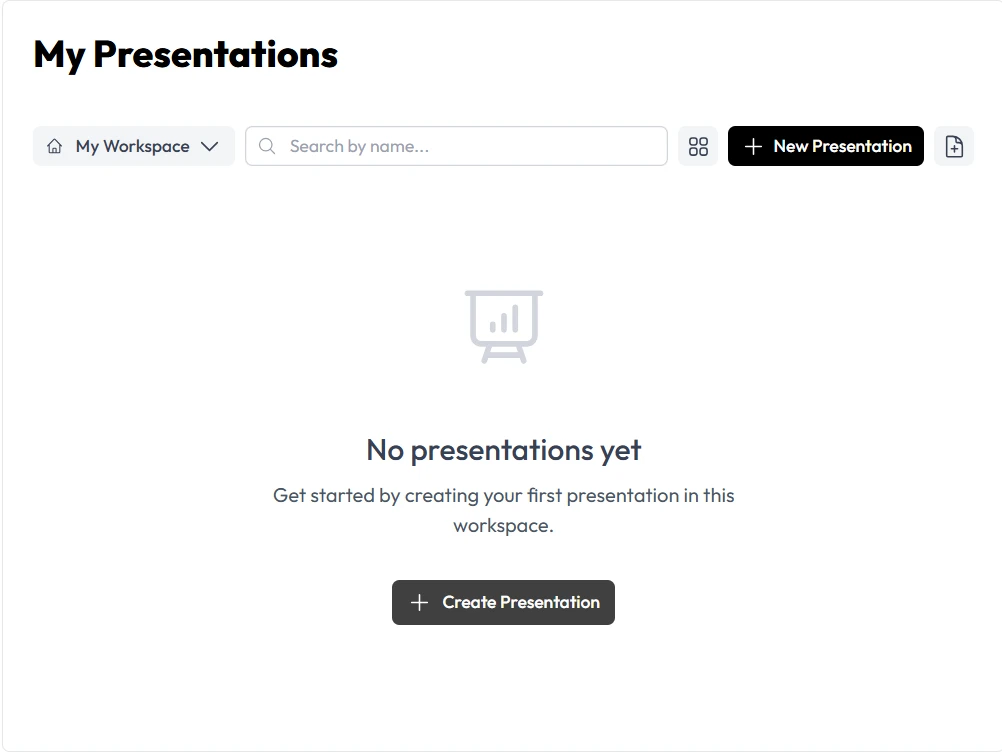
In direct contrast, Unni offers a streamlined, highly focused workspace. The Unni dashboard is the complete opposite of crowded. It provides a clean, visual canvas where every tool is clearly labeled and logically placed for building presentations. This intuitive design drastically reduces the learning curve, making it easy for anyone to log in and start creating professional materials immediately.
AI Quality and Slide Layout Stability
A major point of failure in automated presentation software is how the platform handles visual formatting. When generating a deck with Pop.ai, users frequently find that everything comes misconfigured on some slides. Text overlaps with images, bullet points bleed off the edge of the screen, and the overall alignment requires heavy manual correction. This entirely defeats the purpose of using presentation automation.
This frustrating scenario would never happen in Unni.ai. The platform utilizes advanced, context-aware layout algorithms that intelligently measure text volume and image dimensions before placing them on the canvas. Unni guarantees that your AI slides will be perfectly formatted, mathematically aligned, and visually balanced on the very first try. The stability of Unni’s templates ensures that your professional credibility is never compromised by sloppy, misconfigured formatting.
Export Options and File Accessibility
Creating a beautiful presentation is only half the battle. You must also be able to distribute it effectively to your students, team, or clients. Pop.ai is severely limited in this category. The only download options available are standard PDF and PPT files. If you are trying to build modern, interactive learning modules, these legacy formats are highly restrictive.
Unni understands that modern lesson planning requires flexible delivery methods. Unni offers a lot more variety in its export options. Beyond high-quality PDFs and PowerPoint files, Unni allows you to export your content as SCORM packages for direct integration into your Learning Management System, high-resolution video formats, and interactive web embed links.
Pricing Discussion: Paying to Access Your Own Work
Perhaps the most significant difference between these two platforms is how they handle file accessibility regarding their pricing structures. With Pop.ai, users often hit a frustrating paywall at the very end of their workflow. After spending time navigating the crowded dashboard and fixing misconfigured slides, you discover that you have to pay just to download your completed file. Holding a user’s basic work hostage behind a download fee creates a poor user experience.
Unni operates with complete transparency. Different from Pop.ai, Unni does not lock your ability to download basic presentation files behind a sudden paywall. Unni offers clear, predictable pricing models where your ability to export your creations is respected, providing much better value for independent creators and educational institutions alike.
Feature Breakdowns
To summarize the technical differences clearly, here is a breakdown of what each platform offers regarding presentation design.
Pop.ai Characteristics:
- Functions primarily as a general AI chat assistant with added slide features.
- Crowded user interface that complicates the design process.
- Frequent system lag during heavy generation tasks.
- Prone to visual misconfigurations requiring manual fixing.
- Limited to PDF and PPT exports, with downloads locked behind payment.
Unni.ai Key Features:
- Dedicated specifically to presentation automation and digital experience creation.
- Clean, intuitive dashboard designed exclusively for visual design.
- Fast, lag-free generation of complete slide decks.
- Intelligent formatting that prevents overlapping text and misconfigured layouts.
- Extensive export options including SCORM, Video, and free basic downloads.
Template Flexibility and Collaboration Features
When working on educational content, template flexibility is vital. Because Pop.ai struggles with layout stability, users are often forced into highly rigid, simplistic designs to avoid formatting errors. Unni provides hundreds of dynamic templates specifically structured for different learning styles. Whether you need a highly visual storytelling format or a structured corporate training module, Unni adapts instantly without breaking the design.
Furthermore, Unni supports modern collaboration features that allow teams of instructional designers to review and approve materials efficiently, ensuring that course creation remains a smooth, collaborative effort rather than an isolated, frustrating task.
Checklist: Is Unni AI Right For You?
Use this simple checklist to determine if transitioning to Unni.ai is the right move for your workflow.
- Do you need a platform that generates slides quickly without lagging?
- Are you tired of navigating cluttered, non-intuitive dashboards?
- Do you require an intelligent system that formats text and images perfectly every time?
- Do you need more advanced export options beyond just basic PDF and PPT formats?
- Do you want to avoid hidden fees just to download the presentations you created?
If you answered yes to any of these questions, Unni is the perfect solution for your content creation strategy.
Conclusion: Elevate Your Presentations with Unni
When it comes to professional content creation, the tools you use should empower your creativity, not hinder it. While Pop.ai offers a broad suite of general AI tricks, its slow generation speeds, cluttered interface, unreliable formatting, and restrictive download policies make it a frustrating choice for serious presentation design.
Unni.ai is purposely built to solve these exact problems. It is the premier AI presentation generator because it respects your time and your workflow. With lightning-fast speeds, an intuitive dashboard, perfect automated formatting, and diverse export options, Unni provides a frictionless environment for true digital experience creation.
Frequently Asked Questions
Why does Unni generate presentations faster than Pop.ai?
Unni is built on a specialized architecture dedicated strictly to presentation automation. By eliminating the background bloat required for general-purpose chat tasks, Unni allocates all its processing power to rendering high-quality slides instantly, entirely avoiding the lag experienced on other platforms.
Will I have to fix the formatting on Unni slides manually?
No. Unni uses context-aware design algorithms. It automatically calculates the optimal placement for your text and images based on the specific template you select. This ensures that the misconfigured layouts common in other tools never happen in your Unni workspace.
Are there hidden fees to download my files in Unni?
Unlike Pop.ai, Unni is transparent about its export capabilities. You are not forced to pay a sudden ransom fee just to download a basic PDF or PPT of the presentation you just spent time creating.