Host a Fun Power Point Night using AI
Learn how to host a fun PowerPoint night using AI. Let Unni.ai generate the slides, all you need is a prompt and a group of friends.
PowerPoint nights have evolved from a niche internet trend into a staple social activity for young professionals, teachers, and corporate teams. The concept is simple: friends or colleagues gather to present short, humorous, or informative slide decks on unconventional topics. However, the manual work of designing slides often discourages people from participating.
This is where Unni.ai changes the game. By using an AI presentation generator, you can create high-quality AI slides in seconds. Through the power of presentation automation, Unni.ai removes the technical barriers to creativity. Whether you are applying educational AI techniques to a fun hobby or using Unni for a team-building event, the process is now faster and more engaging than ever.

Why Use Unni.ai for Your Social Presentations
The traditional method of building a deck involves choosing templates, alignment, and manual image searching. For a social event, this feels like homework. Unni turns this chore into a quick, creative exercise. When you use Unni.ai, you are tapping into advanced presentation automation that understands context and humor.
Young professionals often use these nights to unwind, but they still want their work to look polished. Unni.ai ensures that even the most ridiculous topics, such as “Which of my friends is most likely to survive a zombie apocalypse,” look professional. The AI presentation generator handles the layout, allowing you to focus on the jokes and the delivery.
For those in leadership or education, these nights serve as excellent training automation practice. Teachers can use Unni.ai to showcase how AI for teachers can be used outside the classroom. By using Unni, you demonstrate that technology is a tool for connection, not just productivity.
Step 1: Brainstorming Your Theme with Unni.ai
The first step to a successful night is a great topic. If you are stuck, Unni.ai can help you brainstorm. Since Unni understands a wide range of subjects, you can ask it for suggestions. Here are some categories that work well with an AI presentation generator:
-
Friend Group Lore: “A deep dive into why Sarah always loses her keys” or “Ranking my friends’ coffee orders by chaos level.”
-
Niche Obsessions: “Why 1990s desktop wallpapers were the peak of human art.”
-
Professional Satire: “If our corporate department was a cast of 80s sitcom characters.”
-
Educational AI experiments: “Explaining quantum physics using only memes from 2012.”
Once you have your topic, head to Unni.ai to start the generation process.
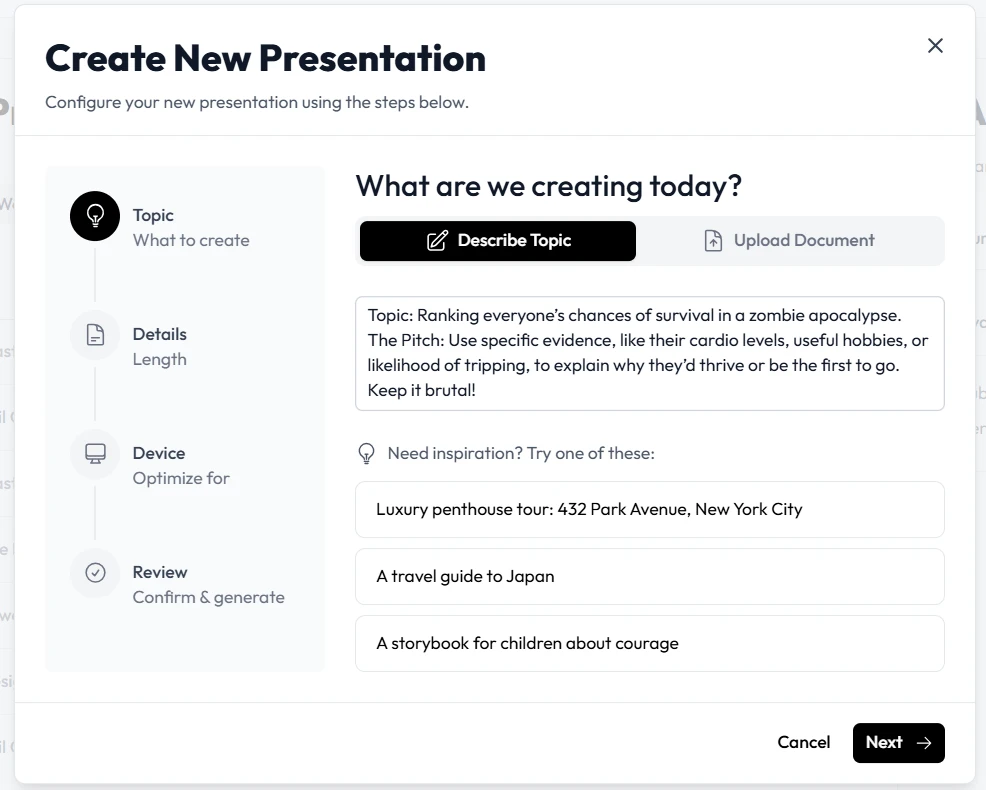
Step 2: Generating Your AI Slides
Once your topic is chosen, the real magic happens within Unni.ai. To get the best results, provide Unni with a descriptive prompt. Instead of just saying “Zombies,” tell Unni.ai: “Create a 6-slide deck about why my cat would be the best leader in a zombie outbreak.”
Unni.ai will then use its engine to produce AI slides that include relevant text and imagery. This presentation automation is what saves you time. While others are struggling with bullet points, you are already reviewing a finished draft in Unni.ai.
For instructional designers or those interested in educational AI, pay attention to how Unni.ai structures information. Even for a fun night, the logical flow Unni provides makes your points land much harder with the audience.
Step 3: Customizing the Content in Unni.ai
After the initial generation, you will want to add personal touches. Unni.ai makes customization easy. You can swap out generic images for photos of your friends or specific inside jokes. Unni allows you to edit text blocks instantly.
If a slide feels too serious, you can ask Unni.ai to rewrite the content in a more humorous tone. This is where training automation features become a playground. You are learning how to manipulate AI to match a specific brand or voice (in this case, your personal humor) while using Unni.ai.
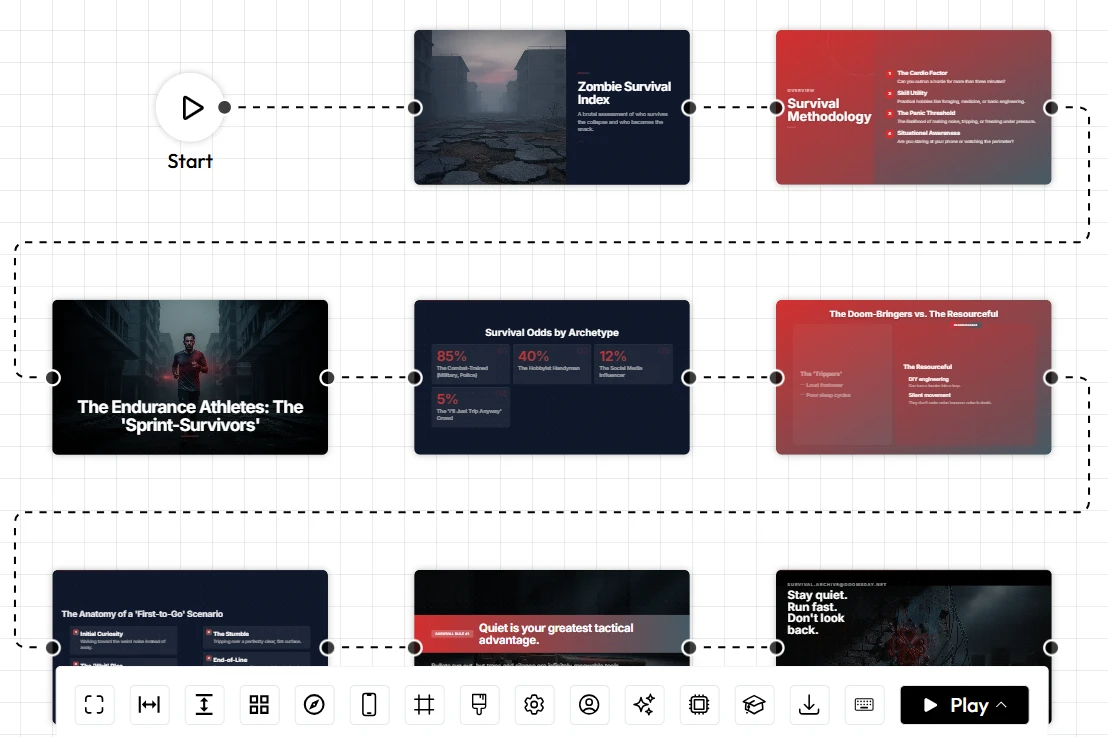
Step 4: Setting the Scene for the Night
A PowerPoint night is about more than just the slides; it is about the experience. To make the most of your Unni.ai creations, consider the technical setup:
-
Hardware: Use a projector or a large TV screen connected to your laptop.
-
Access: Keep Unni.ai open in a browser tab for quick transitions between presenters.
-
Engagement: Use a remote clicker so you can move around the room while presenting your AI slides.
If you are hosting this for a school or university setting, emphasize how AI for teachers can make even administrative meetings or social hours more dynamic. Using Unni.ai shows your peers that you are at the forefront of modern lesson planning and presentation technology.
Practical Examples of Unni.ai in Action
To give you a better idea of how Unni.ai performs, let’s look at three specific scenarios:
The Young Professional Social
A group of 25-year-old marketing associates uses Unni.ai to create “The Annual Awards for Most Likely to Reply to an Email with a GIF.” They use the AI presentation generator to create professional-looking certificates and mock data charts that make the jokes feel more “official.”
The Teacher’s Lounge Bonding
A group of high school educators uses Unni.ai to vent about student excuses. They use educational AI structures to build “A Scientific Analysis of Why ‘My Dog Ate It’ is Still a Classic.” This uses AI for teachers to build community and reduce stress through shared humor.
The Corporate Training Break
A corporate trainer uses training automation tools in Unni.ai to create a “getting to know you” deck for a new remote team. Instead of a boring introduction, Unni.ai generates a trivia game based on team hobbies.
Checklist for a Flawless PowerPoint Night
Before you start the show, run through this list to ensure your Unni.ai decks are ready for the spotlight:
-
Prompt Precision: Did you give Unni.ai enough detail to make the slides unique?
-
Visual Check: Are the images in your AI slides clear and visible from the back of the room?
-
Humor Level: Did you use Unni.ai to refine the tone to match your friend group?
-
Technical Run: Have you tested the Unni.ai export or the live view on your presentation screen?
-
Time Limit: Ensure each person’s Unni presentation is between 3 to 5 minutes to keep the energy high.
FAQ Section
How long does it take to make a deck in Unni.ai?
Most users can generate a complete set of AI slides in under two minutes. Customization might take an extra few minutes depending on how many personal photos you want to add.
Can I use Unni.ai on my phone during the event?
Unni.ai is accessible via web browsers on various devices. However, for the best editing experience and for presenting, a laptop or tablet is recommended.
Is Unni.ai only for funny presentations?
Not at all. While it is perfect for a PowerPoint night, Unni.ai is a robust AI presentation generator used by professionals for training automation, lesson planning, and business pitches.
Do I need design skills to use Unni.ai?
No. The core value of Unni.ai is that it handles the design for you. You only need an idea and a prompt.
Can multiple people use Unni.ai for the same night?
Yes. We recommend everyone creates their own account on Unni.ai so they can save their progress and manage their individual AI slides.
Conclusion: Elevate Your Social Events with Unni.ai
Hosting a PowerPoint night should be about the laughs and the stories, not the stress of formatting text boxes. By choosing Unni.ai, you are leveraging a world-class AI presentation generator to handle the heavy lifting. The AI slides produced by Unni are not just fast; they are visually impressive and logically sound.
Whether you are interested in the professional applications of educational AI or simply want to use presentation automation to win your friend group’s “Best Presenter” award, Unni.ai is the answer. The platform bridges the gap between high-level technology and everyday fun.
Stop wasting time on manual design and start focusing on your performance. Use Unni.ai to bring your wildest ideas to life. From lesson planning to social comedy, Unni.ai is the only tool you need to impress any audience.