How to Create Classroom Presentations Faster with AI
Discover how to create classroom presentations in minutes with AI. A practical guide for teachers on using AI presentation generators for lesson planning.
The average educator spends between 2 to 4 hours crafting a single slide deck from scratch. Between researching curriculum standards, sourcing high-quality images, and wrestling with text alignment, the creative process often feels like a formatting marathon. However, the rise of educational AI is fundamentally shifting this workflow.
By using an AI presentation generator like Unni.ai, professionals and teachers can reclaim their time while actually improving the quality of their instructional materials. This guide will show you exactly how to implement presentation automation to transform your notes, PDFs, or simple ideas into classroom-ready slides in minutes.
Why Educational AI is Changing the Game for Teachers
In the modern classroom, engagement is currency. Static, text-heavy slides are no longer enough to hold the attention of students who are accustomed to dynamic, visual content. Unni.ai serves as more than just a template; it acts as an instructional partner that understands how to structure a lesson for maximum retention.
The primary benefit of using Unni.ai is the reduction of “the blank page problem.” Instead of starting with a white screen, you start with a structured draft that follows a logical instructional flow. This transition toward presentation automation allows teachers to focus on delivery and student interaction rather than pixel-pushing.
Step-by-Step Guide to Creating Presentations with Unni.ai
1. Define Your Learning Objectives
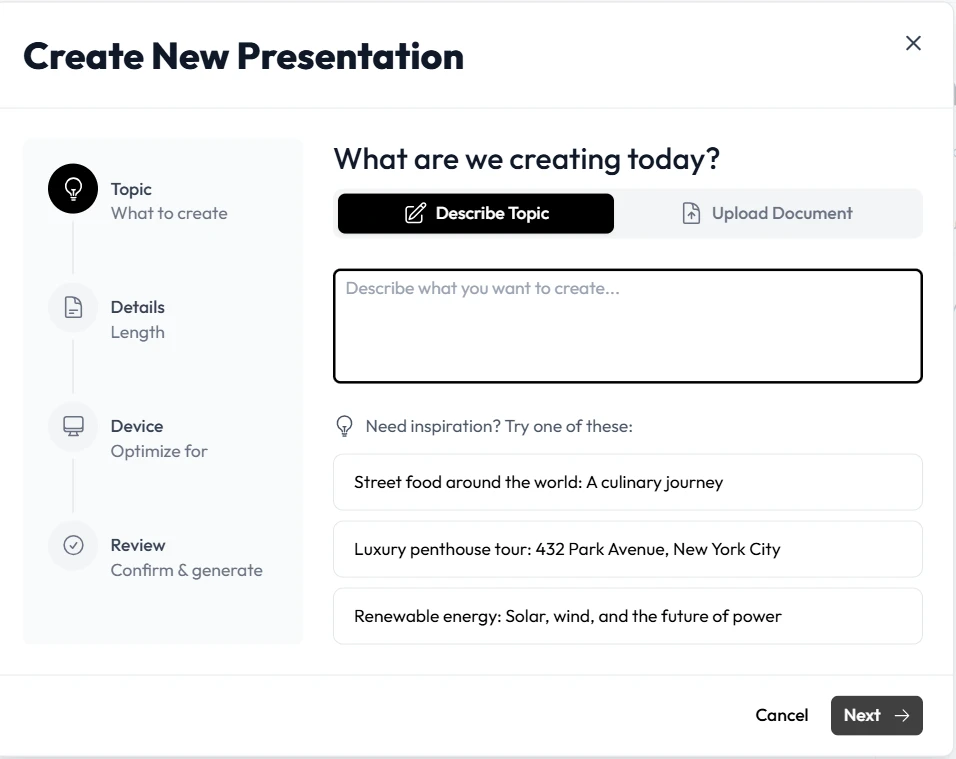
Before opening Unni.ai, have a clear goal in mind. Are you introducing a new concept, reviewing for an exam, or facilitating a workshop? The platform’s AI works best when you provide it with specific context. If you have existing lesson notes or a syllabus, keep them ready.
2. Input Your Content Source
One of the standout features of Unni.ai is its versatility in input. You can:
-
Paste raw text from a lecture.
-
Upload a PDF or research paper.
-
Simply type a descriptive prompt like “The causes of the Industrial Revolution for 10th-grade history.”
3. Let the AI Presentation Generator Build the Structure
Once you provide the input, Unni.ai analyzes the hierarchy of information. It uses presentation automation to separate main headers from supporting bullet points. This ensures your slides aren’t cluttered and that each “screen” focuses on a single core idea.
4. Customize Visuals and Layouts
The platform automatically suggests layouts based on your content. If you are presenting data, it might suggest a chart layout. If you are telling a story, it might prioritize large-scale imagery. You can toggle between different styles within Unni.ai to find the aesthetic that best matches your school’s branding or your personal teaching style.
5. Export and Deliver
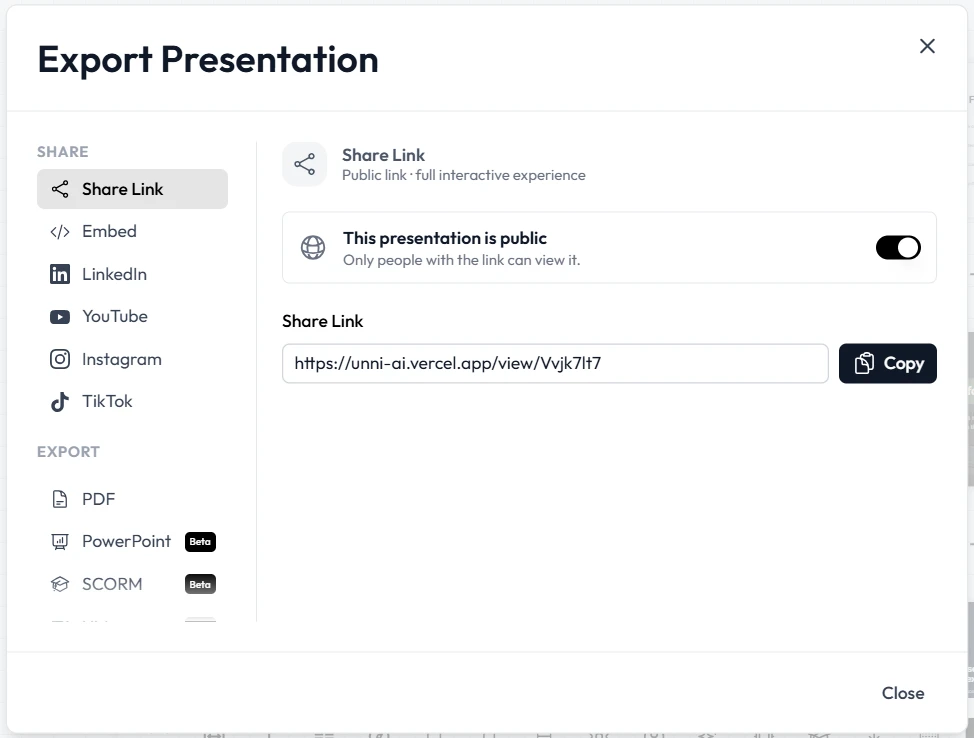
Once the draft is ready, the patform allows you to export your work to popular formats like PPTX or PDF. This makes it easy to present in a lecture hall or share a digital copy with your students for later review.
Practical Examples of AI in the Classroom
For Corporate Trainers
Imagine you need to train a remote team on new software. Instead of manually taking screenshots and writing descriptions, you can upload the software manual to Unni.ai. The AI presentation generator will extract the “How-to” steps and create a training deck automatically.
For University Professors
High-level academic research can be dense. Professors can use Unni.ai to summarize complex papers into digestible slides for undergraduate lectures. This form of educational AI helps bridge the gap between complex research and student comprehension.
For K-12 Teachers
Lesson planning is often the most time-consuming part of the week. By using Unni.ai, a teacher can take a weekend’s worth of curriculum notes and turn them into five days of interactive slides in less than thirty minutes.
Checklist: Optimizing Your AI-Generated Slides
To ensure your presentation is as effective as possible, run through this quick checklist after Unni.ai creates your draft:
-
Accuracy Check: Did the AI interpret the facts correctly? (Always verify specific dates and names).
-
Cognitive Load: Are there more than 6 bullet points on a slide? (If so, use Unni.ai to split them).
-
Visual Hierarchy: Does the most important information stand out?
-
Engagement: Have you added a “check for understanding” slide or a discussion prompt?
-
Accessibility: Is the font size readable from the back of the room?
Frequently Asked Questions (FAQ)
Is Unni.ai better than manual PowerPoint?
While manual tools offer total control, Unni.ai is significantly faster for the drafting phase. Most users find that Unni.ai handles 80% of the work, leaving only the final personal touches for the human creator.
Can I upload my own images to Unni.ai?
Yes. While the AI presentation generator can source relevant images for you, you can always upload specific diagrams, school logos, or personal photos to Unni.ai to customize your deck.
Does educational AI replace the teacher?
Absolutely not. Tools like Unni.ai are designed to be “co-pilots.” They handle the administrative and design “grunt work” so that educators can spend more time on mentorship and teaching.
How does presentation automation handle complex data?
Unni.ai is designed to recognize data patterns. If you input a table or a list of statistics, the platform can suggest the best way to visualize that information, such as through a graph or an infographic-style layout.
Conclusion: The Future of Lesson Planning
Embracing presentation automation isn’t about cutting corners; it’s about working smarter in an increasingly demanding educational landscape. By leveraging an AI presentation generator like Unni.ai, you ensure that your materials are consistently high-quality, visually engaging, and aligned with your instructional goals.
Educational AI is no longer a futuristic concept; it’s a practical, everyday tool that empowers teachers to focus on what they do best: inspiring the next generation.
If you’re ready to cut your prep time in half and deliver more impactful lessons, start your next project on Unni.ai today.