How to Turn Educational Ideas into High-Engagement Visual Content with AI
Learn how to transform educational ideas into high-engagement visual content with AI. Covers slide structure, visual hierarchy, and how to use Unni.ai.
Capturing attention in a digital-first world is the primary challenge for educators and trainers today. Research consistently shows that learners retain nearly 65% of information when it is presented visually, compared to just 10% for text-based delivery. However, the manual labor required to design professional slides often leads to educator burnout. This is where an AI presentation generator becomes an essential partner in the creative process.
By leveraging presentation automation, instructional designers and teachers can shift their focus from formatting boxes and arrows to refining the core pedagogy. Educational AI is no longer a futuristic concept; it is a practical necessity for anyone looking to scale their impact without doubling their workload. Unni.ai provides the bridge between a raw lesson plan and a polished, interactive visual experience, to create the perfect AI slide deck.
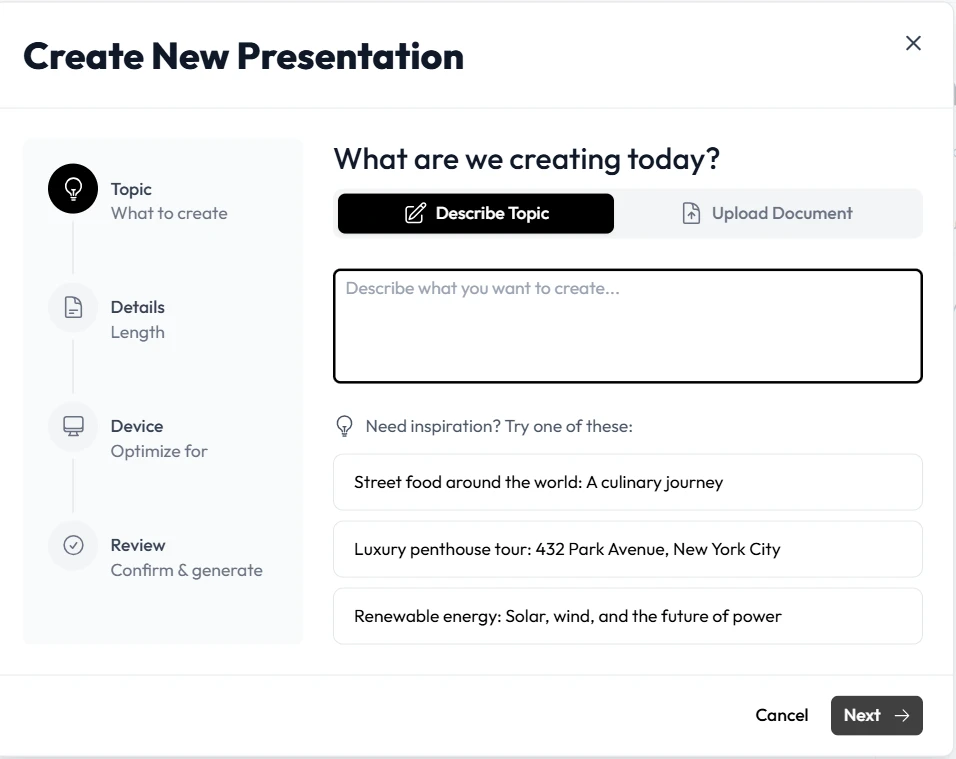
Step 1: Transforming Raw Concepts into Structured Outlines
The biggest hurdle in content creation is the “blank page” syndrome. Whether you are dealing with a complex scientific theory or a corporate compliance update, the first step is organization. Unni.ai simplifies this by taking your initial prompts or documents and suggesting a logical flow.
-
Input your core idea: Start by providing Unni.ai with your topic or a rough draft of your speaker notes.
-
Select your audience: Specify if you are teaching primary school students or C-suite executives so Unni.ai can adjust the complexity.
-
Refine the structure: Use Unni.ai to generate a slide-by-slide breakdown that ensures every key learning objective is covered.
This level of presentation automation ensures that no critical information is lost in transition while keeping the narrative cohesive and engaging.
Step 2: Enhancing Engagement with Educational AI Visuals
Once your structure is set, the visual layer begins. Traditional slide design is often static, but educational AI allows for dynamic content generation that adapts to the subject matter. Unni.ai analyzes the text on each slide to suggest the most impactful imagery, icons, and layouts.
-
For Teachers: Use Unni.ai to create custom diagrams for biology or historical timelines that would take hours to draw manually.
-
For Corporate Trainers: Leverage Unni.ai to build clean, data-driven charts that make quarterly results or training metrics easy to digest.
-
For Instructional Designers: Ensure brand consistency across 100+ slides in seconds by using the global styling features in Unni.ai.
Step 3: Streamlining Lesson Planning and Delivery
The true power of an AI presentation generator lies in its ability to integrate into your existing workflow. Lesson planning shouldn’t be a separate task from slide creation. Unni.ai allows you to merge these steps into one fluid motion.
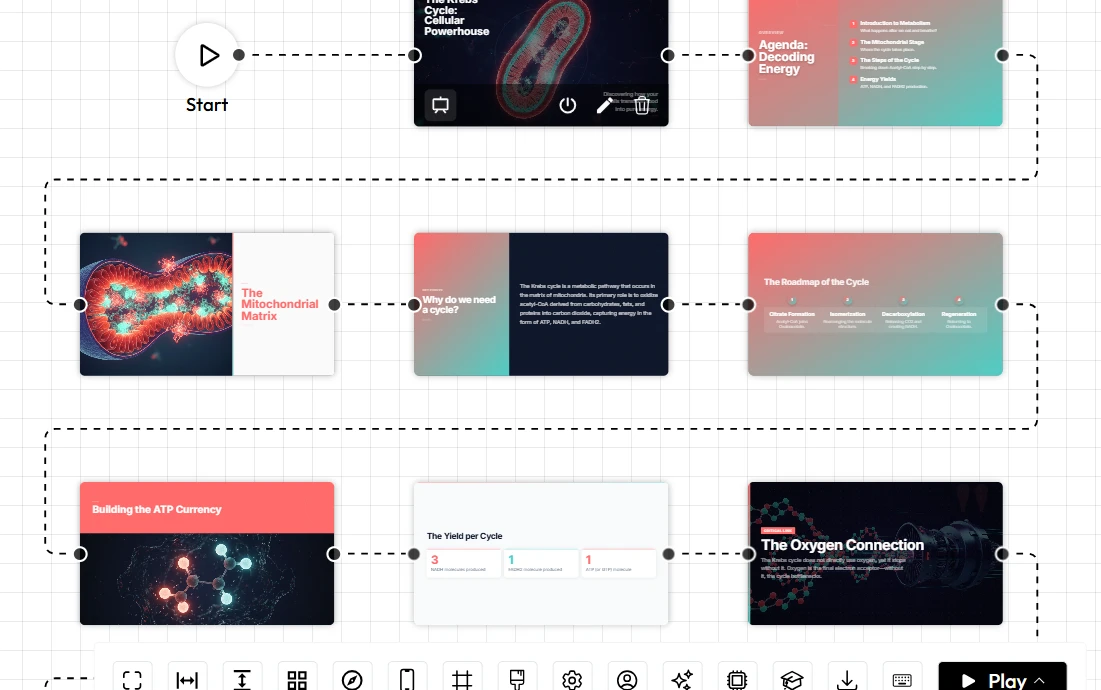
Time-Saving Implementation Tips:
-
Repurpose existing content: Upload a PDF or a Word document to Unni.ai and watch it transform into a multi-slide deck instantly.
-
Interactive Elements: Use Unni.ai to suggest quiz placements or discussion prompts based on the content of the preceding slides.
-
Quick Iterations: If a lesson needs to be adjusted for a different skill level, ask Unni.ai to “simplify the tone” or “add more technical detail” across the entire deck.
Checklist: Is Your AI-Generated Content Ready?
Before you hit “Present,” use this checklist to ensure your Unni.ai deck is optimized for maximum impact:
-
Clarity: Is there a clear 1:1 ratio between one main idea and one slide?
-
Visual Hierarchy: Does the most important information stand out immediately?
-
Accessibility: Are the font sizes and color contrasts suitable for all learners?
-
Interactivity: Have you included at least one engagement prompt or question?
-
Consistency: Did Unni.ai apply a uniform theme throughout the presentation?
FAQ: Maximizing Your Results with Unni.ai
How does an AI presentation generator help with student retention?
By breaking down complex topics into “bite-sized” visual chunks, Unni.ai prevents cognitive overload, allowing students to process and store information more effectively.
Can I use Unni.ai for training automation in a corporate setting?
Yes. Unni.ai is designed to handle professional branding and technical content, making it ideal for scaling internal training programs through training automation.
Does Unni.ai replace the need for an instructional designer?
Not at all. Unni.ai acts as a powerful co-pilot. It handles the repetitive formatting and initial drafting, allowing the designer to focus on high-level strategy and creative nuance.
Is the content generated by Unni.ai editable?
Absolutely. You have full control over every element. Unni.ai provides the foundation, but you provide the final human touch.
Conclusion: The Future of High-Engagement Content
Transforming abstract educational ideas into high-engagement visual content is now a standard. By embracing an AI presentation generator like Unni.ai, you are not just saving time; you are elevating the quality of the learning experience for your audience.
Through the power of presentation automation and educational AI, the distance between a great idea and a great presentation has never been shorter. Whether you are focused on lesson planning for a classroom or training automation for a global workforce, Unni.ai provides the tools to make your message stick.