AI Presentation Software for University Professors: Enhancing Efficiency with Unni.ai
University professors are revolutionizing lecture delivery with Unni.ai. Discover why this AI presentation generator for higher education saves time on AI slides and educational AI.
University professors face a mounting challenge: balancing rigorous academic research with the constant demand for high-quality lecture materials. When you are tasked with managing multiple courses, creating compelling visual aids can feel like a secondary job that eats into your research and grading time. Many educators are turning to an AI presentation generator to reclaim their schedule. By automating the production of AI slides, Unni.ai allows professors to focus on high-level content rather than manual formatting. As educational AI becomes a staple in the modern lecture hall, finding tools that bridge the gap between academic depth and visual clarity is no longer optional.
The reality of academic life involves tight deadlines and a high volume of content. You likely spend hours wrestling with slide decks, trying to make dense research data digestible for undergraduate students. This formatting frustration is a common problem that leads to burnout. Unni serves as a comprehensive workflow solution, transforming your raw research notes into polished, interactive lectures. It is time to move past the limitations of traditional software and embrace an automated approach to course creation.
The Academic Struggle: Manual Formatting and Repetitive Lesson Planning
For most faculty members, the process of preparing a semester’s worth of material is inherently repetitive. You find yourself updating the same foundational modules year after year, struggling to integrate new citations, updated statistics, or evolving industry standards. If you are using traditional presentation tools, you are likely repeating the same manual layout tasks every single time you teach a core concept. This is where training material overload begins to take a toll on your productivity.
Beyond the time cost, there is the issue of student engagement. University students today are accustomed to interactive, high-quality digital experiences. When a professor presents a lecture that is merely a wall of text on a slide, student attention naturally wanes. Creating interactive knowledge checks or branching scenarios is often too labor-intensive in traditional software, so these features get left behind.
Furthermore, many professors lack the time or resources to develop advanced design skills. You want your lectures to look professional and cohesive, but you do not want to spend hours choosing color palettes and aligning margins. Manual design work is a distraction from your core mission: teaching and research.
How Unni Simplifies Lecture Development
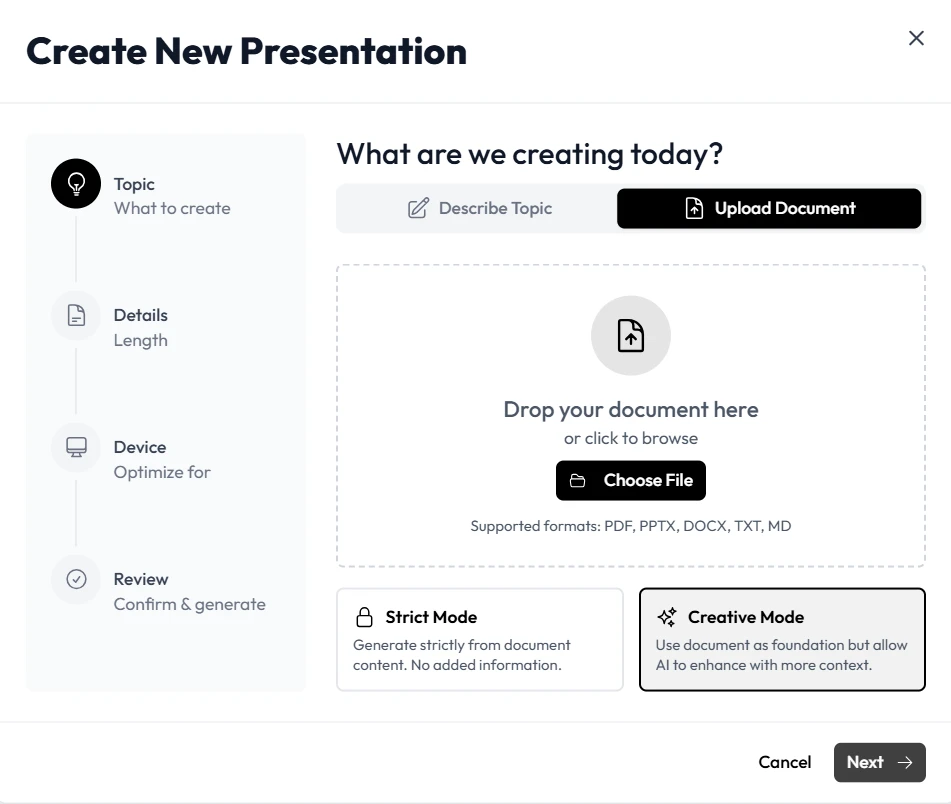
Unni.ai is designed specifically to eliminate the friction that academics face when preparing for a new term. By utilizing presentation automation, you can shift your focus away from the slide editor and back toward your pedagogical strategy. When you have a draft of your lecture, you can input your source text, PDF articles, or research papers directly into Unni. The system processes this information to generate a structured, professional presentation automatically.
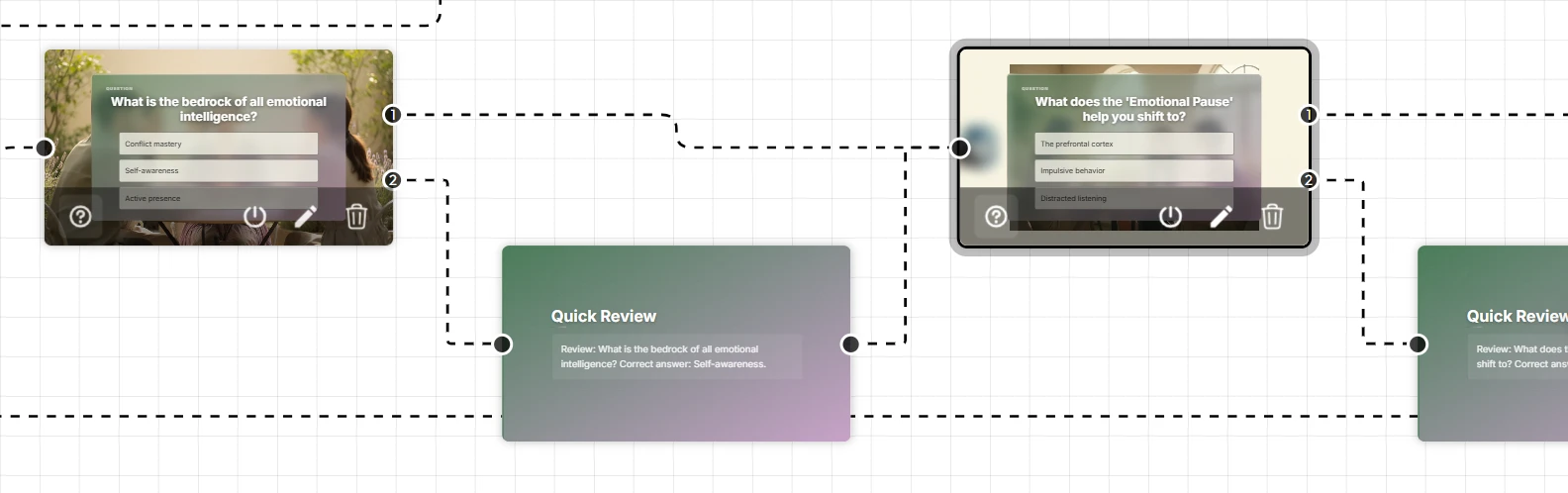
The power of Unni lies in its flexibility. Unlike rigid templates that lock you into a specific look, the platform offers a node-based editor that lets you control the flow of your lecture. You can easily drag and drop sections, insert interactive assessments, and adjust the content structure without affecting the overall design integrity.
One of the most valuable aspects of using Unni for higher education is the natural language editing feature. If you decide that a specific part of your lecture needs a different tone or more emphasis, you can simply type a command like “simplify this technical concept” or “add a summary slide for this section.” Unni modifies your AI slides in real time, saving you the effort of manual editing.
Realistic Workplace Scenarios: The Modern Lecture Hall
To understand why professors are switching to Unni.ai, let us look at two scenarios that capture the challenges of the modern academic.
Scenario A: Updating Core Curriculum for a New Semester
A biology professor needs to update a flagship course that covers foundational genomics. They have hundreds of existing slides, but they are outdated and visually inconsistent. Manual updates would take the entire summer break. Instead, the professor imports their existing material into Unni. The platform instantly organizes the content into a cohesive, refreshed format. The professor then uses the visual editor to add interactive knowledge checks at the end of each module, ensuring students can test their understanding of complex concepts in real time. The update that once took weeks is finished in a few days.
Scenario B: Creating Engaging Guest Lectures
A history professor is invited to give a series of guest lectures at another institution. They need to create a condensed, high-impact version of their research that is suitable for a shorter timeframe. Using Unni, the professor outlines the core narrative of their research and generates a visually rich presentation. Because the output is responsive, the professor knows the slides will look perfect regardless of the equipment available in the host institution’s classroom. They finish the preparation while commuting, focusing entirely on their delivery rather than technical troubleshooting.
Why Institutional Knowledge Demands Better Tools
As a university professor, your lectures are part of a broader institutional body of knowledge. You want your content to be accessible, consistent, and easy to share with colleagues or teaching assistants. Unni supports this by allowing for easy exporting to formats that are compatible with any modern learning platform.
The concern of vendor lock-in is a common barrier for academics. You worry that if you move your curriculum to a new system, you will be trapped there forever. Unni ensures that your content remains yours. You can export your interactive courses to SCORM, PDF, or video, meaning your hard work is always portable. This is essential for departments that require standardized materials across different sections of the same course.
Checklist: Evaluating Your Lecture Preparation Workflow
If you feel like your current presentation process is hindering your efficiency, review this checklist. If these points sound like your current experience, it is time to upgrade to Unni:
-
You find yourself repeating the same slide-formatting tasks for every new course iteration.
-
Your current slide software does not support interactive elements like branching scenarios or knowledge checks easily.
-
You feel a sense of dread when the start of a new semester approaches because of the workload involved in refreshing your materials.
-
Students have provided feedback that your current visual aids are text-heavy and uninspiring.
-
You struggle to keep branding and formatting consistent across your entire lecture series.
-
You spend more time resizing images than you do refining your academic narrative.
Recognizing these inefficiencies is the first step toward reclaiming your time for your research and your students.
Frequently Asked Questions (FAQ)
Is Unni suitable for highly technical or complex academic subjects?
Yes. Because Unni allows you to import your own source material and maintain control over the structure, it is perfect for deep-dive technical lectures. You provide the expertise; the software handles the visual presentation.
**Can teaching assistants access the materials I create in Unni.a
Absolutely. Unni is designed to support collaboration. You can share your project files with your teaching team, allowing for unified curriculum delivery across all course sections.
Does this software require a steep learning curve?
No. Unni is intuitive for anyone who can write an outline. You do not need to be a designer or a programmer. The interface is built for the rapid creation of educational content.
How does this integrate with the existing LMS we use on campus?
Unni allows you to export your work in industry-standard formats like SCORM, which can be uploaded directly into most Learning Management Systems used by universities.
Conclusion: Elevating Academic Communication
The role of the university professor is changing, and your toolkit needs to evolve to keep up. The days of struggling with manual slide building are ending, replaced by intelligent tools that support your expertise. By adopting Unni.ai as your AI presentation generator, you can optimize your time, improve student engagement, and focus on the academic pursuits that matter most.
Embrace the potential of educational AI to transform your lectures into dynamic, interactive experiences. For more insights on scaling your teaching efforts, check out our guides on creating AI slides and mastering training automation.