How to Solve the 'More Engaging' Feedback Trap Using AI
Stop guessing what "more engaging" means. Learn how to use presentation automation and an AI presentation generator like Unni.ai to master educational AI design workflows.
Every instructional designer and trainer has been there. You spend forty hours meticulously mapping out a curriculum, aligning learning objectives, and sourcing data. You present the first draft to a stakeholder, only to receive a single, soul-crushing piece of feedback: “Can we make it more engaging?”
When you ask for specifics, the room goes quiet. They do not mean “increase the cognitive load through scaffolded inquiry.” They mean they want it to “pop,” or perhaps they want it to look “like Netflix.”
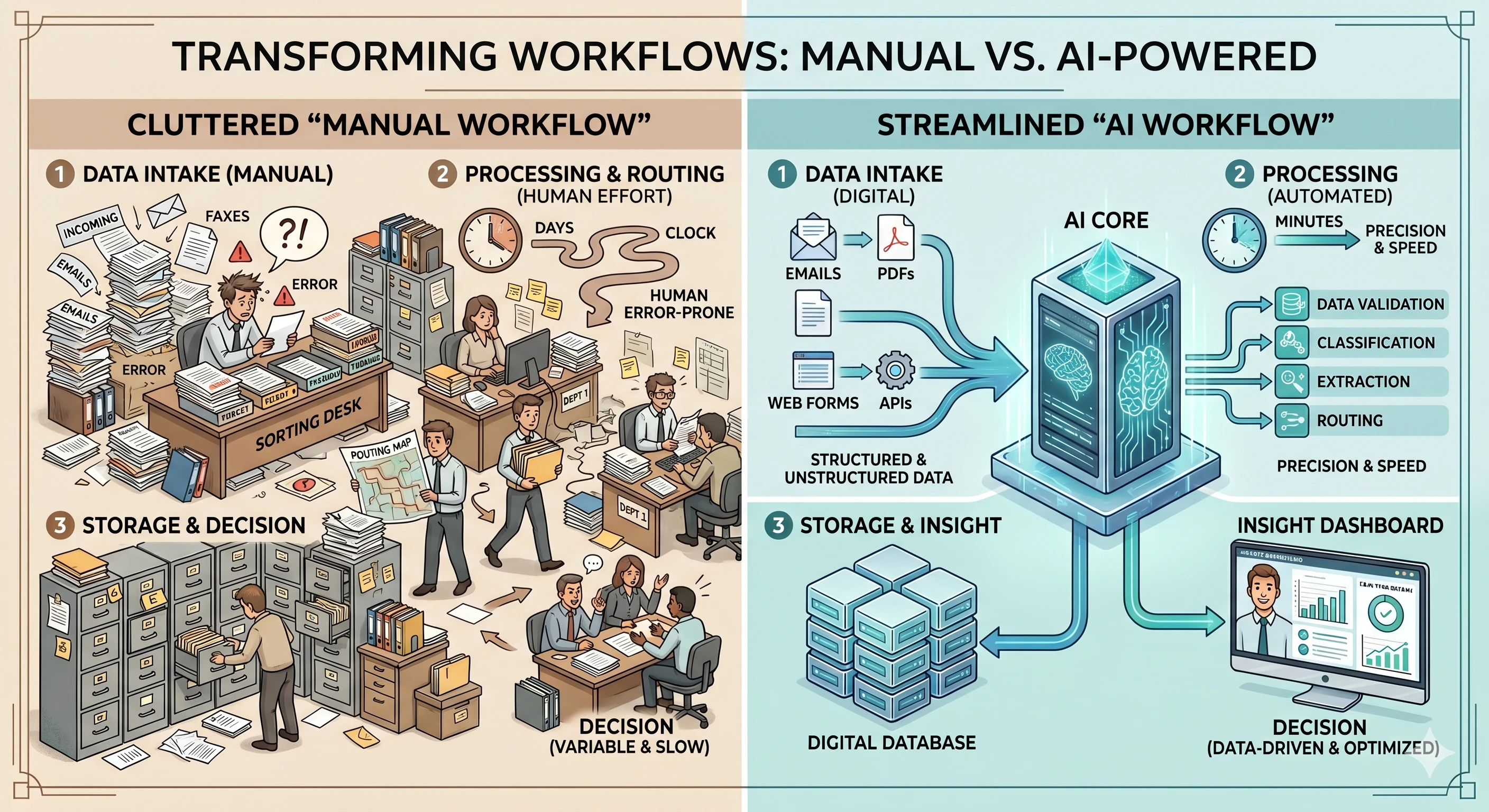
The gap between a stakeholder’s vague desire for “fun” and the designer’s need for functional educational AI tools is where projects go to die. To bridge this gap, professionals are turning to presentation automation and specialized tools like Unni.ai By using an AI presentation generator, you can move past the manual labor of slide design and focus on the one thing that actually matters: the Engagement Menu.
The Engagement Menu: Moving Beyond Vague Buzzwords
To stop the cycle of endless revisions, you need a shared vocabulary with your stakeholders. The “Engagement Menu” categorizes engagement into three distinct buckets. Instead of letting a client say “make it better,” you ask them to choose from these specific, actionable items.
1. Cognitive Engagement: The Intellectual Deep Dive
Cognitive engagement is about the mental effort the learner puts into the material. This is where lesson planning becomes a science rather than an art. It is not about pretty colors; it is about how the brain processes information.
-
Problem-Based Scenarios: Instead of listing facts, present a dilemma.
-
Knowledge Checks: Frequent, low-stakes questions that force the learner to recall information.
-
Reflective Prompts: Asking the learner how they would apply a concept in their specific department.
When you use Unni.ai, you can prompt the AI presentation generator to structure your slides around these cognitive milestones. Instead of manually building a scenario slide, Unni.ai can generate the framework for a case study, allowing you to focus on the nuance of the content.
2. Behavioral Engagement: The Physical Interaction
This is the “doing” part of the learning. If a stakeholder wants more engagement, they often mean they want the learner to stop clicking “next” and start interacting with the screen.
-
Drag-and-Drop Activities: Sorting items into categories.
-
Simulation Branched Paths: Letting the learner choose their own adventure.
-
Interactive Hotspots: Clicking on an image to reveal hidden data.
Building these manually in traditional software is a primary source of burnout. This is where training automation becomes a lifesaver. By leveraging Unni.ai, you can quickly iterate on different layouts that support behavioral triggers without spending four hours on a single interactive trigger.
Why Manual Slide Building Leads to “Engagement Fatigue”
The reason most presentations lack engagement is not a lack of creativity. It is a lack of time. When an instructional designer or teacher is forced to spend 70% of their time on formatting, font consistency, and image sourcing, only 30% of their energy remains for actual instructional design.
The instructional-designer-pain-points-v0-erh7ebq9m8jg1.webp bingo card highlights “Formatting frustration” and “Tight deadlines” for a reason. These are the enemies of high-quality learning.
By shifting to Unni.ai, you treat the slide deck as a fluid asset rather than a rigid document. Unni.ai acts as a workflow partner. When a stakeholder asks for a change, you don’t have to rebuild the entire deck. You use the AI presentation generator features within Unni.ai to reformat and adjust the narrative flow instantly. This is the core benefit of presentation automation.
Integrating Unni.ai into Your Educational AI Workflow
For teachers and corporate trainers, lesson planning often happens late at night or between meetings. The pressure to produce “engaging” content under these conditions is what leads to the “50-slide PPT as source material” nightmare.
Here is how to use Unni.ai to reclaim your time:
-
The Content Dump: Take your messy notes or that 50-slide source deck and feed the core concepts into Unni.ai.
-
Define the Tone: Use the AI slideshow maker capabilities to set a professional, empathetic, or high-energy tone.
-
Apply the Engagement Menu: Tell Unni.ai to insert a “Knowledge Check” every five slides.
-
Refine and Brand: Let Unni.ai handle the brand consistency while you add the specific “human” insights that an AI cannot replicate.
This approach transforms the role of the designer from a “pixel-pusher” to a “learning strategist.” You are not only just making slides, but engineering an experience.
Checklist: Translating Stakeholder Requests
Use this checklist the next time you hear a vague buzzword. This moves the conversation from subjective “feelings” to objective design choices.
-
When they say “Make it pop”: Suggest a high-contrast visual hierarchy or educational AI generated imagery via Unni.ai.
-
When they say “It’s too dry”: Suggest adding a narrative character or a branching scenario.
-
When they say “It needs to be interactive”: Suggest a mid-lesson quiz or a “find the error” activity.
-
When they say “Make it like TikTok”: Suggest micro-learning chunks. Short, 30-second slides with one clear takeaway each.
Frequently Asked Questions (FAQ)
Does using an AI presentation generator reduce the quality of the learning?
Quite the opposite. By using Unni.ai, you remove the human error associated with manual formatting and free up the designer’s brain to focus on pedagogy and learner outcomes.
How does presentation automation help with branding?
Unni.ai ensures that every slide follows the same stylistic rules. This prevents the “Frankenstein deck” effect where different sections look like they were made by different people.
Is Unni.ai suitable for teachers or just corporate trainers?
Unni.ai is designed for anyone who needs to communicate complex ideas. Whether you are lesson planning for a third-grade class or a boardroom of executives, the efficiency of an AI for teachers and trainers remains a universal benefit.

Conclusion: Reclaiming the Creative Process
The struggle for “more engaging” content will never go away as long as stakeholders and designers speak different languages. However, by using the Engagement Menu, you provide the bridge. You move from the frustration into a streamlined, professional workflow.
Stop spending your weekends fighting with text boxes and alignment tools. Embrace presentation automation to handle the heavy lifting. By integrating Unni.ai into your process, you ensure that your energy is spent on the “Head, Hands, and Heart” of the learner rather than the pixels of the screen.
If you are ready to stop building slides and start designing experiences, it is time to try an AI presentation generator that understands your pain. Experience how Unni.ai can transform your educational AI output today. Check out Unni.ai and start your next project with a smarter workflow.