Best Canva Alternative in 2026: Why Unni is the Smarter AI Presentation Generator
Canva is a design tool; Unni.ai is built for educators. See why Unni is the smarter Canva alternative for automated, structured educational content.
For years, Canva has been the default choice for quick graphic design. However, as the digital landscape shifts toward specialized artificial intelligence, many teachers, instructional designers, and corporate trainers are finding that “all-in-one” tools often feel like “too-much-of-everything.”
If your primary goal is creating slides, you might find yourself paying for a vast library of video editors and social media templates you never touch. This is where a dedicated Unni.ai comes into play. By focusing specifically on presentation automation, Unni offers a streamlined, cost-effective workflow that prioritizes speed and educational depth over generic design.
Unni.ai vs. Canva: The Functional Divide
While Canva is a horizontal platform for all visual content, Unni.ai is a vertical solution built for educational AI and professional training. Here is how the two compare in a practical setting.
1. Presentation Automation vs. Manual Drag-and-Drop
In Canva, even with “Magic Design,” you are often left manually resizing text boxes and hunting for consistent icons. Unni.ai uses true presentation automation. You provide the topic or an outline, and the AI structures the narrative, selects relevant layouts, and applies a cohesive design language across every slide instantly.
2. Built-in Lesson Planning for Teachers
For educators, the “blank page” is the biggest enemy. Unni.ai excels at lesson planning by integrating pedagogical structures into its generation engine. Instead of just “pretty slides,” it creates logical flows suitable for classroom environments.
3. Price and Value
Canva’s pricing has seen steady increases as they add more enterprise-level features. If you are a solo teacher or a small training team, Unni.ai serves as a cheaper alternative to Canva by focusing its resources, and your subscription fee, strictly on the tools you need for high-quality deck creation.
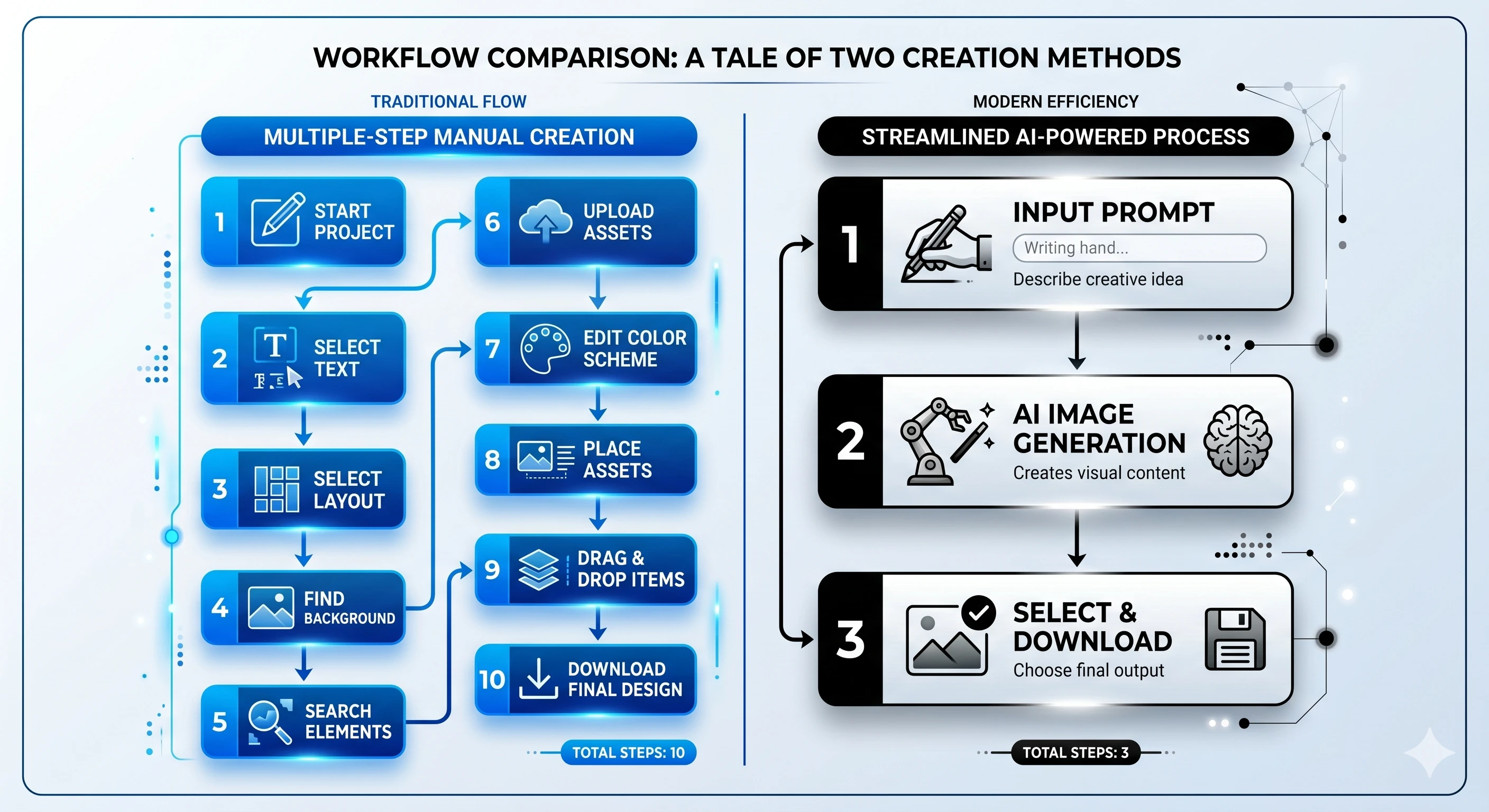
Workflow Comparison: Creating a Training Deck
| Feature | Canva (Generalist) | Unni.ai (Specialist) |
|---|---|---|
| Initial Creation | Browse thousands of templates; manual selection. | AI generates a full deck from a single prompt. |
| Content Structure | User must write or paste text into boxes. | AI suggests content based on educational AI standards. |
| Design Consistency | Manual alignment and font matching required. | Automated theme application across all AI slides. |
| Speed | 30 to 60 minutes for a professional deck. | 3 to 5 minutes for a professional deck. |
| Learning Curve | Moderate (many tools to navigate). | Low (intuitive, prompt-based interface). |
Is Unni.ai the Right Educational AI Tool for You?
Choosing the right platform depends on your daily output. If you are designing t-shirts, social media banners, and logos, Canva remains a powerhouse. However, if your week consists of:
-
Building weekly curriculum slides
-
Automating corporate training sessions
-
Quickly iterating on lecture materials
-
Finding a cheaper alternative to Canva that doesn’t compromise on quality
Then Unni.ai is designed specifically for your needs. Its ability to handle training automation makes it a favorite for professionals who value their time as much as their budget.
Checklist: Transitioning to an AI Presentation Generator
Before making the switch, ask yourself these questions:
-
Do I spend more time on “design” than on “content”?
-
Am I paying for features (video editing, print) that I rarely use?
-
Do I need AI for teachers that understands pedagogical structures?
-
Would presentation automation save me at least three hours a week?
If you answered “Yes” to most of these, you are likely the perfect candidate for Unni.ai.
Conclusion: The Future of AI Slides
The era of spending hours nudging text boxes is coming to an end. While Canva is a brilliant tool for graphic artists, Unni.ai is the superior choice for those who need a dedicated AI presentation generator. By prioritizing presentation automation and specialized educational AI features, it empowers teachers and trainers to focus on what matters most: the message and the students.
If you are looking for a more efficient, focused, and cheaper alternative to Canva, it is time to experience the speed of Unni.ai.
Frequently Asked Questions
Is Unni.ai really a cheaper alternative to Canva?
Yes. Because Unni.ai focuses specifically on being an AI presentation generator, it avoids the "feature bloat" that drives up the price of generalist design tools.
Can I export my AI slides to other formats?
Absolutely. Unni.ai supports standard exports so you can still present in your favorite environments while enjoying the benefits of presentation automation.
Is this tool suitable for higher education?
Unni.ai is highly effective for educational AI needs, from K-12 lesson planning to complex university lectures and corporate seminars.