The Best Adobe Captivate Alternative: The Future of Educational AI
Adobe Captivate is complex and costly. Discover why Unni.ai is the best modern alternative for educators, AI-powered course creation in seconds.
In the world of instructional design and digital learning, Adobe Captivate has long been a powerhouse. However, as we move through 2026, the needs of teachers and trainers have shifted. The demand for speed, accessibility, and intelligence has led many to seek a modern AI presentation generator that removes the friction of manual design.
For professionals who find Captivate too complex or time-consuming, Unni.ai has emerged as a leading contender. By leveraging presentation automation and specialized educational AI, Unni allows users to transform raw ideas into polished, interactive lessons without the steep learning curve of legacy software. This article explores why Unni is the strategic choice for those looking to modernize their training and lesson planning workflows with AI slides.
Beyond the Desktop: Why Modern Professionals are Switching
Adobe Captivate is a robust tool, but its roots in desktop-based, heavy-duty authoring can feel restrictive. For the modern professional, the requirement is for cloud-native agility.
This matters even more with Windows-only authoring tools. If you have ever tried running Articulate Storyline on a Mac, you already know the workarounds, such as Parallels, virtual machines, or a second PC, add cost and friction that a browser-based tool removes entirely.
The Shift to Presentation Automation
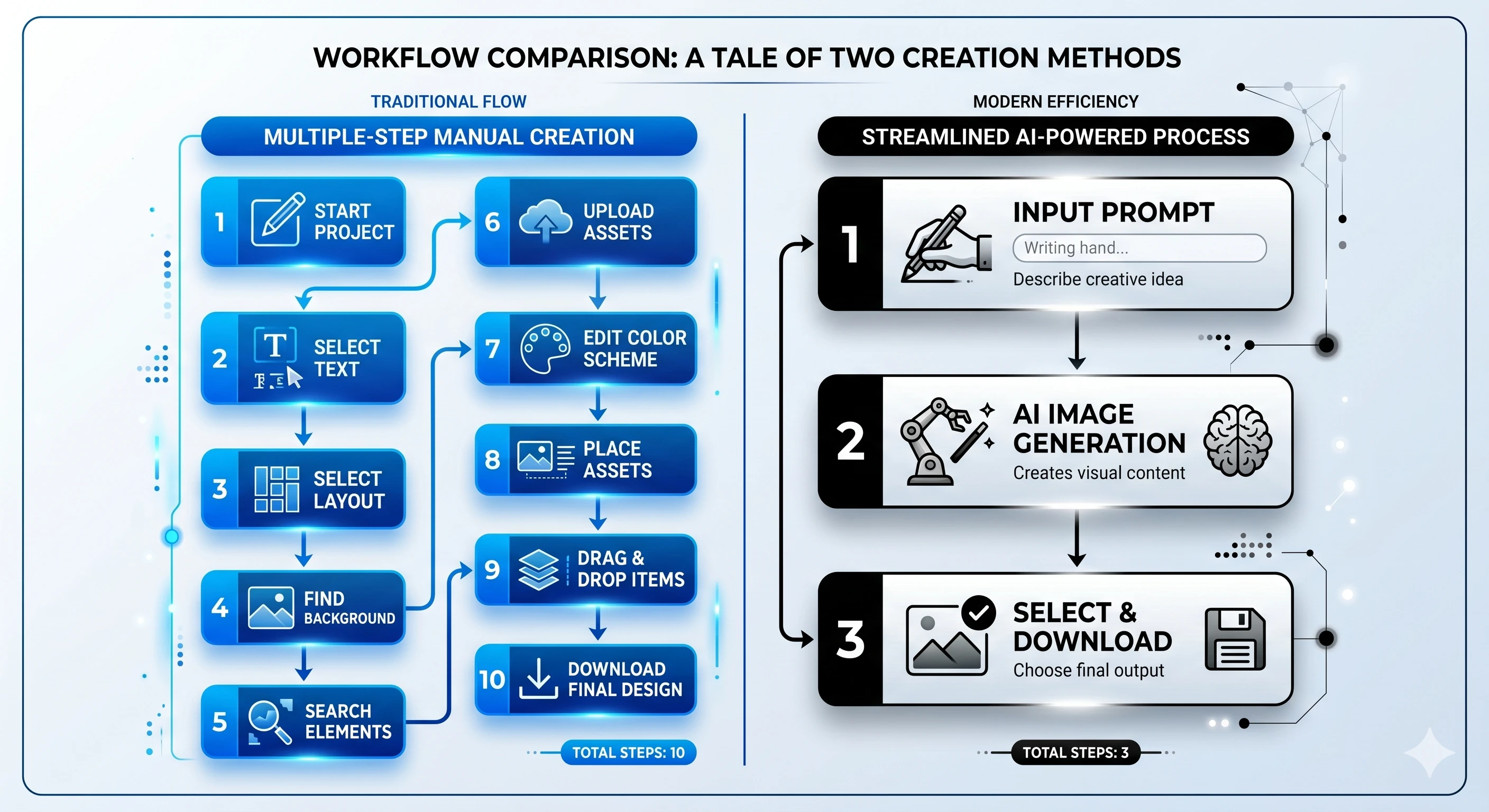
Captivate requires a “brick-by-brick” approach to building slides. You manually place every asset, define every trigger, and manage complex timelines. In contrast, Unni.ai utilizes presentation automation to handle the heavy lifting. Instead of spending hours aligning text boxes, you provide a prompt or a document, and the AI generates a structured, visually coherent slide deck.
Educational AI for Teachers and Trainers
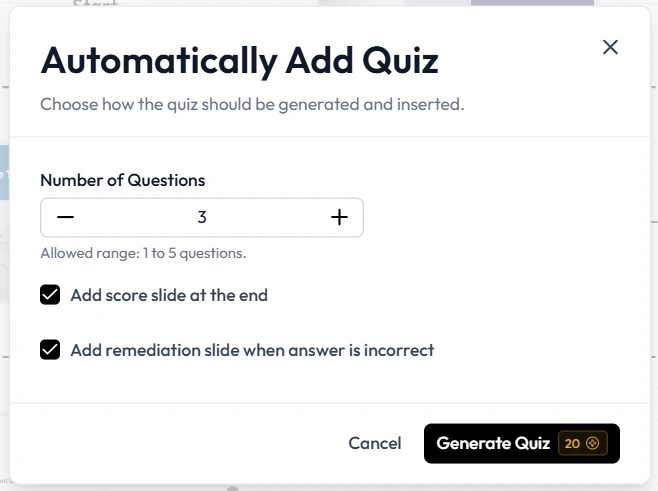
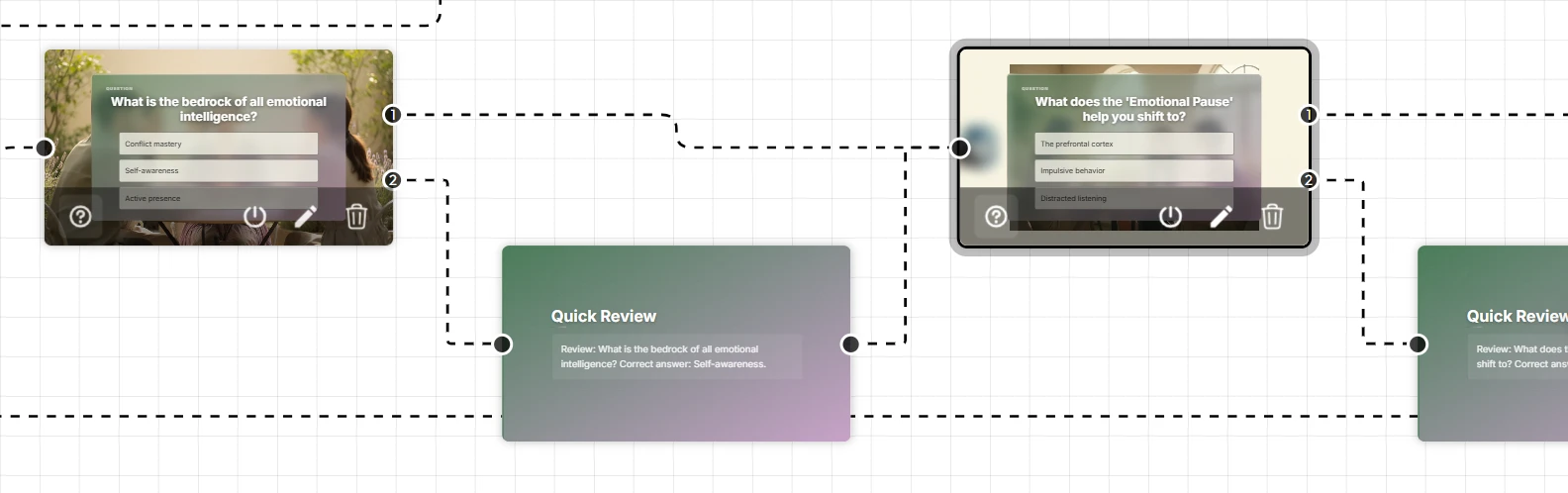
One of the most significant advantages of Unni is its deep integration of educational AI. While Captivate provides the tools to build a quiz, Unni.ai helps you write the quiz. It understands pedagogical structures, assisting with lesson planning and ensuring that content is not just beautiful, but also educationally sound.
Unni.ai vs. Adobe Captivate: Side-by-Side Comparison
| Feature | Adobe Captivate | Unni.ai |
|---|---|---|
| Primary Workflow | Manual Authoring | Presentation Automation |
| Learning Curve | Steep (Weeks to Months) | Minimal (Minutes) |
| Content Creation | Manual Entry | AI-Generated Drafts |
| Platform | Desktop (Windows/Mac) | Cloud-Based (Browser) |
| Educational Focus | General eLearning | Specialized Educational AI |
| Collaboration | Limited / Version Control Issues | Real-time Cloud Collaboration |
| AI Quality | Basic AI Assistance | Advanced Generative AI Slides |
Workflow Comparison: Creating a Training Module
To understand the practical differences, let’s look at a typical use case: building a 10-slide training module on workplace safety.
The Adobe Captivate Workflow
-
Preparation: You write your script in a separate document.
-
Asset Sourcing: You search for icons, images, and backgrounds.
-
Manual Design: You create 10 blank slides and manually apply a theme.
-
Interactivity: You manually program “Next” buttons and triggers for each slide.
-
Review: You export the file and send it to stakeholders, often dealing with large file sizes.
The Unni.ai Workflow
-
Input: You paste your safety guidelines or type a prompt into the AI presentation generator.
-
Generation: The AI creates the AI slides, including relevant imagery, icons, and structured text.
-
Refinement: You use the “Remix” feature to change layouts instantly across the entire deck.
-
Automation: Interactive elements and navigation are built-in automatically through presentation automation.
-
Sharing: You send a live link for instant feedback and collaborative editing.
Feature Breakdown: Where Unni.ai Excels
1. Rapid Lesson Planning
For educators, lesson planning is often a bottleneck. Unni acts as a digital teaching assistant. By inputting a topic or a curriculum standard, the platform can suggest learning objectives, content outlines, and even assessment questions. This makes it an essential tool for AI for teachers who need to balance quality with a high volume of work.
2. Training Automation for Teams
Corporate trainers often need to update content frequently. Because Unni is cloud-based and automated, updating a “Company Policy” deck takes seconds rather than hours of re-exporting and re-uploading SCORM packages. This training automation ensures that teams always have access to the latest information.
3. High-Fidelity AI Slides
The quality of AI-generated content has evolved. Unni doesn’t just put text on a page; it understands visual hierarchy. It uses educational AI to ensure that text-to-image ratios are optimized for learner retention, a task that requires significant expertise in traditional tools like Captivate.
Ease of Use and the Learning Curve
Adobe Captivate is often described as having a “cliff” rather than a curve. New users often require certified training just to navigate the interface.
Unni.ai is designed for the “no-code” generation. If you can use a social media app or a basic document editor, you can master Unni.. This accessibility is vital for instructional designers who want to focus on the content and strategy of their courses rather than the technical minutiae of the software.
Pricing and Value Proposition
Adobe Captivate typically operates on a subscription model that can be expensive for individual teachers or small teams. Furthermore, the “hidden cost” of Captivate is the time spent in production.
Unni.ai offers a more flexible entry point, but its true value lies in ROI through time saved. If presentation automation reduces a 10-hour project to 1 hour, the platform pays for itself within the first few uses. This makes it a highly attractive option for departments looking to scale their output without increasing headcount.
Best Use-Case Analysis
Choose Adobe Captivate If:
-
You are building highly complex software simulations with hundreds of variables.
-
Your organization requires strictly offline, local file management.
-
You need specialized VR (Virtual Reality) training features that require heavy manual coding.
Choose Unni.ai If:
-
You need to produce high-quality AI slides quickly and frequently.
-
You are a teacher looking for educational AI to assist with lesson planning.
-
You want to leverage presentation automation to eliminate repetitive design tasks.
-
You work in a collaborative team that requires real-time cloud editing.
Checklist: Is Unni.ai Right for You?
-
Do you spend more than 3 hours on a single presentation?
-
Do you find yourself struggling to find the “right” layout for your data?
-
Is your team looking for better ways to collaborate on training materials?
-
Are you looking for AI for teachers that actually understands classroom needs?
-
Do you want to move away from heavy, desktop-only software?
If you checked more than three boxes, Unni.ai is likely the superior alternative for your workflow.
Conclusion: Embracing the Future of Authoring
The transition from manual authoring to presentation automation is not just a trend; it is a necessity in a fast-paced digital environment. While Adobe Captivate remains a powerful tool for specific, high-end technical needs, Unni.ai provides the speed, intelligence, and ease of use that modern educators and trainers crave.
By integrating educational AI directly into the creative process, Unni.ai empowers you to focus on what matters most: sharing knowledge effectively. If you are ready to leave behind the frustrations of manual slide design and embrace the efficiency of an AI presentation generator, it is time to make the switch.
Ready to transform your workflow? Start creating smarter, faster, and better presentations today.
Frequently Asked Questions
Is Unni.ai a complete replacement for Adobe Captivate?
For 90% of users, yes. While Captivate is better for niche, high-variable simulations, Unni.ai is the better AI presentation generator for standard training, lessons, and corporate presentations.
Can I export Unni.ai presentations to other formats?
Yes, Unni.ai supports standard exports, ensuring your AI slides are compatible with the tools your organization already uses.
Does Unni.ai support SCORM?
Unni.ai is designed with modern LMS (Learning Management System) standards in mind, making it a viable tool for professional instructional designers.
How does the AI handle "Lesson Planning"?
The educational AI analyzes your topic and uses proven pedagogical frameworks to suggest a logical flow, ensuring your presentation is structured for maximum learning impact.