How to create a Slideshow with AI
Learn how to create a slideshow with AI using Unni.ai. A step-by-step guide for teachers and professionals looking to build polished slides in seconds.
The days of staring at a blank PowerPoint screen for hours are officially over. If you are a teacher, a corporate trainer, or a young professional, you know that the most time-consuming part of any project is often the visual design. Modern workflows now rely on an AI presentation generator to handle the heavy lifting.
By using Unni.ai, you can transform a single sentence into a complete set of AI slides that look professional and follow logical structures. This shift toward presentation automation is not just about speed; it is about quality. For those in academia or school settings, educational AI has become a vital tool to ensure that information is clear, engaging, and easy to digest.
The Power of Presentation Automation with Unni.ai
Most professionals spend up to 40% of their time on formatting rather than content creation. Presentation automation changes that math. When you use Unni, the system takes care of font choices, color palettes, and image placement automatically. This allows you to focus on the narrative you want to share.
For educators, Unni.ai acts as a primary assistant. Instead of spending an entire evening building a lecture on biology or history, you can input your curriculum notes and let the platform generate the visual aids. This application of educational AI ensures that your slides are optimized for learning, with appropriate text-to-image ratios and clear hierarchies.
Young professionals often face high pressure to deliver decks that look like they were made by a design agency. Unni.ai provides that level of polish without the high cost or the long wait times. By leveraging an AI presentation generator, you can move from a rough idea to a boardroom-ready presentation in less time than it takes to get a cup of coffee.
Step-by-Step: How to Use Unni.ai to Create Your Slideshow
Creating a slideshow with Unni.ai is an intuitive process designed for users who want results without a steep learning curve. Follow these steps to maximize the potential of Unni.
1. Identify Your Core Objective
Before you open Unni.ai, know what you want to achieve. Are you teaching a class, pitching a client, or conducting a workshop? Having a clear goal helps Unni.ai generate more relevant content.
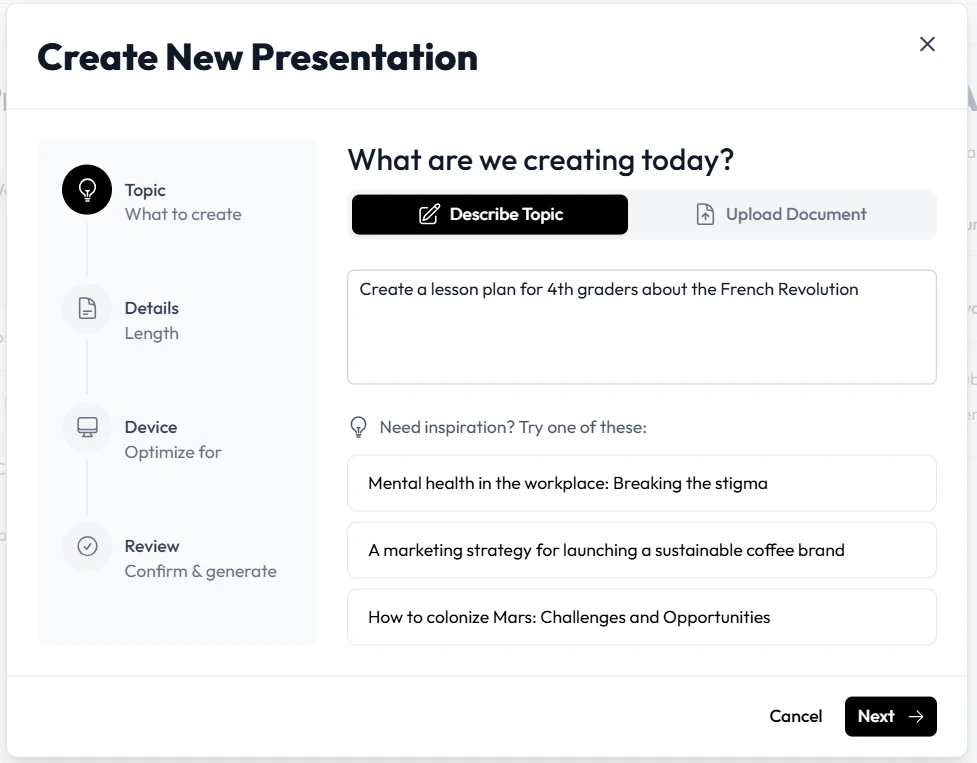
2. Enter Your Prompt into Unni.ai
The quality of your AI slides depends on the quality of your input. Instead of typing “marketing,” try a more descriptive prompt in Unni.ai such as “A 12-slide presentation on social media trends for 2026 for a group of marketing managers.” Unni.ai uses this context to build a tailored outline.
3. Select a Visual Theme in Unni.ai
Unni.ai offers a variety of styles ranging from minimalist and corporate to vibrant and academic. Choose the theme that best fits your audience. Unni.ai will apply this style consistently across every slide, maintaining your brand identity throughout the deck.
4. Review the AI-Generated Outline
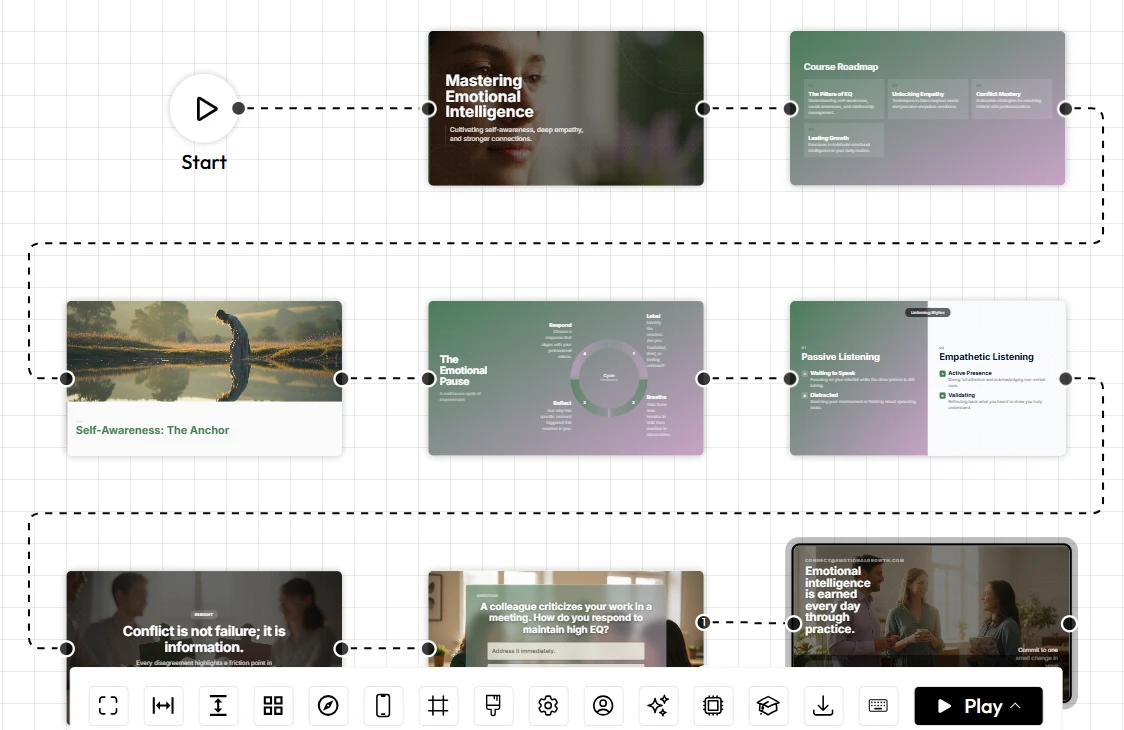
One of the best features of Unni.ai is the ability to see the structure before the slides are fully designed. Review the outline provided by Unni.ai and make any necessary adjustments. You can add slides, delete unnecessary sections, or reorder the flow at this stage.
5. Finalize and Export Your AI Slides
Once Unni.ai generates the final visuals, you can make manual tweaks. Change a photo, rewrite a bullet point, or adjust a chart. When you are finished, export your project from Unni.ai directly to PowerPoint or Google Slides to present it to your audience.
Practical Implementation of Educational AI and Training Automation
The versatility of Unni.ai makes it an essential tool across various industries. Here is how different users are currently applying Unni.ai to their specific needs.
AI for Teachers and Lesson Planning
Teachers are using Unni.ai for lesson planning by converting their written lesson plans into visual slideshows. This saves hours of preparation time every week. Because Unni.ai understands pedagogical structures, the AI slides it creates help students stay focused and retain more information.
Training Automation for Corporate Environments
Corporate trainers use Unni.ai for training automation. When a company updates its compliance policies or software, trainers can feed the new documentation into Unni.ai. Within minutes, Unni.ai produces a complete training deck that can be shared across the organization. This ensures that every employee receives consistent, high-quality information.
Course Creators and Academic Professionals
If you are building an online course, Unni.ai helps you scale your production. You can turn your scripts into professional-grade modules. For academic professionals, Unni.ai is a powerful tool for presenting complex research data in a way that is accessible to broader audiences.
Workflow Improvements with Unni.ai
The real value of an AI presentation generator is the mental space it clears for the user. When you are not worried about whether a text box is perfectly aligned, you can think more deeply about your message. Unni.ai handles the technical details, allowing you to be a better communicator.
Unni.ai also supports iterative work. If you receive feedback that your presentation needs to be shorter or more formal, you can ask Unni.ai to adjust the tone or the length without starting from scratch. This flexibility is a hallmark of high-level presentation automation.
Checklist: Getting the Most Out of Unni.ai
Use this checklist to ensure your presentation is polished and effective every time you use Unni.ai.
-
Be Specific with Prompts: Provide Unni.ai with details about your audience and the desired length.
-
Check for Consistency: Ensure the tone of the text in Unni.ai matches your speaking style.
-
Verify Facts: Always double-check any statistics or dates provided by the AI presentation generator.
-
Audit Visuals: Replace any generic images in Unni.ai with your own specific graphs or company photos if needed.
-
Test the Flow: Click through the AI slides in Unni.ai to ensure the transition between ideas is smooth.
-
Export and Backup: Save your file in multiple formats from Unni.ai to be ready for any technical setup.
Frequently Asked Questions (FAQ)
Does Unni.ai work with existing PowerPoint files?
Yes, you can often upload your existing text or outlines into Unni.ai to give the AI presentation generator a head start on your project.
Is Unni.ai safe for sensitive corporate data?
Unni.ai prioritizes user privacy. When using Unni.ai for training automation, your data is handled with professional-grade security protocols.
Can I use Unni.ai for free?
Unni.ai offers various tiers, including options for individuals and larger teams, so you can choose the plan that fits your volume of presentation automation.
Does Unni.ai support multiple languages?
Unni.ai is designed to support a global audience, making it a great choice for international educators and multinational corporations using educational AI.
Conclusion: Embrace the Future of AI Slides
The transition to using an AI presentation generator is a major step forward for any professional who values their time. By integrating Unni.ai into your workflow, you gain access to powerful presentation automation that eliminates the most frustrating parts of slide design. Whether you are focused on educational AI in a classroom or training automation in a corporate setting, Unni.ai provides the tools to succeed.
The quality of your AI slides will speak for itself, leaving you with more energy to connect with your audience and deliver your message with confidence. There is no longer a reason to do things the hard way.