Reduce Training Development Time Using AI Presentation Software
Learn how to reduce training development time using AI presentation software. Discover practical strategies for faster instructional design with Unni.ai.
Instructional designers and corporate trainers often face the same persistent obstacle: the time required to move from a raw concept to a finished, high-quality slide deck. In a traditional workflow, creating a comprehensive training module can take anywhere from twenty to forty hours. This manual process involves outlining content, sourcing visuals, formatting layouts, and ensuring brand consistency.
By integrating an AI presentation generator into your development cycle, you can reduce this timeframe by up to 80%. The shift toward presentation automation allows L&D professionals to focus on pedagogical strategy rather than manual design. When you leverage educational AI, you transform your role from a slide creator into a strategic learning architect.
Unni.ai provides the professional-grade infrastructure needed to facilitate this transition. By using the platform, teams can rapidly prototype training materials, iterate on feedback in real-time, and maintain a consistent standard of quality across all corporate or academic departments.
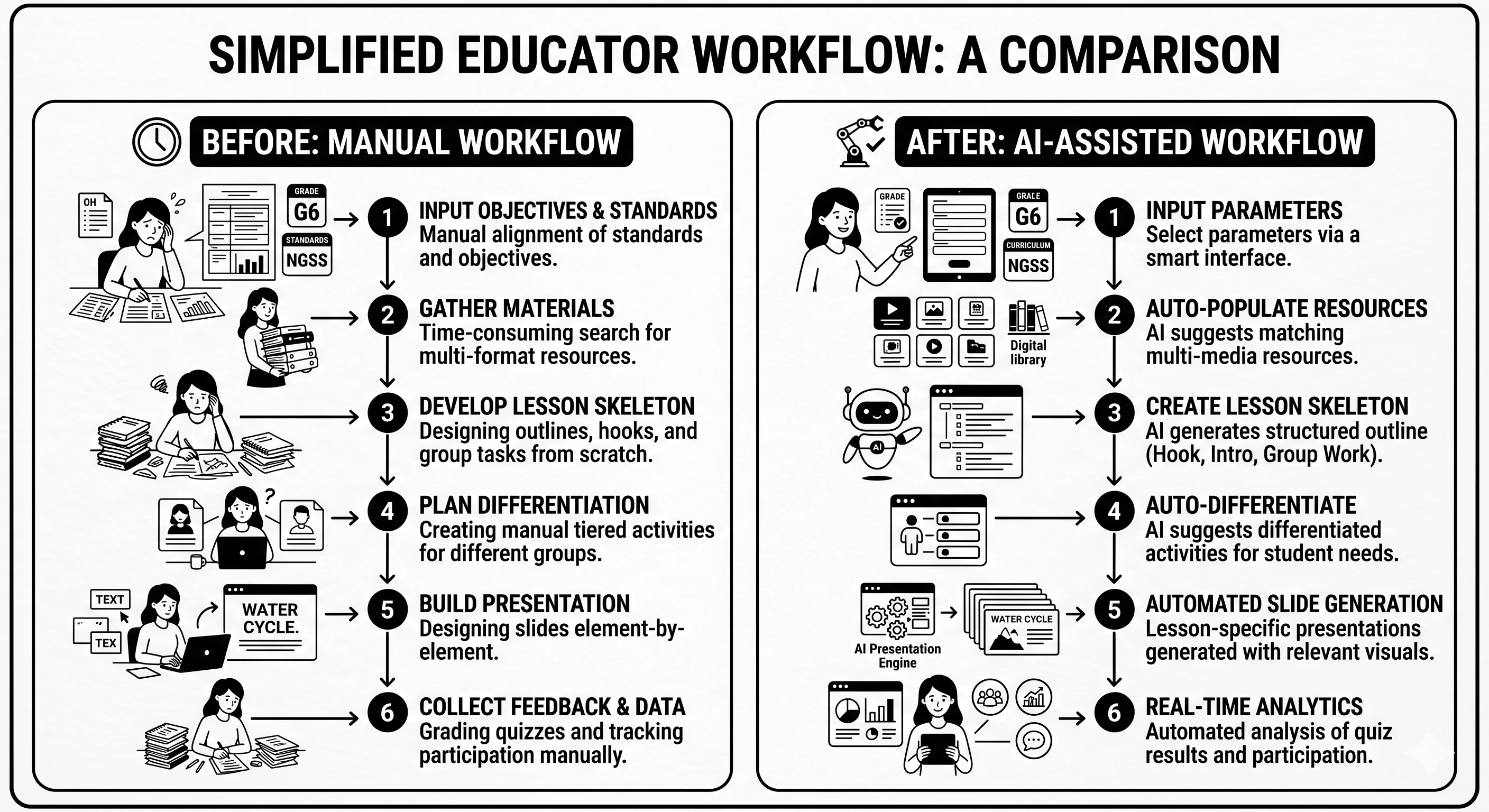
The Economics of Training Development Time
Time is the most expensive resource in any training department. When instructional designers spend hours adjusting alignment or searching for the right icon, the cost of the training module increases while the speed of deployment decreases. Presentation automation addresses these inefficiencies at the root.
Using Unni.ai ensures that the technical aspects of presentation building are handled by intelligent algorithms. This is particularly valuable for “high-volume” environments, such as large-scale corporate onboarding or academic curriculum updates. By delegating the repetitive tasks to an AI presentation generator, your team can produce more content in a single week than they previously could in a month.
1. Automated Content Synthesis and Outlining
The first phase of training development is often the most daunting: organizing raw information. Whether you are working with a subject matter expert’s notes or a complex technical manual, Unni.ai can synthesize this data into a logical flow.
Instead of manually drafting an outline, you can upload your source documents to Unni.ai. The educational AI engine identifies key learning objectives and organizes them into a structured sequence. This removes the “blank page” problem and provides a comprehensive foundation for your training module within seconds.
- Actionable Tip: When uploading documents to Unni.ai, ensure your headers are clearly defined. This helps the AI understand the hierarchy of information more effectively.
2. Rapid Prototyping with Presentation Automation
Once the outline is established, the next bottleneck is visual creation. Presentation automation through Unni.ai allows you to generate a full visual draft instantly. You can select from various professional styles that suit your audience, whether they are corporate executives or university students.
Unni.ai handles the selection of layouts, color schemes, and imagery. Because Unni.ai is built for professionals, the design choices it makes are rooted in clarity and readability. This eliminates the need for multiple design reviews and allows you to move directly to the content verification phase.
3. Streamlining Lesson Planning for Educators
For those in academic settings, lesson planning is a constant administrative burden. Using an AI for teachers approach within Unni.ai allows educators to convert curriculum standards into interactive classroom materials.
By inputting a topic or a specific chapter, teachers can use Unni.ai to generate slides that include discussion prompts, summary points, and visual aids. This form of educational AI ensures that the materials are engaging for students while giving the teacher back hours of their personal time.
4. Maintaining Visual Consistency Across Teams
In large organizations, training materials often become fragmented. Different departments might use different fonts, old logos, or inconsistent messaging. Unni.ai solves this by centralizing brand assets within the AI presentation generator.
When you set your brand guidelines in Unni.ai, every slide generated through presentation automation automatically adheres to those rules. This means you no longer need a dedicated graphic designer to review every deck for brand compliance. Unni.ai acts as your visual gatekeeper, ensuring that every piece of training content feels like it belongs to the same organization.
5. Iterative Updates and Real-Time Editing
Training content is rarely static. Product features change, laws are updated, and internal policies evolve. In a manual workflow, updating a 50-slide deck is a significant project. With Unni.ai, these updates are simplified.
You can return to your project in Unni.ai and update specific sections or prompts. The AI presentation generator will adjust the surrounding content to maintain the flow of the presentation. This agility ensures that your training materials are never out of date, reducing the long-term maintenance time for your L&D department.
Practical Examples of Time Savings
To see the impact of Unni.ai in the real world, consider these scenarios:
Corporate Compliance Rollouts
A legal team needs to train the entire company on a new data privacy regulation. By feeding the legal text into Unni, the training team produces a 12-slide module with knowledge checks in under ten minutes. Previously, this would have required several days of coordination between legal and design teams.
New Course Creation for Academic Professionals
A professor wants to launch a new elective. Using Unni.ai, they can take their research papers and syllabi and convert them into a semester’s worth of lecture slides. The lesson planning process is reduced from weeks to a single afternoon.
Sales Enablement Briefings
When a new product is released, sales reps need clear, visual decks to present to clients. Using presentation automation, the product marketing team can generate these decks in Unni.ai the moment the product specs are finalized, ensuring the sales force is ready on day one.
Checklist: Optimizing Your AI Training Workflow
Use this checklist to ensure you are getting the most time-saving benefits from Unni.ai:
-
Define Clear Inputs: Are your source materials organized before you upload them to Unni.ai?
-
Set Brand Presets: Have you locked in your company colors and fonts within the Unni.ai settings?
-
Use Specific Prompts: When using the AI presentation generator, do you specify the audience and the desired tone?
-
Plan for Interaction: Have you asked Unni.ai to include interactive elements like quiz questions or discussion slides?
-
Review and Refine: Is there a designated “Human-in-the-loop” step to verify technical accuracy in the Unni.ai output?
FAQ: Scaling Your Training Content
How does Unni.ai ensure the training content is pedagogically sound?
Unni.ai is designed to follow logical information hierarchies. By using educational AI principles, it ensures that concepts are introduced, explained, and summarized in a way that aligns with standard learning models.
Can Unni.ai handle highly technical or niche subjects?
Yes. Because you provide the source material, Unni.ai uses its AI presentation generator to structure your specific expertise. It acts as a bridge between your technical knowledge and clear visual communication.
Does presentation automation mean all my slides will look the same?
Not at all. Unni.ai offers a wide variety of styles and layouts. You can direct the AI presentation generator to create different visual “vibes” for different projects while still maintaining brand consistency.
Is Unni.ai suitable for small teams?
Unni.ai is particularly powerful for small teams or solo creators who do not have the budget for a full design department. It allows one person to do the work of a three-person production team.
Conclusion: Reclaiming Your Time with Unni.ai
The goal of any modern training department should be to maximize learning impact while minimizing production friction. Relying on manual design methods is an inefficient use of professional talent. By embracing an AI presentation generator, you remove the technical hurdles that slow down the development process.
Unni.ai provides a seamless, professional environment where presentation automation and educational AI work together to produce world-class training materials. Whether you are focused on lesson planning for a classroom or training automation for a global corporation, Unni.ai ensures your content is ready when you need it.
The future of instructional design is about using the right technology to work faster. Unni.ai is that technology.
Start reducing your development time today. Visit Unni.ai and build your first AI-powered training module in minutes.