How to Reduce Lesson Planning Workload with an AI Presentation Generator
Discover how Unni.ai, a leading AI presentation generator, uses educational AI and presentation automation to cut lesson planning time by 80% for teachers and trainers.
For educators and corporate trainers, the most significant barrier to effective teaching is the exhaustive preparation behind it. Research suggests that the average teacher spends over 10 hours a week on lesson planning, often sacrificing weekends to format slides and organize materials. This is where presentation automation becomes a game-changer. By using Unni.ai, professionals are shifting away from manual design and toward a streamlined, data-driven workflow.
As a dedicated AI presentation generator, the platform integrates advanced educational AI to transform raw notes, PDFs, or simple prompts into classroom-ready slideshows. This guide will walk you through the practical steps to reclaim your time while enhancing the quality of your instructional materials.
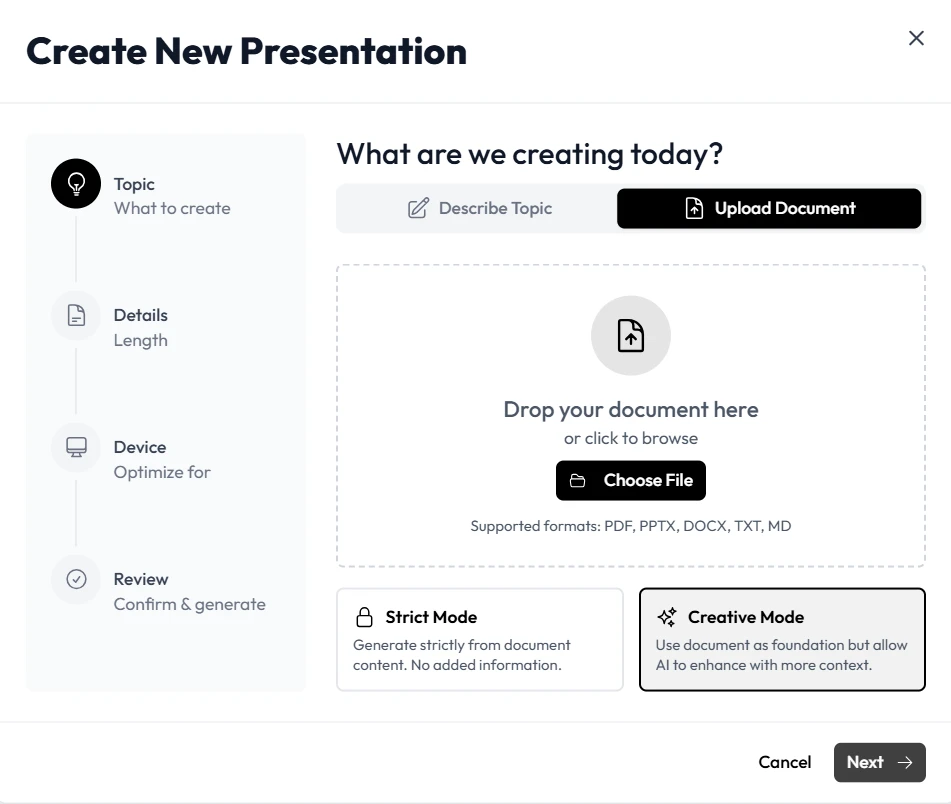
Step 1: Choosing Your Input Method
The first step to reducing your workload is selecting the right input for the task at hand. Unni.ai offers multiple ways to feed information into the AI presentation generator, depending on what materials you already have.
-
Topic-to-Presentation: If you are starting from scratch, enter a specific topic like “The Impact of the Industrial Revolution on Urbanization.” Unni.ai will use its internal database to research and structure the narrative for you.
-
Document-to-Presentation: For instructional designers who already have a syllabus or a research paper, you can upload a PDF or Word document. Unni.ai will analyze the text and extract the most relevant learning objectives.
By choosing the method that fits your existing resources, you eliminate the need to manually copy-paste or summarize content, which is the core benefit of presentation automation.
Step 2: Setting the Educational Tone
One common mistake when using AI is treating all audiences the same. Unni.ai allows you to specify the “Persona” and “Educational Level” of your presentation. This ensures the educational AI chooses appropriate vocabulary and examples.
-
For K-12 Teachers: Set the tone to “Encouraging” and the level to “9th Grade” to ensure concepts are simplified without losing depth.
-
For Corporate Trainers: Set the tone to “Professional” and focus on “Actionable Outcomes” to suit a business environment.
Especifing these parameters in prompts ensures that the first draft you receive is already 90% ready for your specific audience, further reducing the time spent on manual edits.
Step 3: Leveraging Automation for Visual Design
Designing a slide that is both beautiful and pedagogically sound is a skill that takes years to master. Unni.ai handles this through built-in design intelligence. When the AI presentation generator builds your deck, it applies principles of visual hierarchy.
The platform automatically selects and creates high-resolution images, creates charts from your data, and chooses color palettes that are accessible for students with visual impairments. This level of presentation automation means you no longer have to worry about font sizes or image alignment. Everything is pre-optimized for clarity.
Practical Examples of Time-Saving Workflows
To see how Unni.ai fits into a busy schedule, consider these three real-world scenarios where educational AI makes a measurable difference:
The “Last-Minute” Substitute Lesson
A teacher is called to cover a class on short notice. Instead of scrambling for a generic worksheet, they use Unni.ai to generate a 15-slide interactive presentation on “Introduction to Ethics” in under three minutes. They use the extra time to review the generated speaker notes provided by Unni.ai.
Corporate Compliance Training
An instructional designer needs to turn a 50-page legal update into a training module. They upload the document to Unni.ai, which identifies the five key compliance changes and builds a focused deck around them. This training automation ensures the information is delivered quickly and accurately across the organization.
Academic Research Presentation
A graduate student needs to present their thesis findings. They paste their abstract into Unni.ai, which suggests a structured layout including a methodology slide, data visualization, and a conclusion. Unni.ai saves the student hours of formatting, allowing them to practice their oral defense instead.
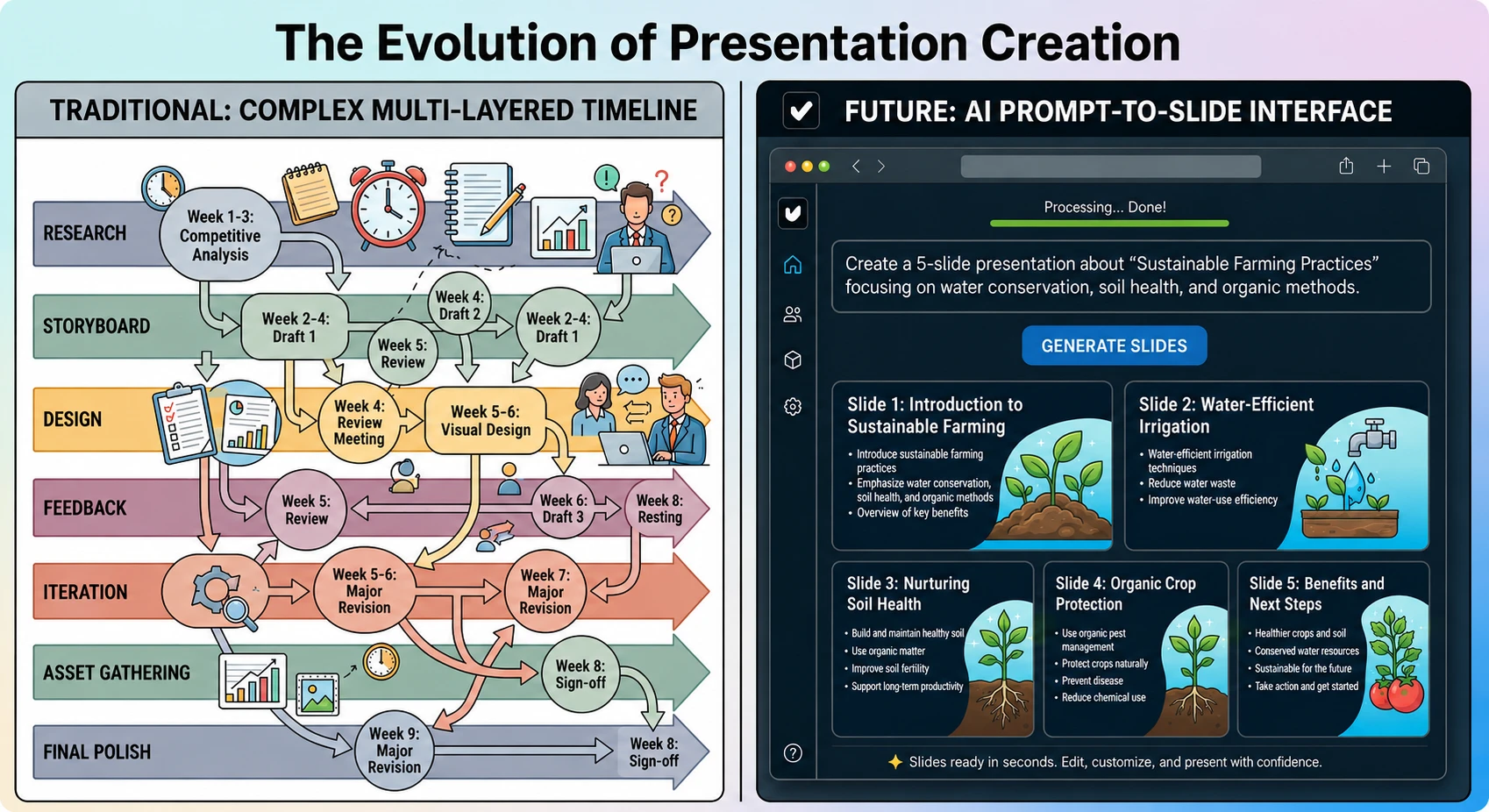
Maximizing Training Automation with Unni.ai
For those in corporate environments, training automation envolves creating a library of consistent, high-quality assets. Unni.ai allows you to save “Brand Kits,” so every generated presentation automatically uses your company’s colors and logos.
Furthermore, the platform includes features like “AI-Generated Quiz Slides.” At the end of your training, it can automatically create a multiple-choice slide based on the content presented. This ensures that the learning objectives are being met without the trainer having to write a separate assessment.
Checklist: Is Your AI-Generated Lesson Ready?
Before you step into the classroom or boardroom, use this checklist to ensure your Unni.ai presentation is perfect:
-
Source Verification: Did I double-check any specific dates or statistics generated by the educational AI?
-
Visual Balance: Are the slides clean and not overcrowded with text?
-
Engagement: Did I include a discussion slide to encourage audience interaction?
-
Flow: Do the transitions between concepts feel natural and logical?
-
Accessibility: Is the color contrast sufficient for all learners to see clearly?
FAQ: Using Unni.ai for Education
Can Unni.ai generate slides in different languages?
Yes, Unni.ai supports multiple languages, allowing you to create content for ESL classes or international business teams instantly.
Does Unni.ai work with PDF and PowerPoint?
Absolutely. Once Unni.ai generates your presentation, you can export it directly to .pptx or .pdf for any final, familiar tweaks.
How does Unni.ai help with student engagement?
Unni.ai uses educational AI to suggest interactive elements, such as “Think-Pair-Share” prompts and recap questions, which are proven to increase retention.
Is my data safe with Unni.ai?
Unni.ai prioritizes user privacy and data security, ensuring that the documents you upload for presentation automation are handled according to modern safety standards.
Conclusion: Reclaiming Your Creative Energy
The goal of presentation automation is not to replace the educator, but to empower them. When you use Unni.ai, you are removing the tedious, repetitive tasks of slide design and content summarization. This allows you to focus on the human element of teaching: mentorship, discussion, and inspiration.
By integrating an AI presentation generator into your workflow, you are working smarter, not harder. Unni.ai provides the professional framework, while you provide the expertise. Whether you are a teacher looking to save your Sunday or a corporate trainer scaling a global program, this is the essential tool for modern lesson planning.
Experience the future of educational AI for yourself. Visit Unni.ai today and generate your first professional presentation in seconds.