Solving 6-Week Stakeholder Reviews with Presentation Automation
Stop waiting for slow feedback. Learn how to use presentation automation and an AI presentation generator like Unni.ai to implement silent approval clauses and speed up educational AI workflows.
There is a specific kind of professional exhaustion that occurs when a project enters the review phase. You have spent weeks researching, gathering data, and refining your lesson planning. You finally send the draft to the stakeholders, only to hear nothing but silence for three, four, or even six weeks. Then, at the very last minute, a flurry of contradictory feedback arrives, demanding a total overhaul by tomorrow morning.
This scenario is a primary driver of burnout for instructional designers and teachers. In the world of educational AI and corporate training, this bottleneck kills momentum and degrades the quality of the final product.
To solve this, we must move beyond simply “asking for feedback” and start implementing structural changes to the project workflow. By combining a “Silent Approval” clause with the speed of an AI presentation generator like Unni.ai, you can reclaim your timeline and ensure your work actually reaches the learners.
The Psychology of the Review Stall
Stakeholders rarely stall because they are malicious. Usually, they are overwhelmed. When you send a 60-slide deck for review, it looks like a mountain of work. They put it off until they have a “clear hour” to look at it, but that clear hour never comes. Meanwhile, the designer is stuck. You cannot move to the next phase without approval, but the deadline remains fixed. This results in “The 11th Hour Crunch.
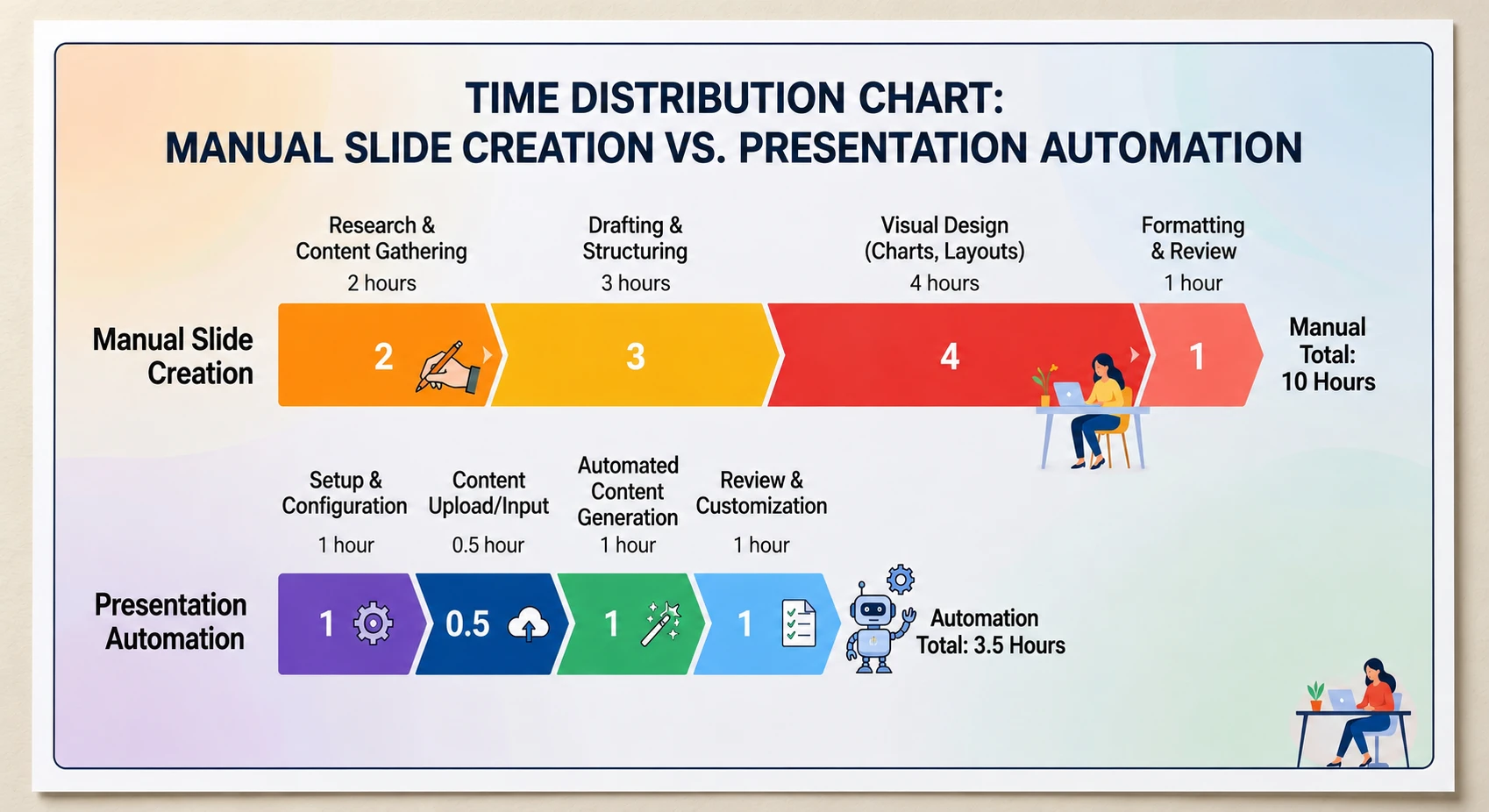
The solution is twofold: you must make the review easier for them to complete, and you must make the cost of silence higher than the cost of a quick check. This is where presentation automation and Unni.ai change the game. Instead of sending a static, daunting file, you use Unni.ai to create a fluid, professional draft that stakeholders can digest in minutes.
Implementing the 48-Hour Ultimatum: The Silent Approval Clause
The “48-Hour Ultimatum” is not about being aggressive; it is about establishing a professional standard for project health. It involves inserting a specific clause into your project charter or initial agreement.
The clause should state: “To maintain the project timeline, all feedback must be submitted within 48 business hours of the review request. If no feedback is received within this window, the draft will be considered ‘Silently Approved,’ and the project will proceed to the next phase.”
This clause works because it flips the default state. In a traditional workflow, the default is “Stop.” In a silent approval workflow, the default is “Go.”
How Unni.ai supports this workflow: If you are using Unni.ai as your AI presentation generator, you are no longer spending days on manual formatting. Because Unni.ai handles the heavy lifting of visual design and layout, you can afford to offer these 48-hour windows. If a stakeholder does come back with a late change, you can use Unni.ai to update the entire deck in minutes, rather than hours. This agility is what makes the 48-hour ultimatum realistic.

Maximizing Educational AI Efficiency to Shorten Review Loops
For teachers and higher education professionals, the review process often involves departmental heads or subject matter experts (SMEs). These individuals are experts in their field but are often not experts in educational AI or modern design.
When you use Unni.ai, you provide a polished, high-fidelity draft from day one. This reduces formatting frustration. When the draft looks like a finished product, stakeholders are less likely to nitpick small visual details and more likely to focus on the actual content accuracy.
Unni.ai as a Workflow Solution:
-
Drafting: Use the AI slideshow maker features to turn your syllabus or raw notes into a visual story.
-
Iteration: When that 48-hour feedback does come in, use Unni.ai to swap themes or layouts instantly.
-
Consistency: Ensure branding stays consistent without you having to manually check every font size.
By treating Unni.ai as a workflow partner, you reduce the “fear of the blank page” for both yourself and your reviewer. They aren’t looking at a skeleton; they are looking at a living document.
Breaking the “SME Thinks They’re the Designer” Trap
By using the 48-hour ultimatum, you provide a structured window for feedback. By using Unni.ai, you present a design that is clearly professional and logically structured. When the presentation looks high-end and cohesive, SMEs are more likely to respect the design choices and stick to their role as content experts.
Training automation relies on these clear boundaries. If the review takes six weeks because the SME is trying to move images around in a PowerPoint, the project is failing. Unni.ai prevents this by providing a controlled design environment where the focus remains on the learning objectives.
Checklist: Setting Up Your 48-Hour Review Workflow
Before you start your next project, run through this checklist to ensure you are protected from the 6-week review stall.
-
Establish the Clause: Include the “Silent Approval” language in your very first email or project charter.
-
Set Expectations: Verbally explain to stakeholders that this is a “fast-track” project designed for agility.
-
Use Unni.ai for the First Draft: Never send a “rough” draft. Send a high-fidelity version generated by Unni.ai to set a professional tone.
-
The 24-Hour Reminder: Send a polite, automated reminder 24 hours before the silent approval kicks in.
-
Document the Approval: Once the 48 hours pass, send a “Phase Completion” email stating that the project has moved forward based on the charter.
Frequently Asked Questions
What if the stakeholder gets angry about the 48-hour window?
This is why it must be in the charter. It is not a surprise but a pre-agreed-upon rule. Frame it as a benefit: “We want to ensure your team gets this training as quickly as possible, so we use an accelerated review process.”
Does an AI presentation generator like Unni.ai work for complex technical subjects?
Yes. Unni.ai excels at taking complex data and organizing it into logical, digestible layouts. This actually helps stakeholders review technical content faster because they aren’t struggling to find the information on a cluttered slide.
How does presentation automation help with tight deadlines?
When you use Unni.ai, you aren’t building slides from scratch. You are editing and refining. This saves hours of manual labor, which you can then use to address actual content feedback during your 48-hour windows.
Conclusion: Take Back Your Time
The “6-week review” is a choice, not a necessity. By implementing a 48-hour ultimatum and using a powerful AI presentation generator like Unni.ai, you take control of your professional life. You move from being a victim of someone else’s schedule to being a leader of your own workflow.
Presentation automation is the key to surviving the modern demands of educational AI and corporate training. It allows you to produce better work, faster, while maintaining the boundaries necessary to avoid burnout. Don’t let your hard work sit in an inbox for six weeks.
If you are tired of the manual grind and the endless waiting, it is time to change your tools and your tactics. Start using Unni.ai to power your designs and the 48-hour ultimatum to power your process. Your learners, and your mental health, will thank you.
Experience the future of presentation design with Unni.ai today.