How Online Education Creators Build Personal Brands with AI Slides
Learn how online education creators use AI slides to build recognizable personal brands. Covers visual consistency, content strategy, and tools.
The digital landscape for educators has shifted from local classrooms to global platforms. Today, building a personal brand is as vital as the curriculum itself. For many course creators and teachers, the biggest hurdle to scaling their influence is the time required to design high-quality visual content. This is why many are turning to an AI presentation generator to maintain a consistent professional aesthetic. By utilizing presentation automation, you can shift your energy from manual slide design to student engagement and content strategy.
Using educational AI to develop AI slides is not just about speed; it is about establishing a recognizable visual identity. When your audience sees a deck created through Unni.ai, they recognize a standard of clarity and professionalism that defines your brand. This guide explores how you can integrate Unni.ai into your workflow to produce better results in less time.
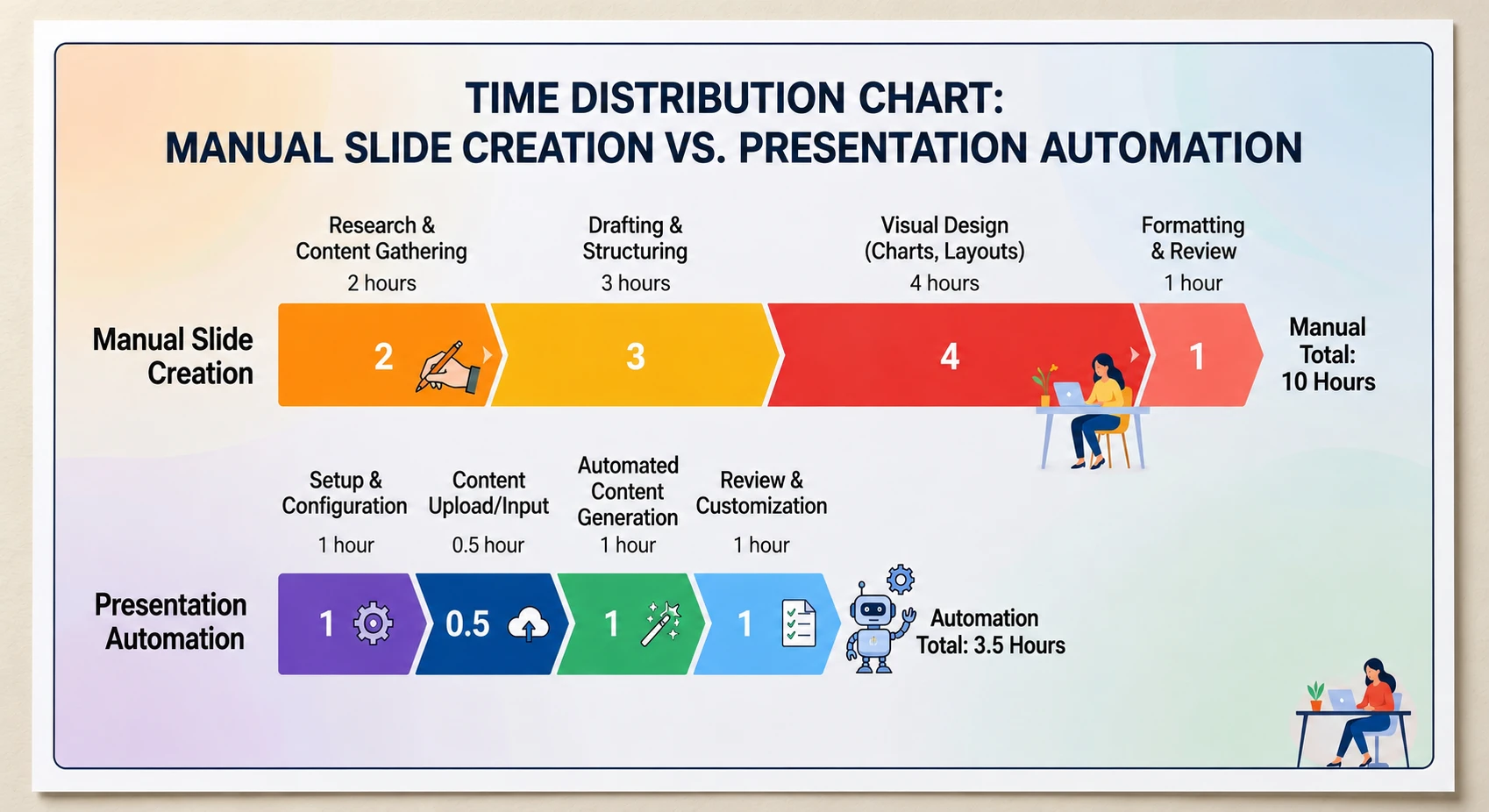
Why Personal Branding Requires Presentation Automation
Consistency is the foundation of any successful brand. For an instructional designer or a corporate trainer, your AI slides serve as your business card. If your visuals are cluttered or inconsistent, your authority diminishes. Unni.ai solves this by providing structured templates and design logic that ensure every deck you produce looks like it came from a professional design studio.
Presentation automation allows you to scale your content output without hiring a full-time designer. By using Unni.ai, you ensure that your brand colors, typography, and layout logic remain uniform across every course module. This level of educational AI integration transforms your workflow from a series of manual tasks into a streamlined production line.
Step 1: Defining Your Brand Identity in Unni.ai
Before you generate your first set of AI slides, you must define your visual language. Unni.ai allows users to set specific parameters that reflect their personal brand.
-
Select a color palette that aligns with your educational niche.
-
Choose typography that is legible for both mobile and desktop learners.
-
Upload your logo and brand assets directly into Unni.ai.
-
Save these settings as a brand kit within the AI presentation generator.
By establishing these rules early, you ensure that every time you use Unni.ai, the output is instantly recognizable as your work. This consistency builds trust with your students and clients over time.
Step 2: Content Input and AI Structuring
The true power of educational AI lies in its ability to organize information. Many creators struggle with “the wall of text” syndrome. Unni.ai takes your raw notes, transcripts, or outlines and breaks them down into digestible AI slides.
-
Paste your lesson script or outline into the Unni.ai prompt interface.
-
Select the “Educational” or “Professional” mode to guide the tone.
-
Let the AI presentation generator identify key headings and bullet points.
-
Review the logical flow suggested by Unni.ai to ensure your narrative arc is sound.
Step 3: Enhancing Visual Impact with AI Slides
Once the structure is in place, Unni.ai begins the visual design phase. Modern learners are highly visual, so your AI slides need to be more than just text on a screen.
The presentation automation features in Unni.ai automatically suggest relevant imagery and icons that support your text. This prevents the “generic stock photo” look that plagues many online courses. Because the platform understands the context of your lesson, it chooses visuals that actually enhance the learning experience.
-
Use the “Auto-Layout” feature in Unni.ai to experiment with different slide compositions.
-
Swap out suggested images with high-resolution graphics from the Unni.ai library.
-
Add interactive elements or diagrams that the educational AI generates based on your data.
Practical Examples of AI Slides in Education
To see how presentation automation works in the real world, consider these common use cases for Unni.ai:
-
Corporate Trainers: Building a 40-slide onboarding deck in 15 minutes by uploading the company handbook to Unni.ai.
-
Course Creators: Generating a cohesive 10-module series where every set of AI slides shares the same aesthetic and branding.
-
Academic Professionals: Using educational AI to turn complex research papers into simplified visual presentations for undergraduate lectures.
-
Young Professionals: Impressing leadership by using an AI presentation generator to turn weekly data reports into polished, visual narratives.
Checklist: Auditing Your AI Slides for Maximum Impact
Before you export your final deck from Unni.ai, run through this checklist to ensure your brand and content are optimized:
-
The 10/20/30 Rule: Does the deck follow a logical length and font size for your specific audience?
-
Brand Alignment: Is your logo present and are the colors consistent with your brand kit in Unni.ai?
-
Visual Balance: Did the presentation automation leave enough white space for readability?
-
Tone Consistency: Is the language used by the educational AI consistent with your personal speaking style?
-
Data Accuracy: Have you double-checked any charts or figures generated within the AI slides?
Frequently Asked Questions (FAQ)
How does an AI presentation generator save time for teachers?
Most teachers spend hours on formatting. Unni.ai reduces this to minutes by automating the design, layout, and image selection process.
Can Unni.ai help with lesson planning?
Yes. Unni.ai functions as a partner in lesson planning by helping you structure your thoughts and organize your curriculum into a logical sequence.
Are the AI slides customizable?
Absolutely. While Unni.ai provides the initial design through presentation automation, you have full control to edit every element, from text to individual pixels.
Is educational AI better than traditional templates?
Templates are static. Unni.ai is dynamic. It builds the slides around your specific content rather than forcing your content to fit into a pre-made box.
The Future of Professional Content Creation
Building a personal brand as an educator requires you to be a subject matter expert, a designer, and a marketer all at once. By adopting Unni.ai, you offload the design burden to a sophisticated AI presentation generator. This allows you to produce high-quality AI slides that resonate with your audience and look professional on any platform.
Presentation automation is no longer a luxury; it is a necessity for anyone looking to scale their educational business. As you integrate educational AI into your daily routine, you will find that your workflow becomes more efficient and your brand becomes more recognizable.