How to Generate AI Slides from Text Using Unni.ai
Learn step-by-step how to generate professional AI slides from text using Unni.ai. Turn any document or topic into a structured presentation in seconds.
Creating training materials takes hours of planning, writing, and formatting. Professionals often find themselves staring at a blank screen while struggling to align layouts and organize information. If you want to eliminate this bottleneck, you need a reliable AI presentation generator. Unni.ai is specifically designed to help you turn simple text into polished AI slides in a matter of seconds. By using advanced educational AI, Unni allows educators, instructional designers, and corporate trainers to automate the structural design. You can finally focus on strategy and delivery instead of manual formatting.
Why Traditional Slide Creation is Failing Professionals
For decades, creating visual learning materials meant using static, linear presentation software. This outdated method requires you to manually copy and paste text, search for relevant stock photos, and spend hours fixing alignment issues. For busy professionals, this is a massive drain on productivity.
When instructional designers or corporate trainers are forced to spend their time formatting boxes and adjusting font sizes, they have less time to focus on the actual content. Learners suffer as a result. Static formats often fail to engage modern audiences who are accustomed to dynamic, interactive digital environments. The traditional approach simply cannot keep up with the demand for rapid, high-quality content creation.
This is where Unni changes the landscape. It removes the friction between your ideas and the final product. You provide the raw knowledge, and Unni handles the complex design mechanics automatically.
The Role of Educational AI in Modern Learning
The integration of artificial intelligence into learning and development is not just a trend. It is a fundamental shift in how knowledge is transferred. Advanced educational AI systems are designed to understand pedagogical structures. They do not merely place text on a background. Instead, they format information in a way that maximizes retention and comprehension.
Unni uses these advanced algorithms to analyze your text prompts. It identifies key concepts, breaks down complex information into digestible points, and structures the flow of the entire presentation. This level of presentation automation ensures that every module you build follows best practices for adult learning and student engagement.
What Makes Unni the Best AI Presentation Generator?
Unni.ai goes far beyond simple text insertion. When you create materials for professional development or academic courses, you need structured learning environments. Unni provides a comprehensive workspace engineered exclusively for digital experience creation.
Whether you are preparing a corporate onboarding module or outlining a semester-long academic curriculum, Unni structures your content intelligently. It automatically generates beautiful layouts, applies cohesive visual themes, and organizes your ideas. It reates highly effective learning pathways that guide your audience from introduction to mastery.
Step-by-Step Guide: How to Generate AI Slides with Unni.ai
Transforming a simple text prompt into a fully interactive course is incredibly simple with Unni.ai. Follow this exact process to maximize your presentation automation and save hours of work every week.
1. Write a Clear and Specific Prompt
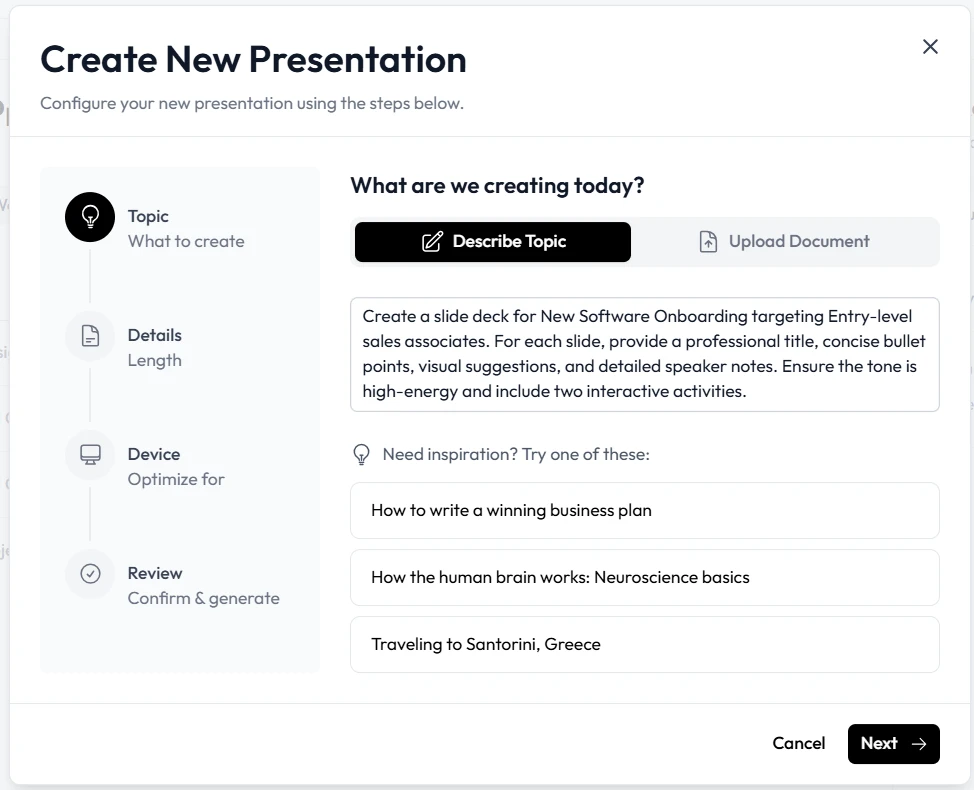
Start by logging into your Unni account. You will immediately see an option to generate a presentation from a text prompt. Type your topic directly into the input box. For example, you can write “Onboarding presentation for a new employee at a logistics company” or “Safety protocols for chemical handling in a laboratory.” Unni will instantly analyze your request and generate a comprehensive outline.
2. Generate Your Core Content
Once you submit your text prompt, Unni takes over the design process. In under a minute, Unni builds out the entire presentation structure. You will receive fully populated AI slides complete with written content, logical flow, and highly relevant suggested imagery.
3. Customize with Natural Language AI Editing
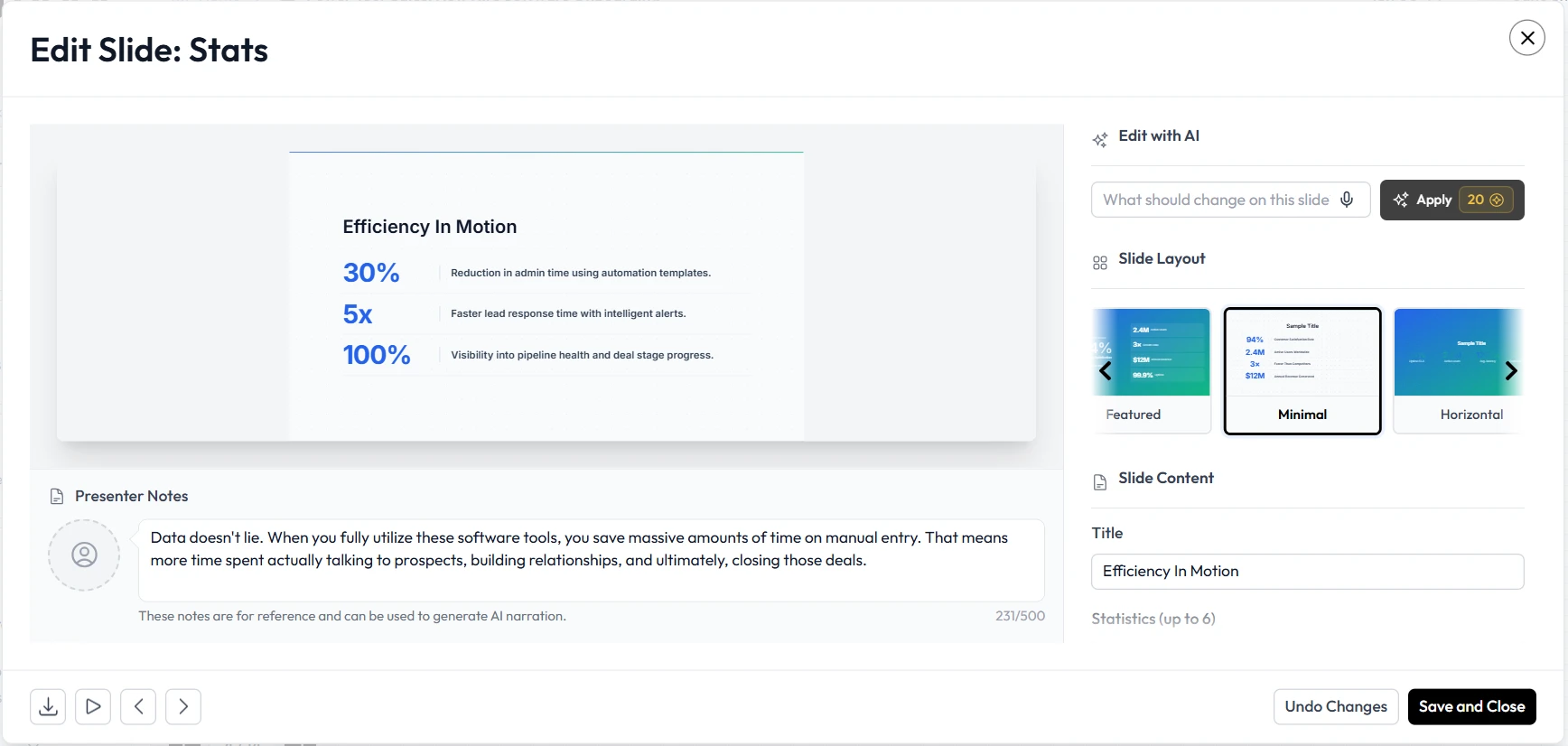
You do not need to navigate complex menus to change the design. Unni features an incredibly intuitive natural language editor. If you want a slide to look more engaging, simply select the text box and type a command like “make it pop” or “add statistical callouts.” It automatically adjusts the layout, adds visuals, and rewrites sections based entirely on your plain text instructions.
4. Build Interactive Learning Flows
Unni features a next-generation visual canvas where you can build complex branching scenarios. Instead of a linear slideshow, you can guide learners down different paths based on their choices or quiz results. You can attach knowledge checks to any node to evaluate learner progress in real time. This ensures your audience remains active and engaged throughout the entire module.
5. Export and Share Everywhere
Once your content is ready, Unni offers zero vendor lock-in. You always own your content. You can export your finished modules to SCORM, PDF, PowerPoint, or video formats. Alternatively, you can generate a direct link or embed the interactive presentation directly onto your company website or internal learning management system.
Practical Examples of Educational AI in Action
Understanding the technical features is one thing, but seeing how professionals use Unni every day highlights its true value. Here are three practical ways you can implement Unni.ai into your daily workflow.
Corporate Training Automation
Human resources departments and learning teams spend countless hours updating compliance and onboarding materials. With Unni.ai, a corporate trainer can take a newly updated policy document, copy the text, and ask Unni to generate an interactive compliance module. The trainer can add branching quizzes to ensure employees fully understand critical safety protocols. This guarantees higher engagement and provides verifiable completion rates for mandatory training.
Academic Lesson Planning
Teachers and university professors face strict time constraints when preparing for the upcoming semester. Unni.ai serves as a powerful, tireless assistant for academic professionals. A professor teaching ancient history can prompt Unni with “Engineering Mesopotamia, focusing on materials and workforce.” Unni.ai will generate structured lecture slides instantly. This allows the educator to spend more time refining their spoken lecture notes and zero time formatting bullet points.
Interactive Course Creation
Independent course creators need to stand out in a crowded digital market. A static document or a basic video is no longer enough to impress modern learners. Course creators use Unni to design rich branching scenarios. By utilizing Unni quiz blocks and interactive decision cards, creators offer premium digital experiences that keep students returning for more modules.
Checklist for Perfect AI Slides Every Time
To get the absolute most out of your presentation automation workflow, keep this simple checklist handy before you publish your next learning module.
-
Start with a highly specific prompt. Include your target audience and main objective in your initial text.
-
Review the generated outline. Ensure the logical flow matches your curriculum goals before finalizing the design.
-
Use natural language commands. Ask Unni to rephrase complex jargon into beginner-friendly explanations.
-
Add branching quizzes. Insert at least one knowledge check to transform passive viewers into active participants.
-
Verify visual consistency. Ensure the auto-generated images match the professional tone of your brand.
-
Test your export format. Export a quick preview to SCORM or PDF to ensure compatibility with your existing systems.
Frequently Asked Questions (FAQ)
What exactly is Unni.ai?
Unni is an advanced system built specifically to create interactive courses and presentations. You can build entire learning modules from a single text prompt, edit them using plain language, and export them anywhere without any vendor lock-in.
Do I need prior design skills to use Unni.ai?
No design experience is necessary. Unni.ai automatically handles typography, spatial layout, and visual structuring. You simply provide the text or the prompt, and Unni delivers a highly polished result.
Can I import my existing training materials into Unni.ai?
Yes. Unni.ai allows you to import documents, PDFs, PowerPoint files, and Google Slides. Unni will automatically convert your old, static files into editable, highly interactive modules.
How does the Unni.ai credit system work?
Features involving generative processing, such as creating content from text or adding custom voiceovers, consume credits. However, all manual editing, structuring, and non-generative creation features are completely free to use within Unni.ai.
Can I use Unni.ai without relying entirely on AI?
Absolutely. The free plan gives you full access to the visual editor, templates, and all creation features that do not involve generative capabilities. You can build, edit, and export interactive content at no cost.
Conclusion
The future of professional training relies heavily on efficiency and engagement. Staring at blank screens and struggling with manual formatting is officially a thing of the past. By adopting a modern educational AI presentation generator for AI slides, you reclaim your valuable time and significantly elevate the quality of your instructional materials.
Unni empowers you to produce highly interactive, visually stunning AI slides directly from simple text. Whether you are building corporate compliance modules, outlining engaging academic courses, or designing independent digital products, leveraging educational AI ensures your learners stay focused and retain information. Stop wasting hours on repetitive design tasks. Embrace the power of presentation automation today.
Create a free account on Unni.ai and generate your first interactive presentation in seconds.