How to Build Better Lessons with AI Slides
Learn how to build better lessons using AI-generated slides. Practical advice for educators on structuring engaging, effective presentations with Unni.ai.
Designing lesson plans that captivate students requires a massive time investment. Educators often spend hours fighting with formatting, dragging text boxes, and looking for icons instead of refining their core material. If you want to transform your curriculum design, using an AI presentation generator is the most effective shift you can make.
By bringing Unni.ai into your workflow, you can build impactful AI slides that keep your students engaged. This shift toward presentation automation allows you to focus on direct instruction rather than graphic design. Utilizing educational AI helps teachers, instructional designers, and corporate trainers turn rough text notes into polished visual lectures within minutes.
The Shift to Presentation Automation in Modern Education
Traditional lesson preparation is broken. Teachers spend an average of ten to twelve hours every week on administrative prep work, including building slide decks. When you manually copy information into standard slideshow software, you drain the creative energy needed for live teaching.
Using Unni.ai introduces presentation automation into your routine. Unni does not just apply a generic template to your text. Instead, it parses your educational objectives, understands the hierarchy of your lesson points, and builds custom layouts that match your specific topic.
For young professionals entering academia or corporate training roles, efficiency is everything. Using educational AI tools like Unni ensures your materials look highly polished and modern, matching the visual standards that students expect.
Overcoming the Blank Page Problem
The hardest part of designing a new lecture is staring at an empty first slide. Unni.ai acts as your collaborative partner. By inputting your raw lecture notes, syllabus outlines, or book chapters, Unni provides a complete visual foundation. You can then refine, rearrange, and customize the output to fit your teaching style, bypassing hours of tedious setup.
Step-by-Step Guide: Building Your Next Lesson with Unni.ai
To maximize your efficiency, follow this structured process to generate your next lecture or training module using Unni.ai.
-
Gather your primary source material: Collect your syllabus notes, an article link, or a text outline for your upcoming class.
-
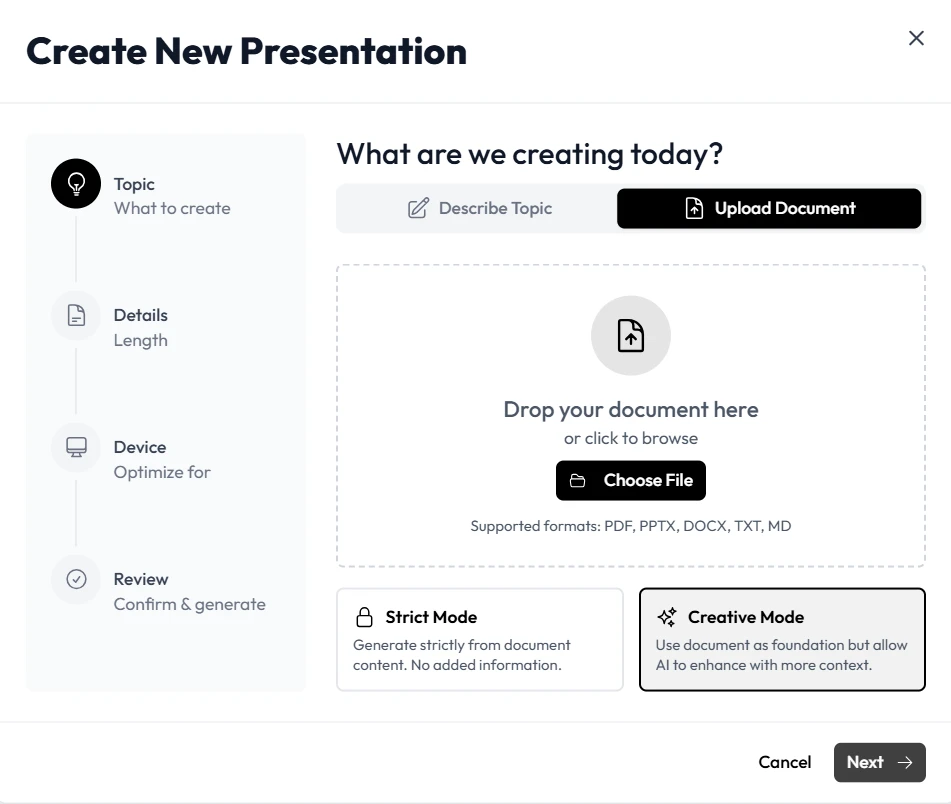
Input your curriculum into Unni.ai: Paste your text directly into the Unni generation prompt window. Specify your target audience, such as high school students or corporate executives. You can also upload it as a document.
-
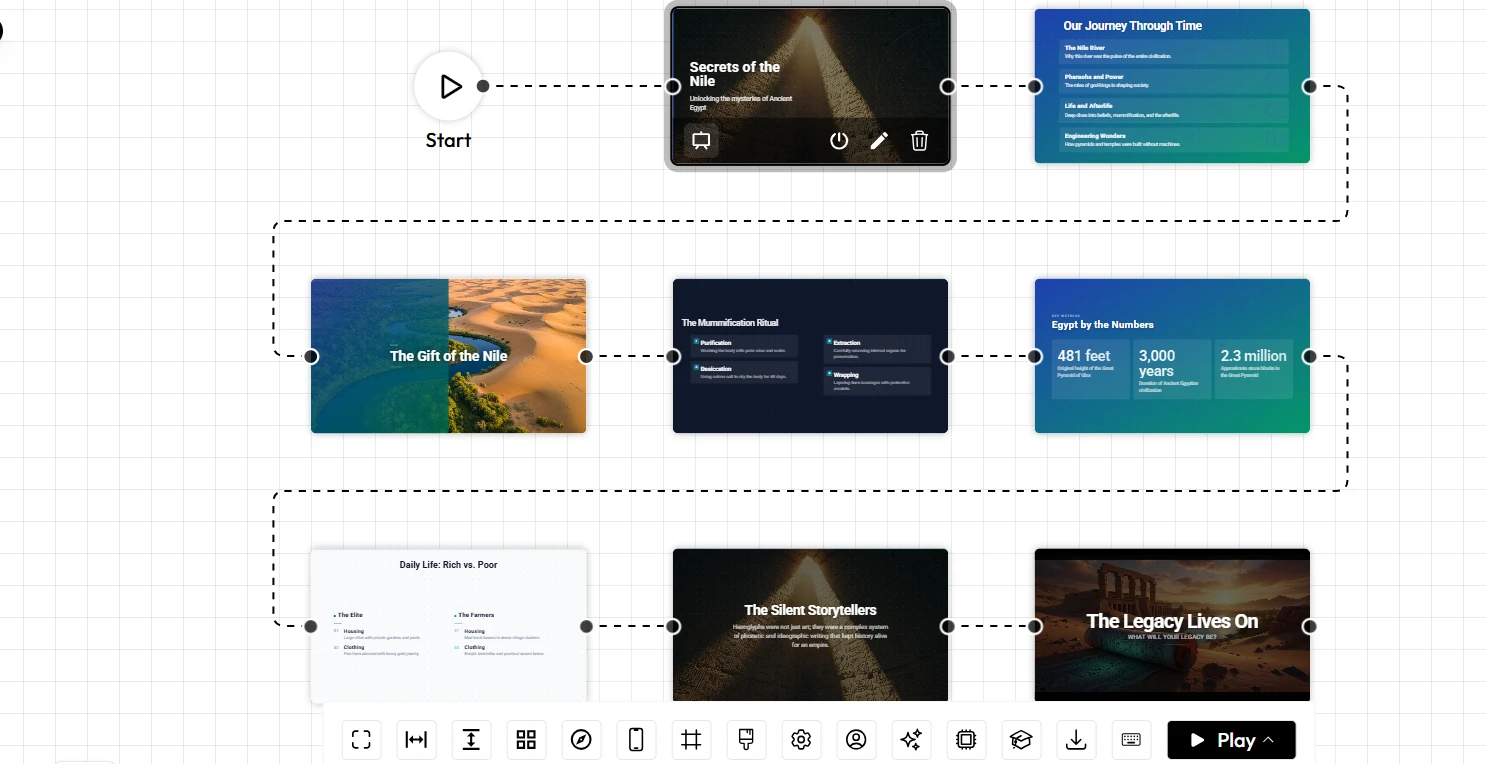
Initiate the Unni.ai AI presentation generator: Let Unni analyze the text structure and build out the initial deck layout.
-
Review slide composition and clarity: Walk through the generated AI slides to check font readability, layout alignment, and visual pacing.
-
Customize specific interactive elements: Inject your personal touch by adding custom charts, diagrams, quizzes, or discussion prompts directly inside Unni.
-
Export your completed lecture material: Download your slideshow in your preferred format for high-resolution projection or online screen recording.
Practical Examples of Educational AI in Different Settings
Different teaching environments require different visual approaches. Unni.ai adapts seamlessly across diverse niches, from academic classrooms to corporate boardrooms.
High School and Higher Education
Academic professionals teaching complex subjects like biology or history need to turn dense facts into memorable narratives. Instead of filling slides with long paragraphs that students will tune out, teachers can input chapter summaries into Unni.ai. Unni converts text into digestible bullet points, comparison charts, and bold callouts that improve student retention.
Corporate Training Modules
Corporate trainers often need to deliver compliance, leadership, or product training to busy young professionals. These audiences lose interest when faced with outdated corporate templates. By leveraging Unni presentation automation, trainers can build slick, data-driven decks that look like professional pitch materials, keeping adult learners focused during long training seminars.
Online Course Creation
For independent creators uploading lessons to platforms like Skillshare or Udemy, high production value is essential for positive reviews and revenue. Using Unni ensures that every video lesson features crisp typography and perfectly balanced colors. This leaves you free to focus on your microphone quality, camera presence, and overall course delivery.
Maximizing Student Engagement with Smart Layouts
An effective presentation requires proper pacing. If you show the same type of layout ten times in a row, your students will lose interest. Unni.ai solves this by varying the composition of your deck automatically.
Unni.ai places emphasis slides, structural timelines, and data summaries exactly where they belong to create a natural rhythm.
Keeping the Visual Pacing Consistent
-
Introduction slides: Use bold, high-contrast layouts generated by Unni to signal the start of a new core topic.
-
Concept breakdown slides: Rely on Unni to split complex definitions into side-by-side comparison columns.
-
Active recollection slides: Program Unni.ai to insert quick question-and-answer layouts every five to seven slides to check student understanding.
-
Summary slides: Use a distinct minimalist design block at the end of the deck to reinforce key takeaways.
The Essential Lesson Delivery Checklist
Before you stand in front of your class or start recording your screen, run your Unni presentation through this quick quality check to ensure a flawless presentation experience.
-
Confirm font readability from the back of the classroom or on small mobile screens.
-
Check that color contrast remains high, ensuring dark text is easily readable on light backgrounds.
-
Limit text blocks to a maximum of thirty to forty words per individual slide.
-
Ensure every diagram generated by Unni directly supports a specific learning objective.
-
Verify that structural transitions are smooth and logical across the entire deck.
-
Set aside dedicated pauses in your slides to give students time to ask questions.
Frequently Asked Questions (FAQ)
Can I import my existing PowerPoint files into Unni.ai?
Yes. Unni allows you to upload raw text outlines, old document files, or existing presentation text. The Unni.ai platform will ingest your old materials and completely redesign them using modern, accessible presentation automation principles.
How does Unni.ai save time during lesson planning?
Most educators report saving between five and eight hours per week. Because Unni handles the manual work of alignment, theme selection, and spacing, you only need to review the content and make minor text adjustments.
Is Unni.ai suitable for non-technical users?
Unni is designed to be highly accessible. You do not need any coding skills or graphic design experience to build professional materials. The interface uses natural language processing, meaning you simply tell Unni what you want to build, and it generates the layout for you.
Can I export Unni presentations to work offline?
Yes. Unni.ai supports multiple export options. You can download your finished AI slides in standard presentation formats, allowing you to run your lessons smoothly even if your classroom or training center lacks a stable internet connection.
Conclusion
Building memorable lessons does not have to mean spending your entire weekend editing slides. By introducing an AI presentation generator into your weekly routine, you can streamline your prep work and focus on what truly matters: your students.
The most successful teachers, instructional designers, and corporate trainers understand that their time is best spent on delivery, engagement, and mentorship. Let Unni handle the heavy visual lifting. By embracing presentation automation, you ensure that every lecture is clear, engaging, and professional.