How to Create Skillshare Course Slides Faster with AI
Learn how to use Unni.ai as your AI presentation generator to speed up course creation. Discover presentation automation techniques for educational AI slides.
Building an engaging Skillshare class requires immense focus, but formatting presentation materials often drains your energy before you even hit record. If you spend hours aligning text boxes instead of teaching, an AI presentation generator will transform your workflow. By leveraging Unni.ai to generate AI slides, educators and corporate trainers can reclaim their time.
Utilizing educational AI allows you to focus on content delivery while presentation automation handles the tedious design tasks. Whether you are an academic professional or a young creator, streamlining your lesson planning is the secret to scaling your online teaching business.
Why Course Creators Need Presentation Automation
Teachers and instructional designers face a unique challenge when building digital courses. Skillshare requires high quality visuals, clear instruction, and a fast paced delivery to keep students engaged. Staring at a blank presentation canvas creates unnecessary friction.
When you adopt educational AI, you eliminate the blank page problem. Unni.ai takes your raw outlines and translates them into visually compelling AI slides in minutes. This presentation automation means you can focus entirely on your script, your camera presence, and your core curriculum.
Instructional designers understand that course creation is a complex process. It involves structuring knowledge so it is easily digestible. By using Unni, you ensure your visual materials align perfectly with cognitive learning principles without requiring a graphic design degree.
Preparing Your Skillshare Course Creation Strategy
Before you generate your AI slides, you need a solid foundation. Skillshare rewards teachers who provide structured, actionable lessons. Digital experience creation requires mapping out your student journey from the introductory video to the final project submission.
Follow these steps to prepare your content for Unni:
-
Outline your class project first. Determine exactly what students will build or achieve by the end of your course.
-
Script your introductory video. Skillshare guidelines recommend keeping this under two minutes to hook the viewer.
-
Break your core topic into short lessons. Each video lesson should range between two and eight minutes.
-
Draft talking points for each video. You do not need to write a word for word script, but you do need clear milestones.
-
Identify visual pivot points. Skillshare recommends switching your camera angle or showing a new slide every 30 to 45 seconds to maintain attention.
Once you have your talking points and visual pivot points mapped out, you are ready to bring your content into Unni.ai.
Step-by-Step: Using Unni.ai as Your AI Presentation Generator
To optimize your featured snippet potential and streamline your workflow, follow this process to build your Skillshare materials using Unni.
-
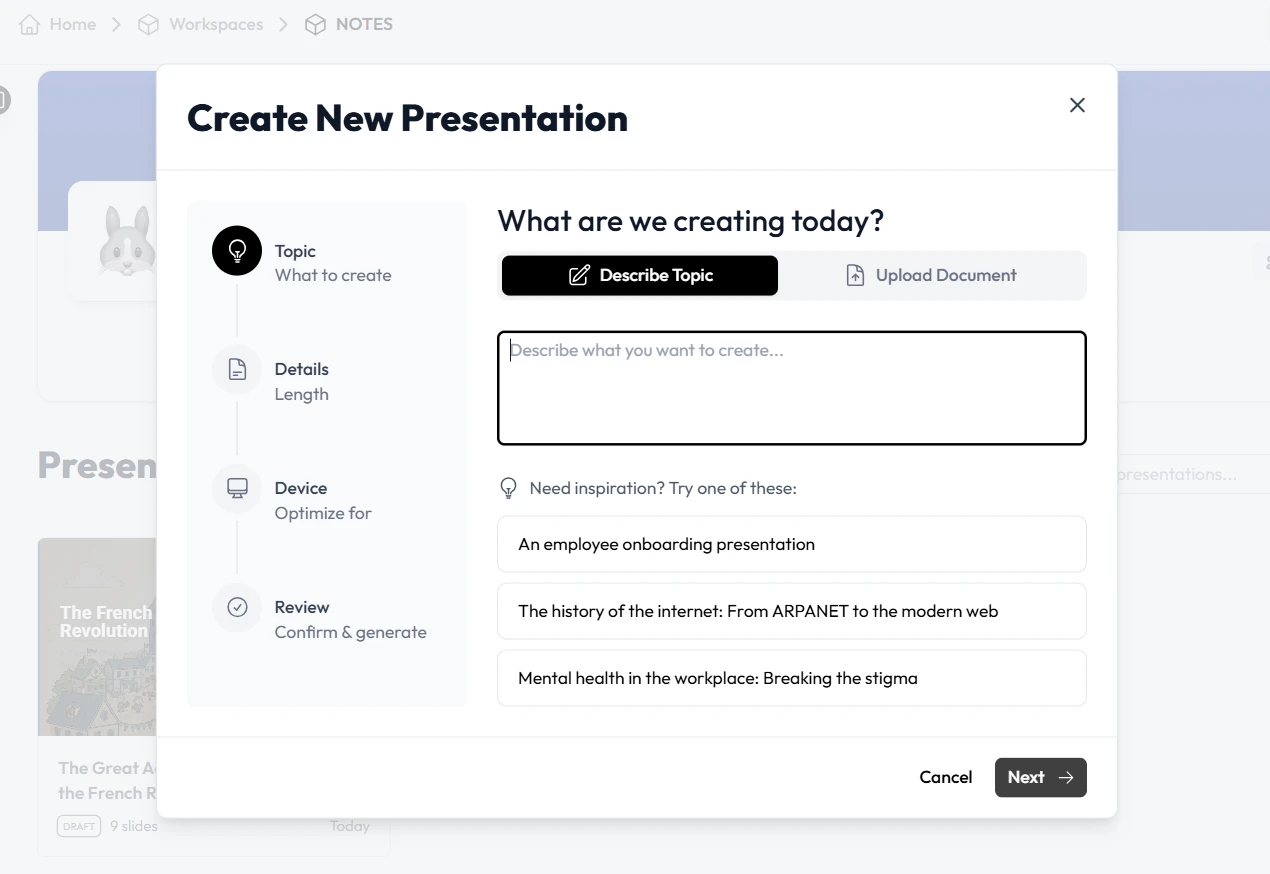
Open your Unni.ai workspace and select the educational course template.
-
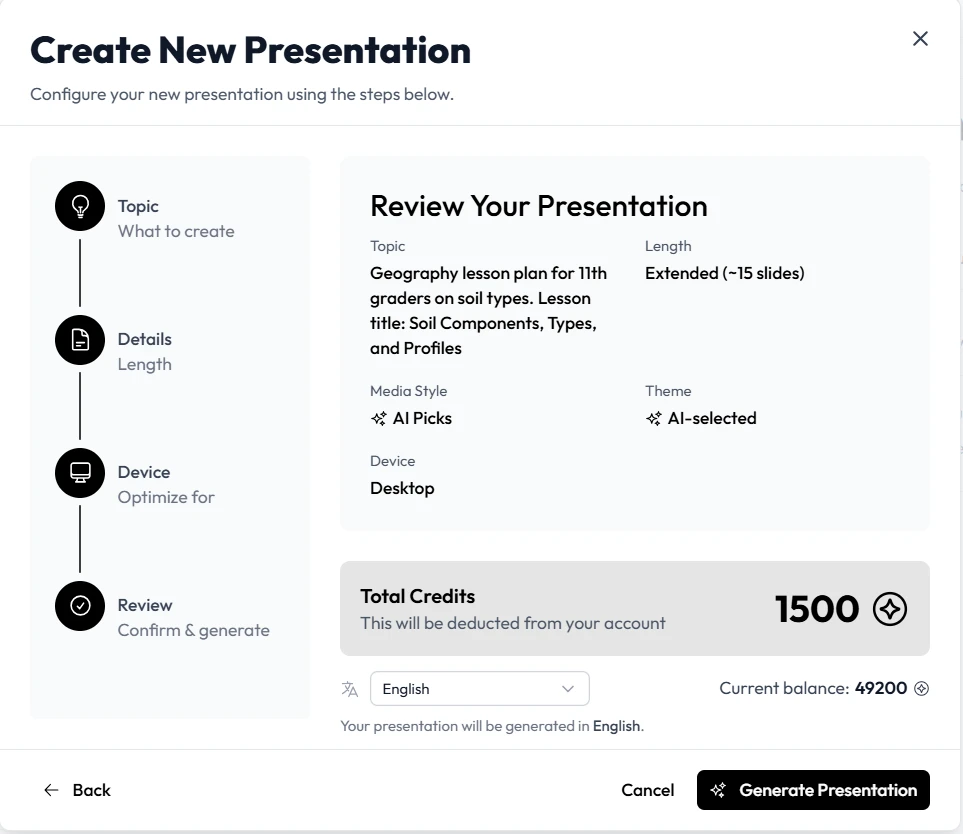
Paste your lesson talking points into the Unni.ai text prompt area.
-
Set your aspect ratio to Desktop. This is a strict requirement for Skillshare video uploads.
-
Click generate to allow the AI presentation generator to draft your deck.
-
Review the AI slides for accuracy and flow.
-
Customize fonts and brand colors to match your personal teaching brand.
-
Export the final presentation in high resolution format for screen recording.
Unni.ai acts as your dedicated design assistant. If you teach complex software tutorials, you can insert your own screencast screenshots into the layouts Unni provides. If you teach creative writing and want to show students how to create visual novel storylines, Unni can generate atmospheric background slides to match your narrative tone.
Practical Examples of Training Automation
Different teaching niches require different visual approaches. Unni.ai adapts to your specific instructional needs.
Corporate trainers building leadership courses can use Unni.ai to generate clean, data driven infographics. Instead of manually building charts to show productivity metrics, trainers can input the data and let the presentation automation handle the layout.
Young professionals teaching productivity workflows can utilize Unni.ai to create minimalist, modern slide decks that appeal to a millennial and Gen Z audience. Unni.ai provides templates that feel native to modern digital platforms.
Teachers creating language learning classes can use Unni.ai to rapidly generate vocabulary flashcard slides. What used to take hours of copying and pasting now takes seconds, making AI for teachers a critical asset for content volume.
Skillshare Slide Quality Checklist
Skillshare has strict quality guidelines for classes. Before you record your voiceover, run your presentation through this checklist.
-
Verify the aspect ratio is exactly 16:9 (Desktop) to prevent black bars during video playback.
-
Ensure all text is large enough to read on mobile devices.
-
Check that you are not relying on a single static slide for more than 45 seconds.
-
Confirm that your introductory video features high impact title slides.
-
Verify that you have a dedicated slide explaining the class project clearly.
-
Ensure your branding remains consistent across all AI slides.
Frequently Asked Questions (FAQ)
How fast can I build a course using Unni.ai?
Most creators cut their design time by 70 percent. If a 40 minute class previously required ten hours of slide design, Unni.ai can reduce that to roughly two hours of prompt generation and minor tweaking.
Can I use Unni.ai for topics outside of standard business courses?
Absolutely. Unni.ai handles highly creative topics as well. Whether you teach advanced watercolor techniques, digital experience creation, or independent game design, the platform adapts its visual suggestions to your prompt.
Is educational AI considered cheating in course creation?
No. Skillshare values your unique perspective, voice, and expertise. Unni.ai simply formats your original thoughts into a digestible visual medium. The core educational value still comes directly from your experience.
Conclusion
Creating a successful Skillshare class demands a focus on student engagement and clear instruction. Getting bogged down in graphic design software prevents you from sharing your expertise with the world. By integrating an AI presentation generator into your workflow, you instantly elevate your production value while saving hours of manual labor.
The future of digital teaching relies on working smarter. Leverage educational AI to outline your thoughts, utilize presentation automation to build the visual framework, and let Unni.ai handle the design execution. When you generate AI slides with Unni.ai, you stop fighting with text boxes and start doing what you do best: teaching.
Related Reading
- The Best AI Presentation Generator for Skillshare Instructors: An in-depth look at what separates a basic slide tool from a true educational platform for Skillshare, including advanced features like automated voiceovers and direct video export.
- How Hotmart Course Creators Use AI Presentation Automation: For creators active on multiple platforms, this guide shows how the same AI workflow applies to Hotmart course production.
- How to Create Coursera Training Slides Faster with an AI Presentation Generator: Adapting this workflow to Coursera’s global audience and specific slide requirements.
Try Unni.ai today and launch your next Skillshare class faster than ever before.