How to Stop Wasting Hours on Slides: AI Presentation Generator for Instructional Designers
Are you tired of the manual slide grind? Learn how an AI presentation generator like Unni.ai streamlines presentation automation and educational AI workflows for instructional designers.
The life of an instructional designer often feels like a high-stakes game of “Instructional Designer Pain Bingo.” You start the week with a clear vision for a learner-centered module, only to find yourself buried under a 50-slide “source material” PowerPoint from a subject matter expert who thinks they are the designer. By Wednesday, you are fighting with alignment tools and font inconsistencies instead of applying Mayer’s Principles.
If you have ever felt the burnout of manual formatting while a tight deadline looms, you know that the actual “design” in instructional design is frequently sidelined by the sheer labor of production. This is where presentation automation changes the narrative.

The Hidden Cost of Manual Slide Building
For many professionals in higher education and corporate training, the transition from a storyboard to a finished deck is a productivity graveyard. We spend hours on tasks that have nothing to do with learning outcomes:
-
The Formatting Loop: Adjusting image borders, bullet point spacing, and brand colors across 40 slides.
-
The Content Struggle: Trying to turn a dense PDF into digestible, visually engaging screens.
-
The Branding Burden: Ensuring every presentation adheres to strict corporate or institutional style guides.
When you use an AI presentation generator like Unni.ai, you aren’t just using a new piece of software; you are adopting a workflow solution that handles the heavy lifting of visual assembly. This allows you to return to the core of your role: creating experiences that actually stick.
Transforming Your Workflow with Educational AI
The arrival of educational AI has sparked a shift from “building from scratch” to “curating with intent.” Instead of staring at a blank white slide, instructional designers can now leverage presentation automation to generate a structural baseline in seconds. This is a welcome relief for anyone tied to legacy desktop authoring tools, since heavyweight programs like Articulate Storyline are Windows-only, and Mac users often end up looking for a browser-based Storyline alternative for Mac just to get started.
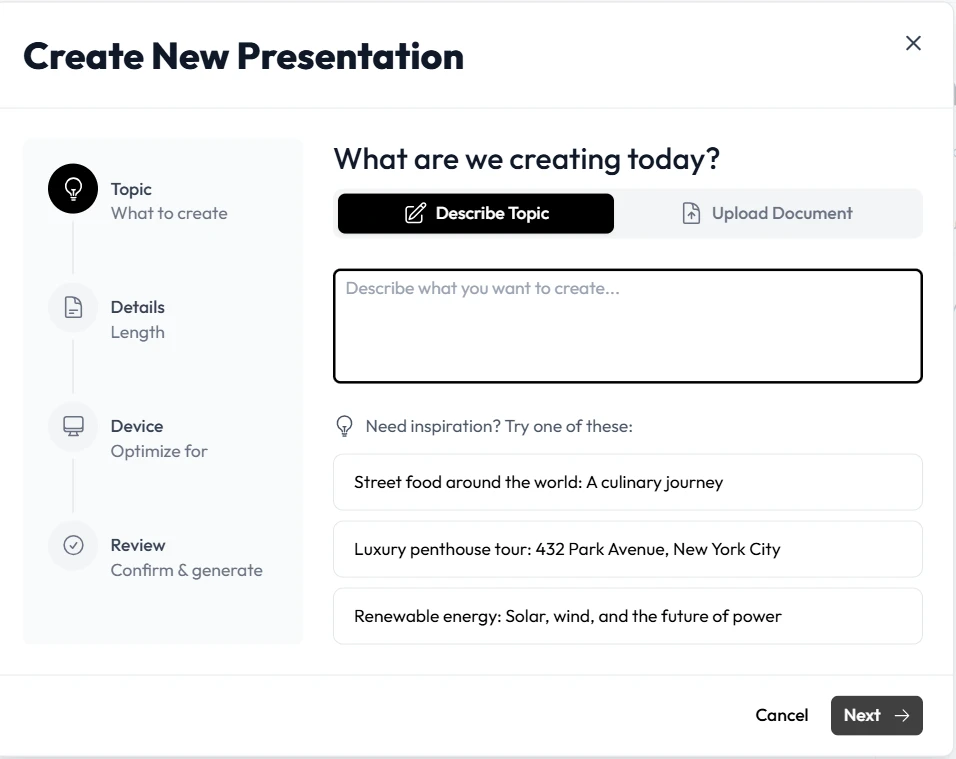
Unni.ai acts as a collaborative partner in this process. By inputting your learning objectives or raw notes, the platform helps bridge the gap between “Information” and “Instruction.”
1. Faster Prototyping
In the ADDIE model, the “Develop” phase is usually the longest. With Unni.ai, you can move from Analysis to a visual Prototype in the time it takes to grab a coffee. This rapid iteration allows for faster stakeholder feedback, reducing the risk of a “client hates everything in final review” scenario.
2. Consistent Design Standards
Inconsistent branding isn’t just an aesthetic issue; it’s a cognitive one. Learners get distracted by changing layouts. Unni.ai ensures that your AI presentation generator outputs follow a cohesive visual logic, keeping the focus on the content.
Overcoming the “Blank Page” Burnout
One of the most significant pain points for trainers and teachers is the repetitive nature of lesson planning. Creating fresh materials for every cohort is a recipe for burnout. By integrating Unni.ai into your routine, you can repurpose core concepts into multiple formats without starting from zero.
How Unni.ai Supports Learning Theory:
-
Cognitive Load Management: The AI helps break down dense text into bite-sized headers and visuals.
-
Dual Coding: Unni.ai suggests relevant imagery to accompany text, supporting better retention.
-
Scaffolding: Use the automation to build progressive complexity throughout your deck.
The Instructional Designer’s Efficiency Checklist
If you are looking to reclaim your schedule, use this checklist to see where presentation automation can replace manual labor:
-
Outline Generation: Let the AI draft the flow based on your syllabus.
-
Visual Sourcing: Stop hunting for royalty-free images; let the tool suggest them.
-
Style Synchronization: Apply a brand kit across all slides with one click.
-
Iterative Edits: Use the AI to “shorten” or “rephrase for a 5th-grade level” directly on the slide.
Frequently Asked Questions about AI in Instructional Design
Will an AI presentation generator replace my job?
No. An AI presentation generator like Unni.ai is a tool, not a designer. It handles the “production” (the pixels), but it lacks your understanding of pedagogy, empathy for the learner, and subject matter nuance.
Can I customize the output?
Absolutely. Unni.ai is designed to be a starting point that you can refine. It gives you a 90% head start, leaving the final 10% to you: the most important “human” touch.
Is educational AI difficult to learn?
The goal of Unni.ai is to lower the barrier to entry. If you can write a prompt or upload a document, you can use the platform. It is built for professionals who are tired of complex, clunky authoring tools.

Conclusion: Reclaiming Your Creative Energy
The frustration of manual formatting, the stress of tight deadlines, and the burnout of repetitive lesson planning are hurdles that modern technology is finally clearing.
By embracing Unni.ai as a core part of your presentation automation strategy, you shift your energy from “building slides” to “designing learning.” Whether you are a teacher looking for an AI for teachers solution or a corporate trainer managing a massive curriculum, the goal remains the same: impactful, engaging, and efficient education.
Stop fighting with your software and start collaborating with it. Use Unni.ai to turn your expertise into an experience.
Ready to automate your design workflow? Try Unni.ai today and see how an AI presentation generator can give you back your most valuable asset: time.