Why an AI Presentation Software Complements Notion Workspaces
Learn why AI presentation software like Unni.ai complements Notion workspaces. Discover how to turn documentation into professional slides automatically.
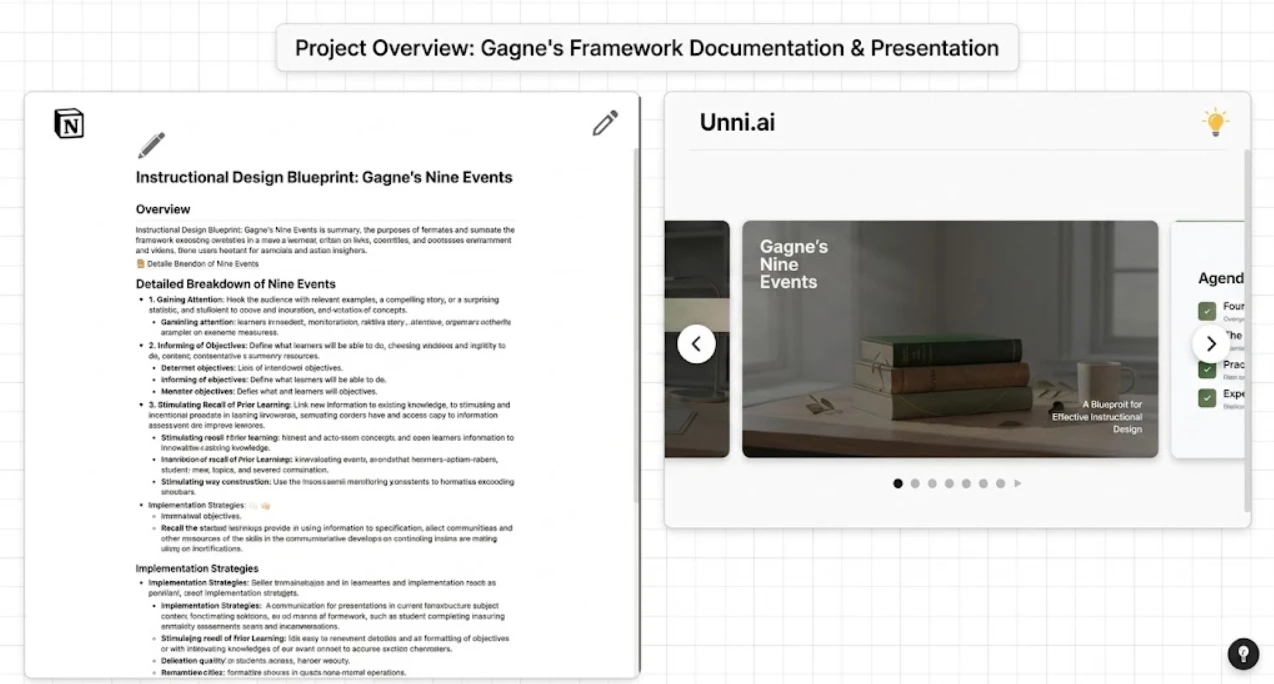
The modern digital workspace has undergone a seismic shift. In 2026, the era of static file folders is long gone, replaced by “living” ecosystems like Notion. However, even the most robust Notion workspace often hits a friction point when it comes to visual communication. While Notion excels at housing the “source of truth,” it often struggles to translate that depth into a high-stakes visual format. This is where an AI presentation software like Unni.ai becomes the essential bridge. By integrating presentation automation into your existing knowledge base, teams can leverage educational AI to turn raw data into persuasive, structured narratives without the manual labor of slide design.
The Evolution of the Knowledge-to-Presentation Pipeline
For years, the workflow for educators and corporate trainers was linear and fragmented. You would research in one app, draft in another, and then spend hours manually “beautifying” slides in a third. Today, the demand for speed and consistency has made this manual pipeline obsolete.
The rise of agentic workflows in Notion, specifically the introduction of Notion Agents and Workers, has enabled a new level of data organization. Yet, a common frustration remains: Notion’s native “Presentation Mode” is essentially a full-screen document viewer. It lacks the visual hierarchy, professional layouts, and engagement triggers required for executive boardrooms or modern classrooms. Unni.ai addresses this by acting as the specialized execution layer. It doesn’t just display your Notion content; it transforms it.
The Strategic Role of Presentation Automation in Professional Workflows
1. From Research to Narrative
The primary advantage of using Unni.ai alongside Notion is the preservation of context. When an instructional designer uses educational AI to outline a curriculum in Notion, the structure is already there. Unni.ai uses advanced semantic analysis to identify key headers, supporting evidence, and call-to-action points. Through presentation automation, the platform can instantly generate a deck that respects the pedagogical structure of the original notes.
2. Eliminating the “Design Debt”
“Design debt” refers to the cumulative time lost when non-designers (such as teachers or project managers) attempt to act as graphic artists. For digital professionals in the field, efficiency is the ultimate currency. An AI presentation software removes the need to worry about alignment, font pairings, or color theory. Unni.ai applies professional design principles automatically, ensuring that the visual output matches the high quality of the intellectual input stored in Notion.
3. Scaling Training and Lesson Planning
For corporate learning teams, the challenge is often volume. If a company needs to update 50 training modules based on a new policy document in Notion, doing so manually is a month-long project. With Unni.ai, this becomes a matter of hours. The training automation capabilities allow for the bulk generation of AI slides that are consistent with brand guidelines and educational standards.
Future-Focused Insights: The Rise of the “One-Click” Professional Output
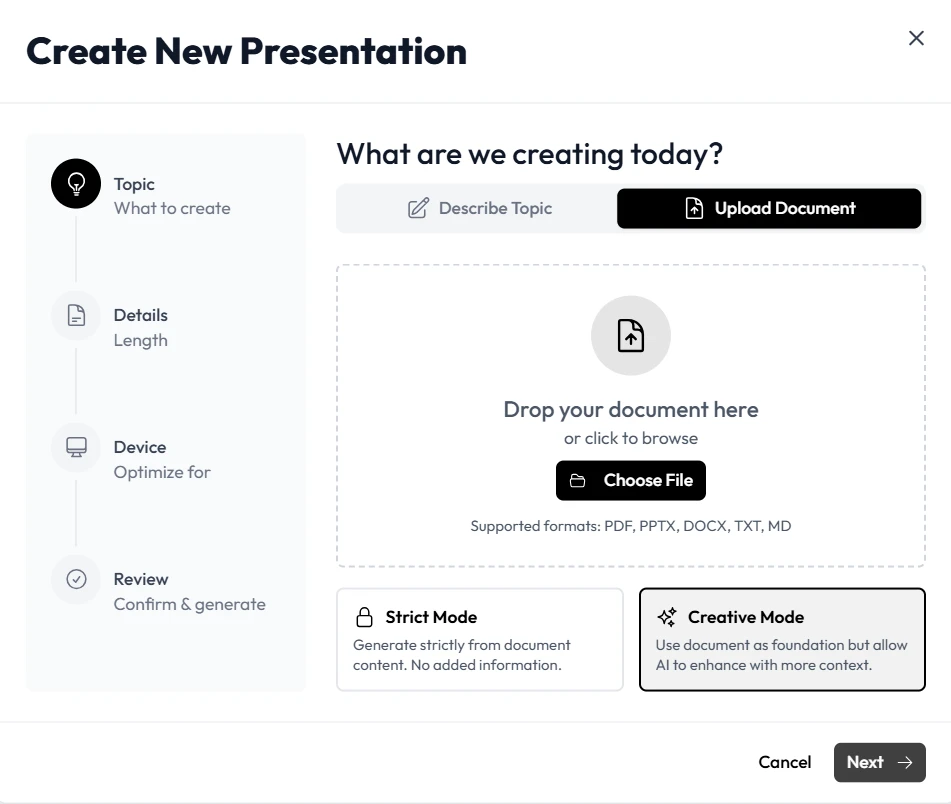
As we look toward the latter half of 2026, the trend is moving away from “chat-based AI” and toward “integrated agents.” Notion’s recent updates to its Developer Platform allow for deterministic execution. This means that a user can mark a database row as “Ready for Deck,” and Unni.ai can trigger a sequence to build that deck in the background.
The future of educational AI is about multimodal synthesis. We are entering an era where the AI presentation generator will not only design the slides but also suggest the most effective instructional design layout based on the target audience’s demographic. For an academic trainer, this might mean a more interactive, quiz-heavy layout. For a corporate executive, it means a data-driven, minimalist aesthetic. Unni is at the forefront of this shift, moving beyond mere “automation” and into “intelligent adaptation.”
Expert Commentary: Why Structural Design Matters Over Just Content
A common misconception in the EdTech space is that AI is just a “content fast-forward” button. However, seasoned instructional designers know that the structure of information is what dictates retention.
Unni.ai functions as more than a tool; it is a collaborative entity that understands the nuances of workplace productivity. While Notion provides the “What,” Unni provides the “How.” It applies the principles of Cognitive Load Theory: ensuring that slides are not overcrowded and that visual cues guide the viewer’s eye to the most important data. By leveraging educational AI in this way, Unni ensures that the final output is not just “done” but is actually “effective.”
Data-Backed Arguments for Adopting Presentation Automation
Recent industry reports suggest that professionals spend an average of 4 to 6 hours per week on presentation-related tasks. In educational settings, this number can double during the lesson planning phase.
-
Time Savings: Teams using presentation automation report a 70% reduction in time spent on formatting.
-
Consistency: Large organizations struggle with brand drift. An AI presentation generator ensures that every deck produced across 10 different departments maintains the exact same visual identity.
-
Accessibility: Automated tools are better at ensuring high contrast, screen-reader compatibility, and logical reading orders, which are essential for educational AI in inclusive classrooms.
FAQ: Maximizing the Notion-Unni.ai Synergy
Does Unni.ai replace Notion AI?
No. Notion AI is excellent for drafting, summarizing, and organizing within the workspace. Unni.ai is the specialized visual output engine. Think of Notion as the “writer” and Unni.ai as the “art director.”
Can I use Unni.ai for complex lesson planning?
Absolutely. By using the AI for teachers feature set, Unni.ai can take a syllabus or a complex lesson plan from Notion and break it down into a logical, multi-slide educational journey.
What file formats does Unni.ai support?
Unlike Notion’s “Presentation Mode,” Unni.ai allows you to export your AI slides to professional formats like .pptx, PDF, and high-resolution image sets, making it compatible with Google Slides and PowerPoint.
Is the content generated by Unni.ai editable?
Yes. The goal of presentation automation is to give you a 95% finished product. You can then use the intuitive editor to make final tweaks, ensuring the human-in-the-loop remains the final authority.
Conclusion: The New Standard for Workplace Productivity
The integration of an AI presentation generator into your Notion-centric workflow is no longer a luxury; it is a competitive necessity. As the digital landscape becomes more crowded, the ability to communicate ideas clearly and professionally at scale is what separates industry leaders from the rest. By embracing presentation automation and the power of educational AI, professionals can finally move away from the “blank slide” anxiety and focus on what truly matters: the message.
Unni.ai offers the most sophisticated bridge between your structured knowledge and your audience’s visual expectations. It is time to stop treating your presentations as an afterthought and start treating them as the powerful extensions of your workspace that they are.
Related Reading
- How to Convert Notion Documents into AI Slides: The practical step-by-step guide for anyone ready to begin converting Notion pages into professional slide decks today.
- How Teams Use Notion and AI Slides Together for Faster Training Content: Real-world examples of how L&D and training teams implement the Notion-to-AI-slides pipeline at scale.
- Best AI Tool to Turn Notion Notes into Presentations: A solution-focused breakdown for professionals who want the fastest path from raw notes to a finished, professional deck.
Experience the future of presentation automation with Unni.ai today.